Bill of Material (BOM) Outline
A Bill of Material (BOM) is a structured list of all the raw materials, components, subassemblies, and parts required to manufacture a finished product. It acts as a blueprint for production, ensuring that all necessary elements are available in the correct quantities and sequence.
Add BOM Outline
The BOM Outline is the basic template of a specific product item. It contains the essential steps of production, including stepwise consumption and production details. The BOM Outline is used in various production processes such as:
- BOM Specifications
- Pre-Costing
- Production Record Entry
Navigation Add BOM Outline
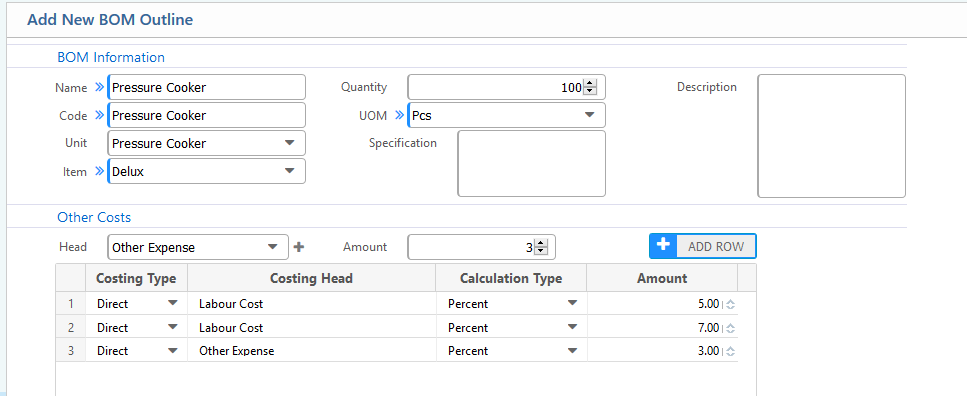
To create a BOM Outline, the user must fill in the following details and click the Save button:
Form Fields
- Name: The name of the BOM Outline.
- Code: The unique code for the BOM Outline. This code is displayed as the tab name in the BOM Outline details page.
- Unit: The production unit name.
- Item: The production item for which the user is creating the BOM Outline.
- Quantity: The amount of product to be produced by the recipe/template.
- UOM (Unit of Measurement): The measurement unit for production.
- Other Cost: Additional overhead costs required for production, such as Labor Cost, Other Expenses, etc. These costs can be either fixed or percentage-based. The cost head is configurable, allowing users to define it as per requirements.
BOM Outline List
Navigation BOM Outline List
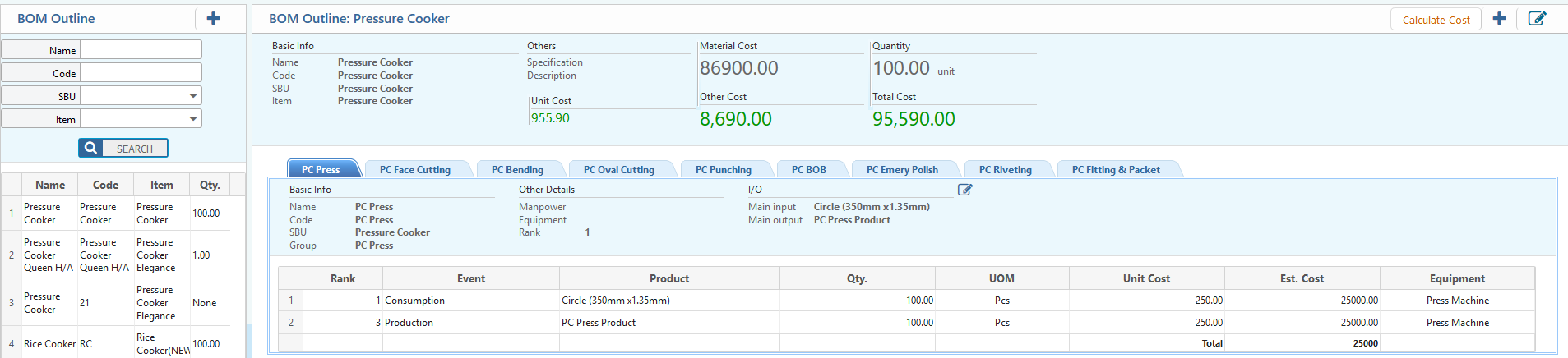
The user can view the BOM Outline list with detailed steps of all production processes. Additionally, users can edit each production step from this window.
Add Process Step
*Navigation BOM Outline List
To create a new Process Step within a BOM Outline, the user must click on the (+) button on the top right corner of the detail view page of the BOM. Then, fill in the form with suitable data and click the Save button.
Basic Information
- Name: Name of the Process Step.
- Code: Code of the process step; this code will be displayed as the tab name.
- SBU: The production unit.
- Group: The production step group.
- Manpower: The number of human resources required for this step.
- Rank: The Rank number is used to maintain the sequence of process steps.
- Main Input: The main input of the step.
- Main Output: The main output of the step.
After inputting the basic info, the user must select the product from the Select Material section and then click on the Add Row button.
- The Consumption Event indicates that this material will be consumed in this step.
- The Production Event indicates that this product will be produced in this step.
- The user must select whether the value of the consumed goods in this step will be calculated in the BOM or not from the Calculate in BOM column.
After completing all tasks, the user must click on the Save button to create the step.
