Quotation
In PrismERP the quotation feature allows users to manage the entire process of receiving, reviewing, and tracking vendor quotations efficiently. It covers creating new quotations, viewing detailed quotation information, managing attachments and payment plans, and handling delivery plans.Users can search, filter, and take actions on received quotations, ensuring that all relevant information is captured and easily accessible. The module also enables tracking delivery schedules, updating delivery statuses, and summarizing delivery plans to support smooth procurement and inventory operations.
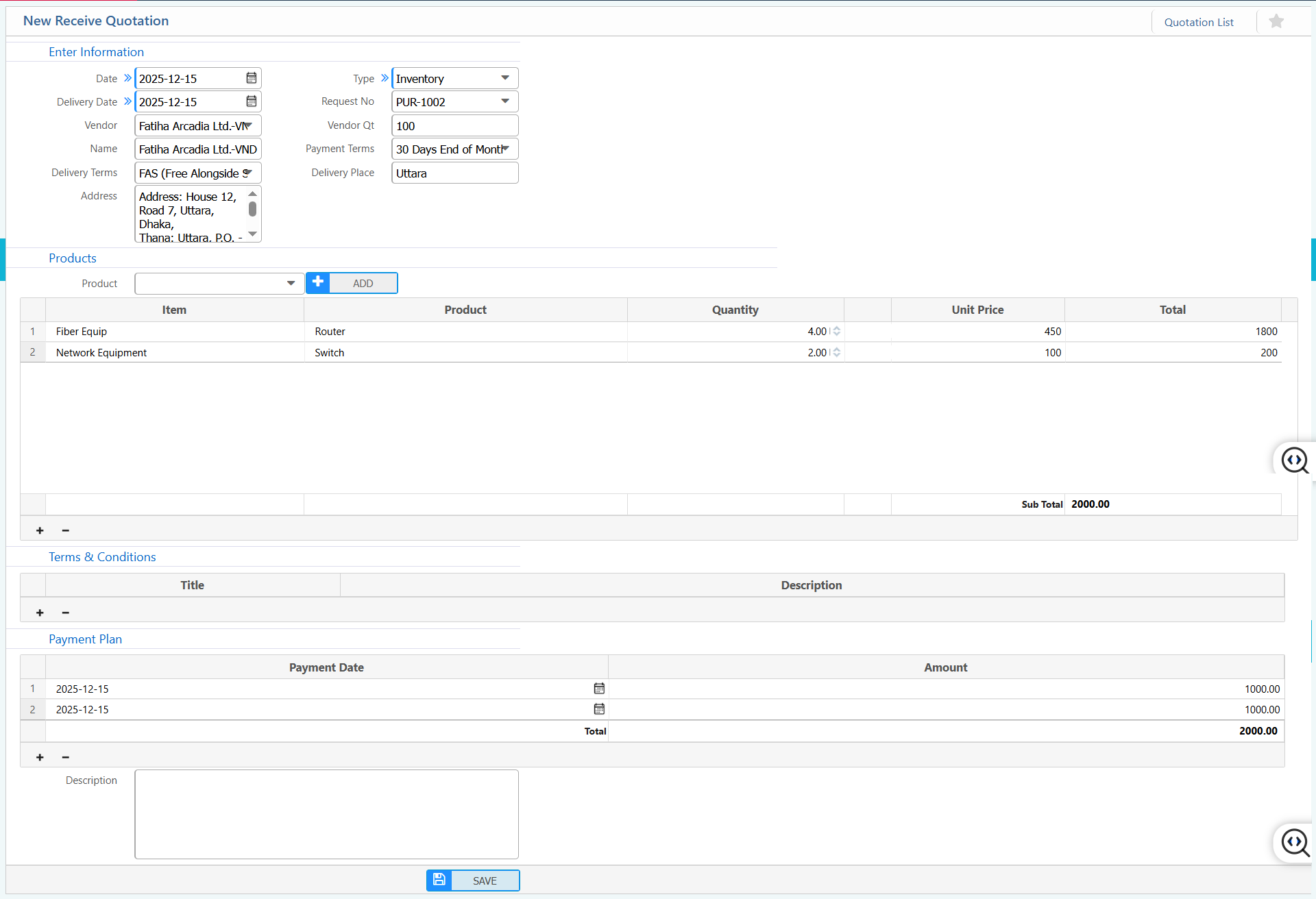
1. New receive quotation
| Field | Action |
|---|---|
| Date | Select the date the quotation is received. |
| Delivery Date | Enter the expected delivery date for the items. |
| Vendor | Select the vendor providing the quotation. |
| Name | Displays the name of the selected vendor. |
| Delivery Terms | Specify the delivery terms (e.g., FAS, FOB, CIF). |
| Address | Shows the vendor’s address, including house, road, thana, division, and country. |
| Type | Specify the type of quotation (e.g., Inventory, Service). |
| Request No | Enter or select the purchase request number linked to this quotation. |
| Vendor Qt | Enter the vendor’s quotation reference number or ID. |
| Payment Terms | Specify the agreed payment terms (e.g., 30 Days End of Month). |
| Delivery Place | Enter the location where the goods will be delivered. |
| Item | Enter the item or department name. |
| Product | Select the product included in this quotation. |
| Quantity | Enter the quantity of each product. |
| Unit Price | Enter the price per unit of each product. |
| Total | Displays the total cost per product (Quantity × Unit Price). |
| Sub Total | Shows the sum of all product totals before taxes or discounts. |
| Terms & Conditions | Enter any specific terms and conditions for the quotation.(if applicable) |
| Payment Plan | Select the payment plan.(if applicable) |
| Payment Date | Enter the scheduled payment date for each installment. |
| Amount | Enter the payment amount for each installment. |
2. Receive Quotation List
2.1 Receive quotations search and actions
| Field | Description |
|---|---|
| Req No | Search quotations by purchase request number. |
| Ref No | Search quotations using the quotation reference number. |
| Status | Filter quotations by current status and update the status required |
| Vendor | Filter quotations by vendor name. |
| Product | Filter quotations based on the selected product. |
| From Date | Select the starting date of the date range for the search. |
| To Date | Select the ending date of the date range for the search. |
| Search Action | Apply the selected filters to display matching quotations. |
2.2 Receive quotations details view & action
| Field | Description |
|---|---|
| Detail | View and edit complete quotation information, including vendor, products, pricing, and terms. |
| Attachments | View upload and download attached documents related to the quotation |
| Payment Plan | View scheduled payment dates and amounts. |
| Delivery Plan | View delivery plan details and change the delivery plan status as required. |
| Delivery Plan Summary | View summarized information of delivery plan. |
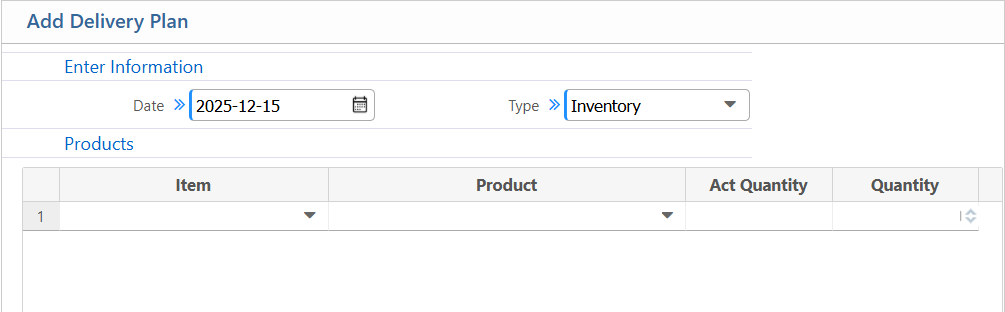
2.3 Receive Quotation Delivery Plan
| Field | Action |
|---|---|
| Date | Select the date when the delivery plan is being created. |
| Type | Specify the type of delivery (e.g., Inventory, Service). |
| Item | Select the item. |
| Product | Select the product to include in the delivery plan. |
| Act Quantity | Enter the actual quantity available or prepared for delivery. |
| Quantity | Specify the quantity scheduled to be delivered. |
| Description | Enter any additional notes or instructions for the delivery.(if applicable) |