Project Group in PrismERP
Project Group in PrismERP is a powerful classification tool that allows businesses to organize and manage multiple projects by grouping them according to common characteristics—such as client, department, region, or project type. This structure ensures better project tracking, improved reporting, and streamlined project management.
Key Features
- Centralized Grouping: Combine multiple related projects under a single group.
- Categorization by Criteria: Group projects by client, business unit, geographic region, or custom criteria.
- Enhanced Reporting: Generate reports at both individual project and group levels.
- Hierarchy View: View project hierarchy under each group for better monitoring and analysis.
Steps to Utilize this Feature in PrismERP
To Add a Project Group
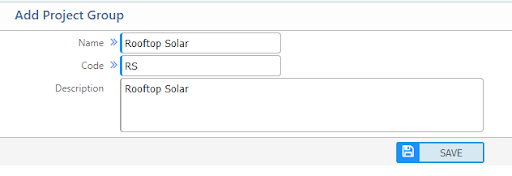
To create a new project group, the following information must be provided:
- Name: The name of the project group.
- Code: A unique code identifying the project group.
- Description: A brief description explaining the purpose or details of the group.
These fields help categorize and organize projects effectively within the PrismERP system.
Project Group List

Users will see the list view of already created project groups here. This list page provides:
- Name and code view
- Search/filtering option