Project Status
To understand the detailed status of a project, the Project Manager page is highly useful for users. It provides an in-depth view of all project-related activities, including progress tracking, financial updates, task status, and overall performance. This centralized dashboard enables users to monitor and manage projects effectively from a single interface.
Key Feature Tagging with Project
Each project in PrismERP can be associated with the following key features to ensure complete visibility, control, and management:
- Dashboard – Overview of project progress, status, and key metrics
- Work Order – List of issued work orders and their status
- BOQ (Bill of Quantities) – Materials, labor, and cost details
- Inventory – Stock tracking and procurement details
- Cashbook – Records of all cash transactions
- Voucher – Financial vouchers for income and expenses
- Expenses – Categorized project expenditure
- Budget – Allocated budget, expenses, and remaining funds
- Sales Invoice – Invoices for project-related sales
- Sales Delivery – Records of sales deliveries
- Service Sale Invoice – Invoices for services provided
- Purchase Invoice – Invoices for purchased goods and services
- Purchase Delivery – Details of received goods
- Import LC (Letter of Credit) – Import financial transactions
- Import LC Invoice – Invoices linked to LC transactions
- LC Expense – Expenses under the Letter of Credit
- Services – Service-related project activities
- Task – Assigned tasks and their completion status
- Income Statement – Summary of project revenue, expenses, and financial performance
These features are automatically linked to each project to provide seamless integration and holistic project management.
Steps to Utilize this Feature in PrismERP
After clicking on a project name in the list, the Project Manager Dashboard will be displayed. This section serves as a centralized interface to manage the entire project on a single page. All transactions and related activities are presented in an organized and structured format, enabling efficient monitoring and decision-making.
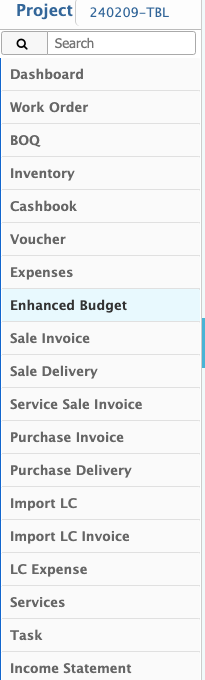
Project Manager Details View
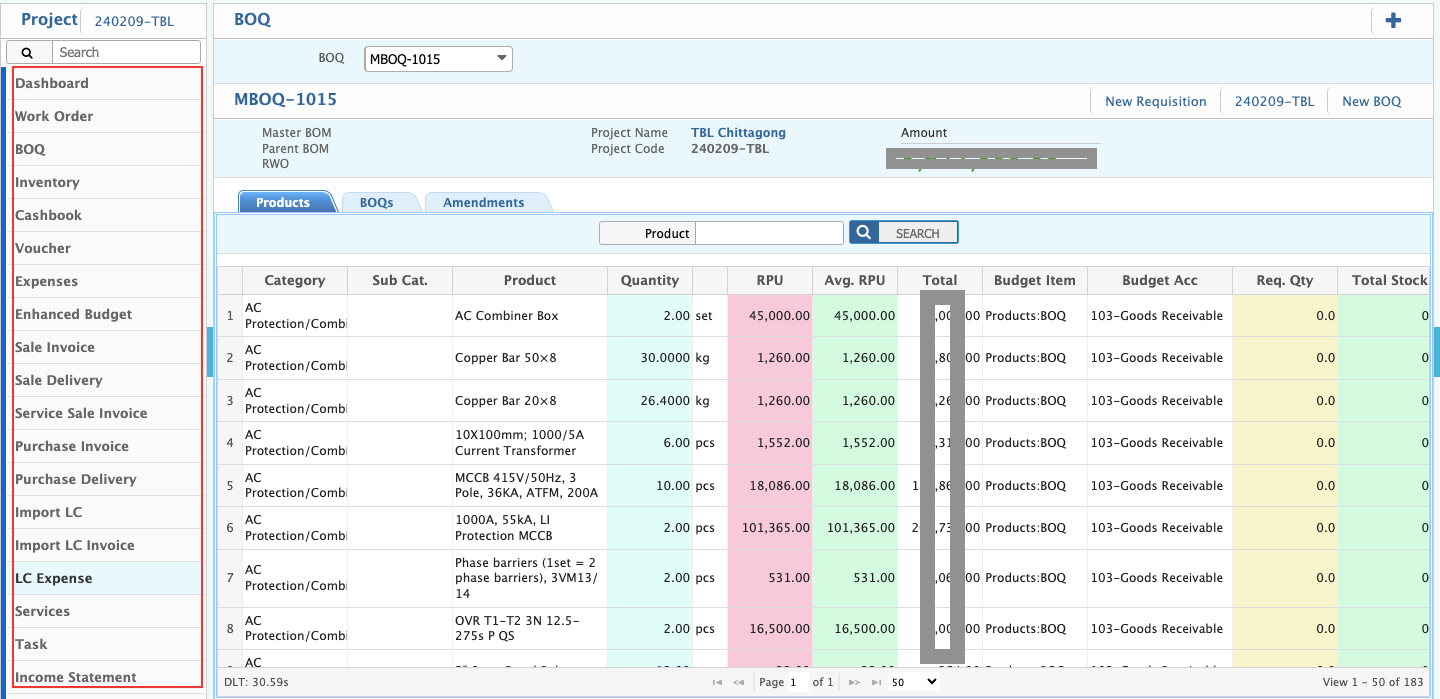
The user can view a comprehensive project summary, which includes various key sections such as:
- Dashboard: Provides an overview of the project's progress, status, and key metrics.
- Work Order: Displays issued work orders, their status, and related details.
- BOQ (Bill of Quantities): Lists materials, labor, and costs associated with the project.
- Inventory: Tracks available stock, materials used, and procurement details.
- Cashbook: Maintains records of all cash transactions related to the project.
- Voucher: Stores financial vouchers for income and expenses.
- Expenses: Displays categorized project expenditures for better financial tracking.
- Budget: Shows the allocated budget, actual expenses, and remaining funds.
- Sales Invoice: Lists all invoices generated for project-related sales.
- Sales Delivery: Records deliveries made as part of sales transactions.
- Service Sale Invoice: Documents invoices for services provided within the project.
- Purchase Invoice: Tracks invoices for purchased goods and services.
- Purchase Delivery: Displays details of received goods from vendors.
- Import LC (Letter of Credit): Manages import-related financial transactions.
- Import LC Invoice: Tracks invoices linked to LC transactions.
- LC Expense: Records expenses incurred under the Letter of Credit.
- Services: Lists all service-related activities within the project.
- Task: Provides a breakdown of assigned tasks and their completion status.
- Income Statement: Summarizes revenue, expenses, and overall financial performance of the project.