MRP for Aluminium Production
Materials or Products management
Material Resource planning (MRP) gives actual information of all available raw materials and products that are required for production.
MRP ensures that inventory levels are maintained at its minimum levels. But also ensures that material and product are available whenever production is scheduled, therefore, helping in matching demand and supply.
MRP provides information of production planning and scheduling but also provides information around dispatch and stocking.
MRP for Aluminium production requires 3 step production process which will be explained in the other feature segments.
In order to start any aluminium production process in MRP module. First and foremost comes the addition of new products in the inventory. Creating an inventory and adding new products that are required or associated with Aluminium production.
Addition of New Product or Material in an inventory:
Adding up all the product, materials that are associated with Aluminium production at first.
In order to do first go to: Inventory--> New Products
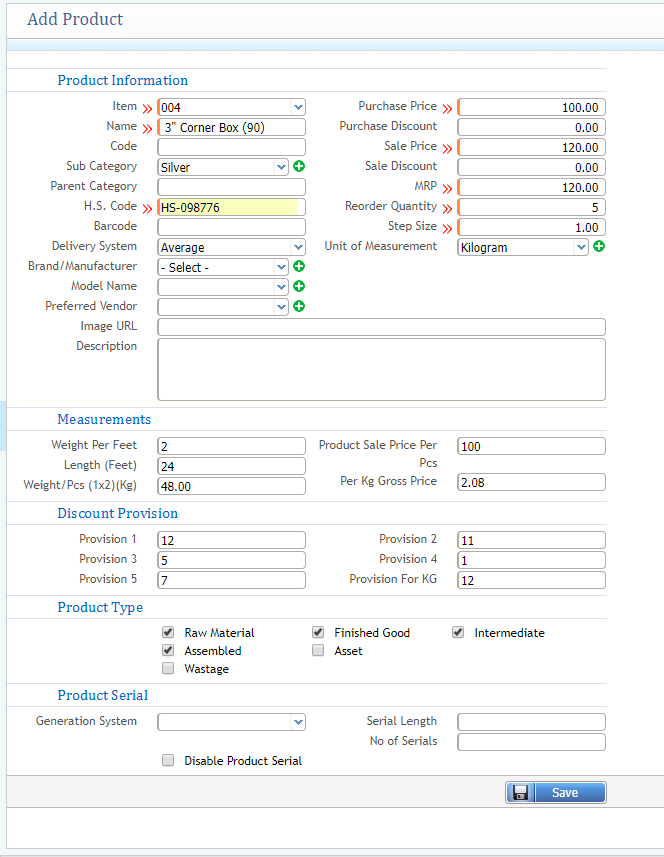
Process is similar to as mentioned in the inventory control of creating a new product where you need to fill up some following information about the product. (Note that for aluminium production process measurements fields and product type field options of each product is very important and kind of mandatory as that measurement will be required while going for further steps of production).
Billet Consumption
Billet Consumption Material refers to the process of gathering and mixed out of all raw materials in a house chamber to bring it in a shape of aluminum, this process of consuming all the raw materials together for making a shape of aluminium is known as Billet Consumption.
1) Add Billet Consumption:
Consumption
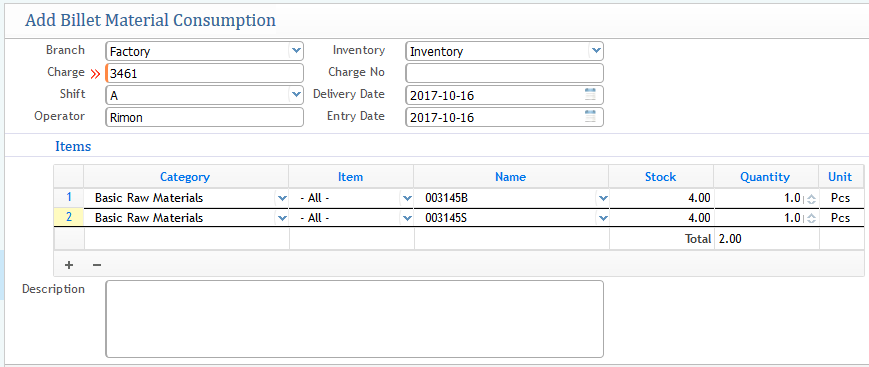
- In the addition billet window first and foremost choosing the branch from which consumption addition is being generating.
- Charge: Refers to specific machine or any instrumental thing related to your company for production.
- Choosing the Inventory from where raw materials will be taken for consumption for making aluminium
- Delivery Date: Date of delivering the aluminium making
- Entry Date: Date of Entry of Billet Consumption
- Operator: Name of the operator who is in charge of this consumption billet management
- Item information: Where you will assign the name of the products (raw materials), choosing the category, will show the current stock available of that product, and the quantity you need for the consumption for the production of aluminium.
2) Approval Layer of Billet Consumption:
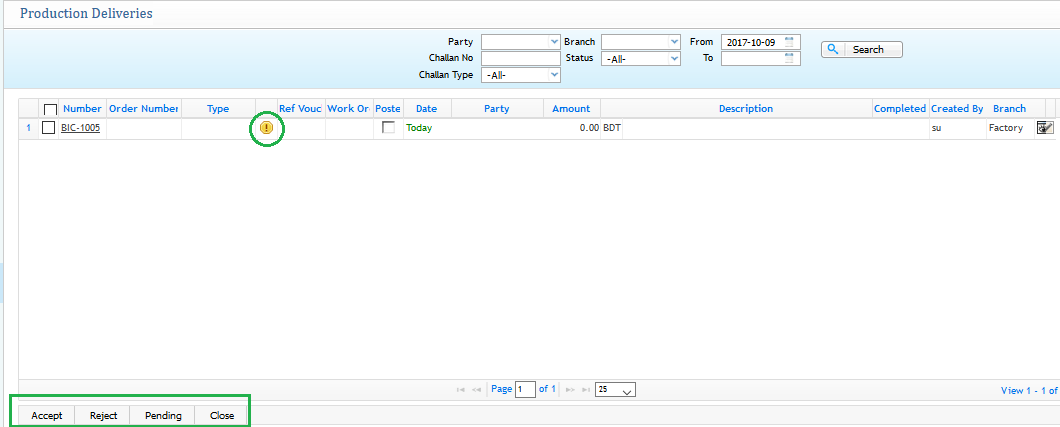
From the above screenshot you can see after generating the Billet Consumption of Raw materials you can see in the production delivery list that a billet is generated as number BIC-XXX but on the other hand a yellow exclamation sign has been shown which indicates that although the Billet has been generated for production but the delivery is not done yet to the inventory, it is in pending state. So from that page if you want to proceed you need to click on the accept button as shown on the end of the screenshot. You can also make edit or modification or even change the status of a particular billet consumption.
3) General view of a specific billet consumption number:
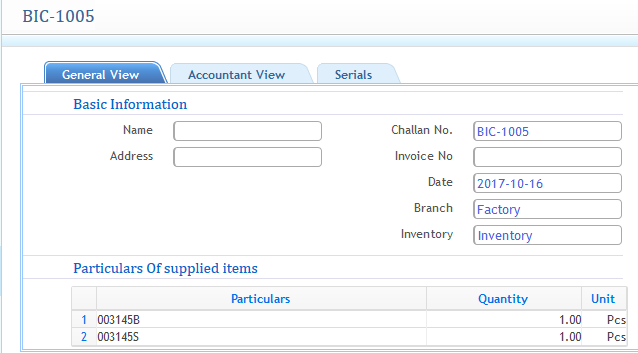
Select a particular BIC-xxx from the production delivery list page. It shows the general view as well as accountant view of a specific billet number. Also you can assign serial of that billet from that page.
Billet Production
After consuming the raw materials by adding Billet consumption, The next step is to go for the Billet Production stage where the long aluminium shape will be produced.
Billet Production
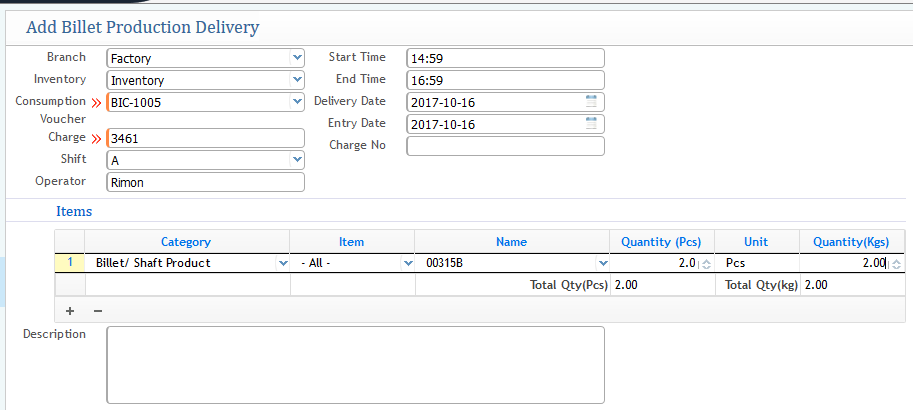
- In this process you are actually making the production of the aluminium bar trunk and delivering into the inventory as a product.
- The required fields needs to be fill up in order to generate or proceed the billet production delivery
- Branch: From which branch it is generating
- Inventory: Choosing the Inventory
- Consumption Voucher: Choosing the specific Billet Consumption Number
- Start Time: Start time of production
- End Time: End time of Production
- Delivery Date: Date of Delivery
- Entry Date: Entry of the generation
- Item and Product information: Choosing the category, Assigning the Name of the product which will be produced from that Billet consumption, How many quantity will be generated, Weight of that each quantity
- After filling up all the requirement fields then click on save for further proceed.
Approval Layer of Billet Production Delivery:
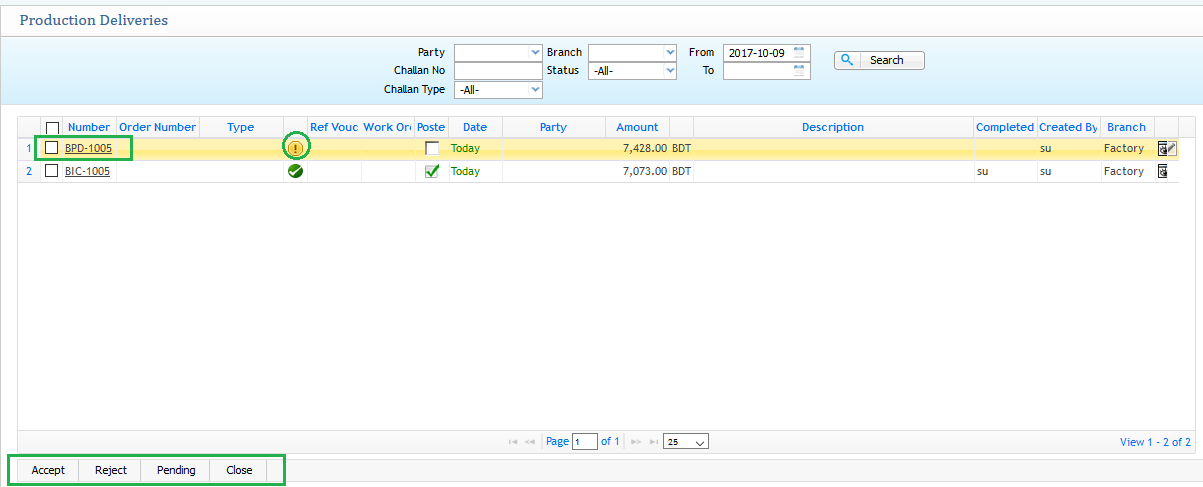
Similar like Billet Consumption now for the Billet Production and Delivery after generating from the application it will show in the production deliveries list and it will be pending state. So in order to accept the Billet Product click on the accept and it will then be delivered to the inventory as a Aluminium bar product.
Mill Finish Consumption
1) Mill Finish Consumption:
After finishing for the billet consumption as well as production of aluminium then it will proceed for mill finishing production.First you need to go for the mill finish material consumption generation.
Consumption
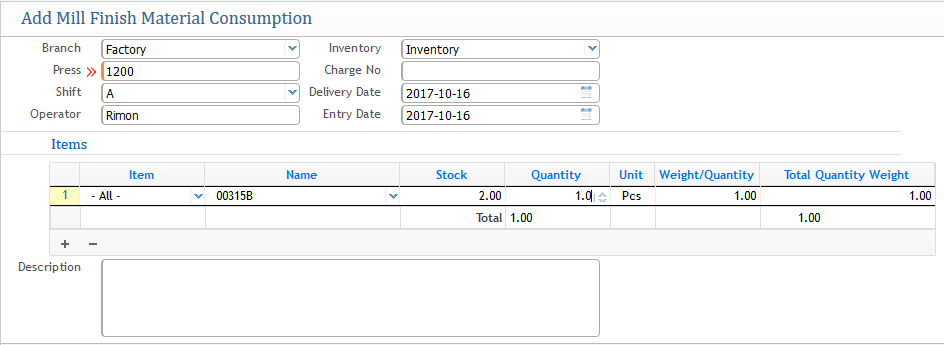
- From the above screenshot:
- Branch: First choosing the branch
- Press: It is a very important aspect for aluminium production. Press refers to the aspect element or you can say a machine which is used in the factory to cut down the large aluminium trunk bar which was created in billet production into pieces. So the Press is referred here as the machine where you will assign either by machine name or machine number depending on how you use it.
- Shift: Shift level
- Operator: Name of the operator who is in charge
- Inventory: Choosing the inventory from where the raw material is selected
- Delivery Date: Date of delivery
- Entry Date: Date of Entry
- Items: information related to the raw materials or product which is selected for mill finishing,choosing the quantity depending on stock and it will show the weight of that quantity too
- Description field: Optional field if it is required
2) Approval Layer for Mill Finishing Consumption:
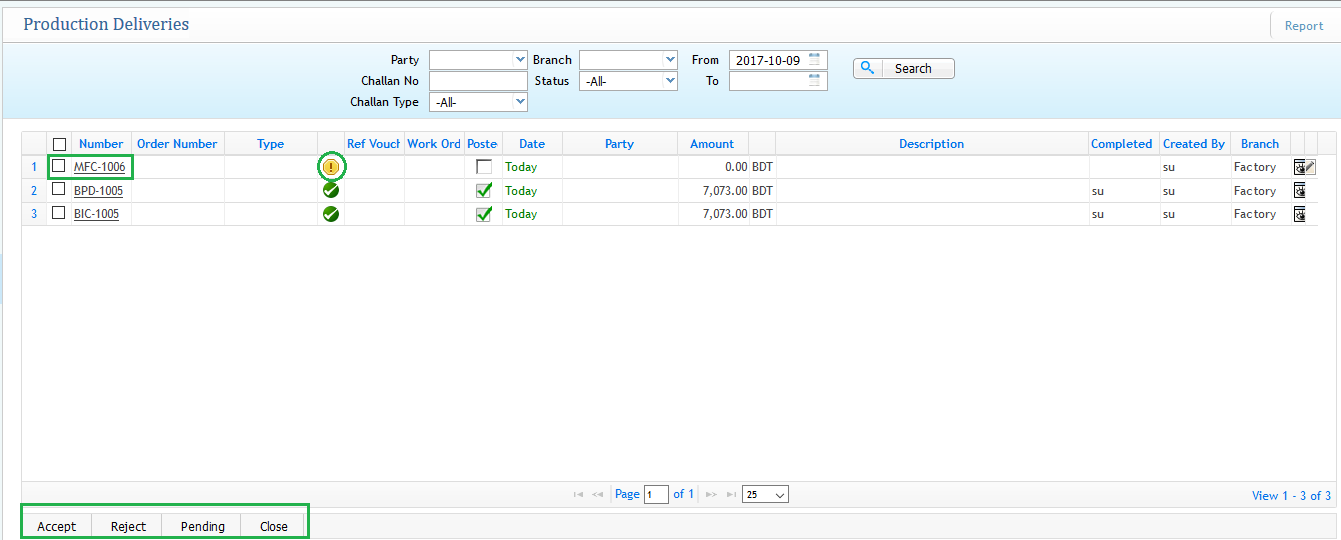
Similar like other process approval is needed in order to further process of mill finishing consumption. Also you can do edit or modification or changes to any Mill Finishing Consumption which is termed as MFC-XXX
Mill Finish Production
After adding the materials for Mill finishing Consumption then comes the final step of Mill Finish production with delivery. For that first go to Mill Finish Production
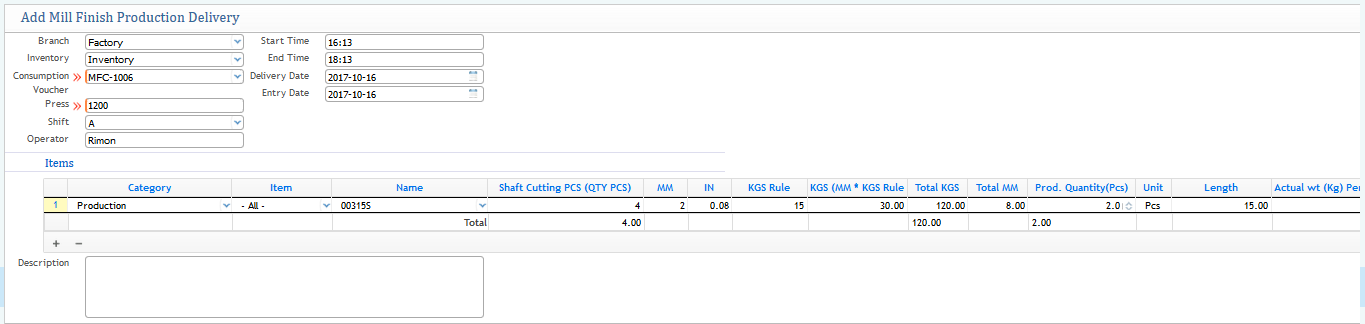
- Branch: Assign the Branch
- Inventory: Choosing the inventory
- Consumption Voucher: Choosing the desire Mill Finishing Consumption number on which mill finish production will be created
- Start Time: Start time for production
- End Time: End time for production
- Delivery Date: Date of delivering the finishing product
- Entry Date: Date of Entry
- Item Information: Fill up the requirements of category that is for production, Name of the Product which will be produced for Mill Finish, Shaft Cutting Pieces defines the number of pieces to be created i.e. the quantity, Unit, Length etc and many more depending on how you want the production to be done.
- After completing fill up the fields then click on save for further process.
Approval Layer of Mill Finishing Production Delivery:
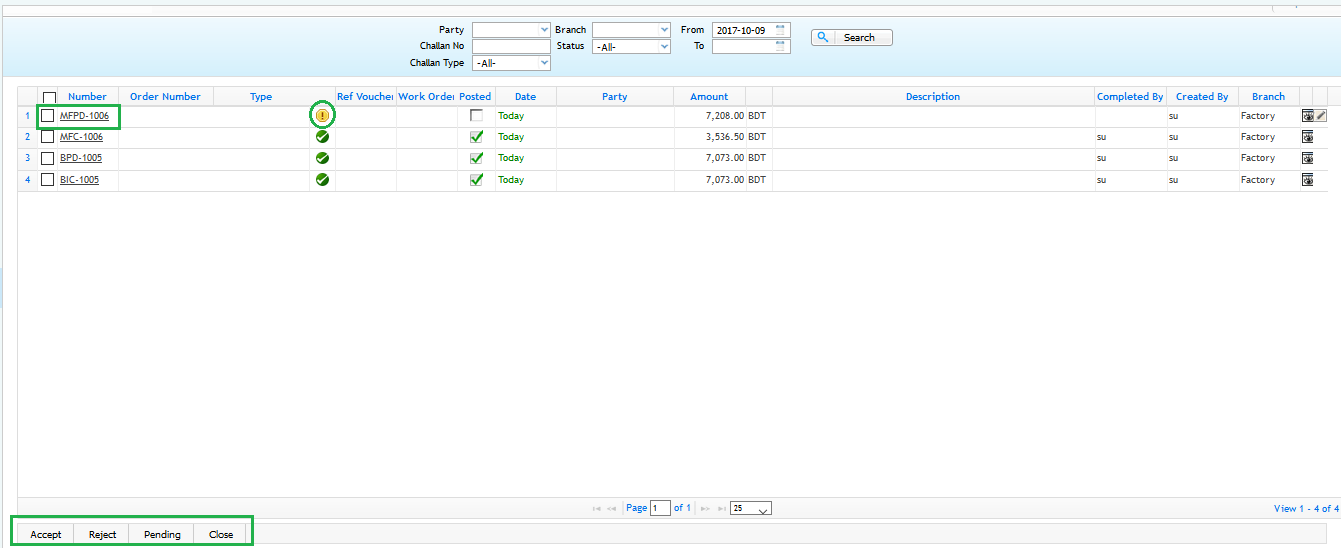
Similar process like others approving into accept will then proceed for the production delivery to the inventory. Currently it shows exclamation sign which indicates it is in pending state.
Finish Consumption
Finishing Consumption is the final part or step of the raw materials consuming after the Mill finishing product.
Finishing Consumption
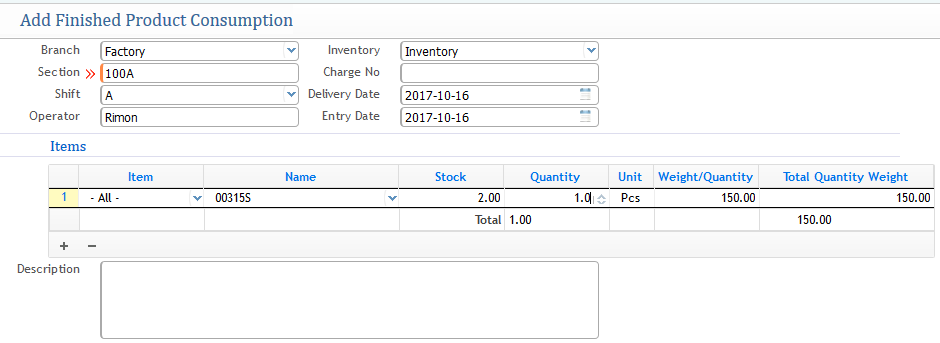
- Branch:Assigning the Branch from where the Finishing Consumption is generating
- Section: Number of the section or group wise the finishing production consumption will be going for
- Shift: Level of Shift
- Operator: Name of the operator who is in charge of the consumption
- Inventory: Selecting the Inventory from where the raw materials
- Delivery Date: Date of delivery the raw materials
- Entry Date: date of entry
- Item information: Providing the item information, name of the product(raw material) which which was created while in Mill finishing production , Number of Quanity needed of that product.
Approval Layer after Generating the Final Consumption Material:
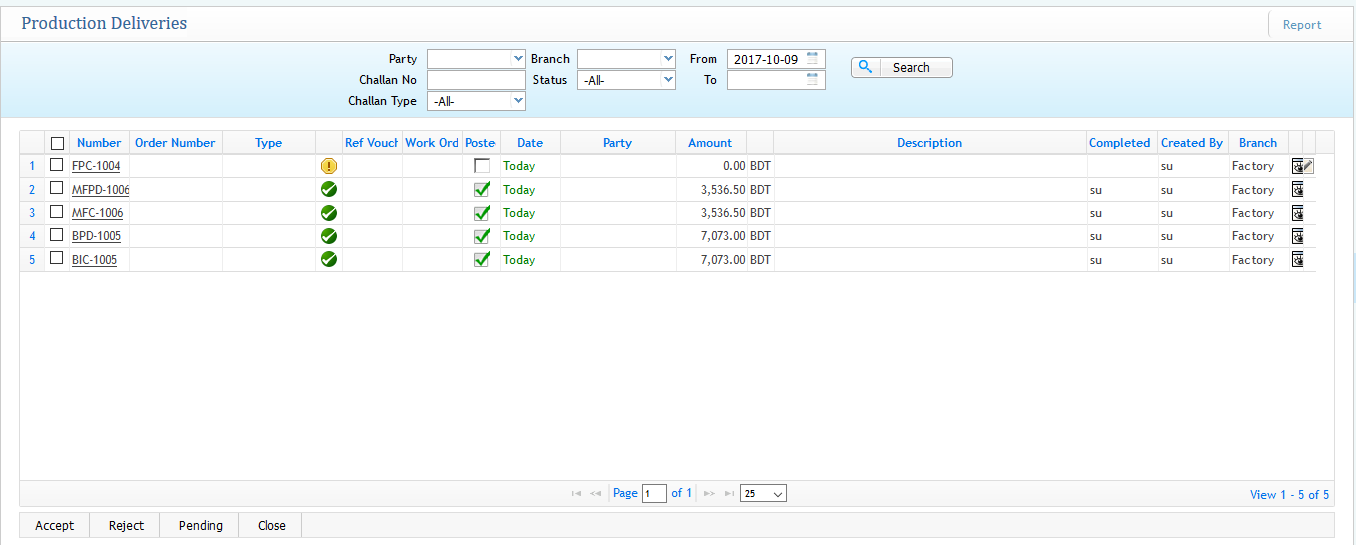
Without any approval layer the final consumption material addition will not go for further process. The final production consumption generates as a number FPC-xxx. you need to accept in order to approve the consumption.
Finish Production and Delivery
Navigate to Finish Production
After accepting the Finishing production consumption then the final step procedure is to do the finish production and the delivery of that product so that the final Aluminium steel comes out as a final product.
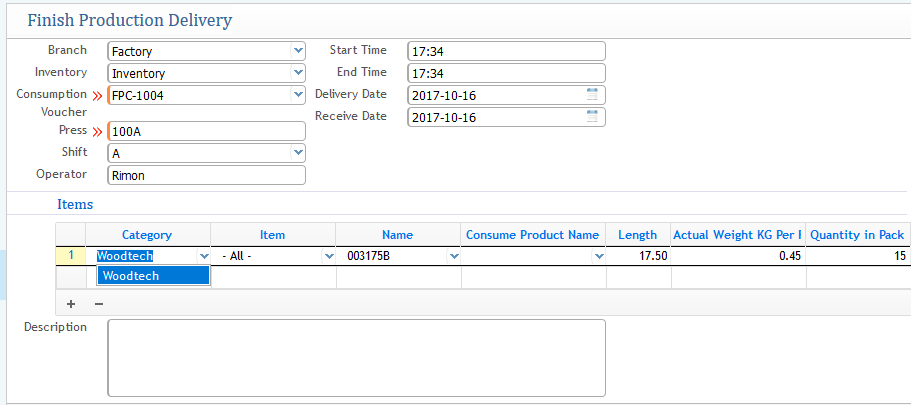
- Branch: Choosing the branch
- Inventory: Selecting the Inventory where the production good will stock in
- Consumption Voucher: Selecting the Finishing Product Consumption number
- Press: Automatically generates while selecting the consumption voucher
- Shift: Automatically generates with the Consumption voucher assigning
- Operator: Name of the Operator who is in charge
- Start time: Date of Starting the production process
- End Time: End Time of getting the product ready
- Delivery Date: Date of delivering the product
- Receive Date: Date of Receiving the product
- Product Information: Selecting which product to be created along with all the measurement which you select the weight,quantity and other options.
- After finishing the required field fill up then save for further proceed
Approval Layer page for the Final Production Delivery:
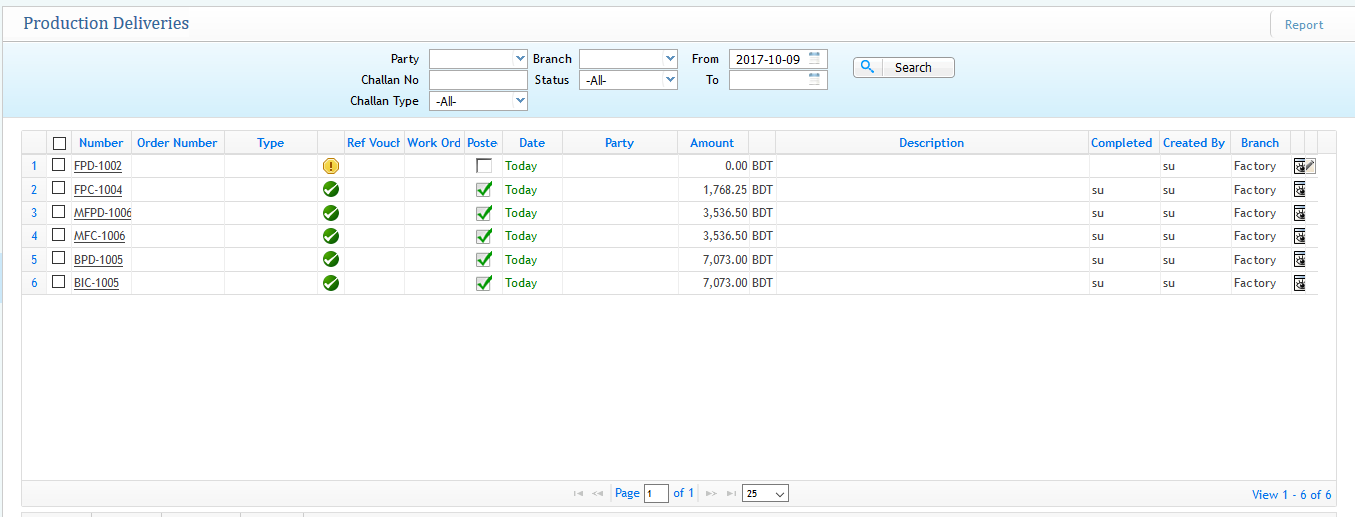
For final step approval you need to accept the Final production delivery number that has been generated as it is showing in pending state by looking at the exclamation sign.
Production Reports Dynamic/Non-dynamic
- Production Report (Dynamic): Shows all the step report list in dynamic view from the application.
-e79b7e55a501956f274e734a2b7292d2.png)
This is the dynamic view where you can see all the three steps of aluminium production in details of what has been consumed, used for production and wastage. Everything is shown in details of all the quantity, amount used for overall process.
-
Non Dynamic View:
a) Billet Production:
Print to Billet Production
From the Print section selecting the aluminium production and then click on Billet for showing the non dynamic individual report of Billet consume and production step
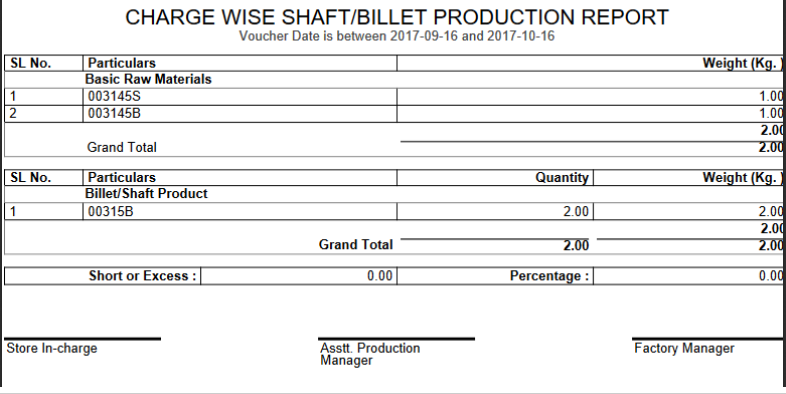
Reporting can also be shown from a specific date range by assigning the to and from date from the print setting format
b) Mill Finish:
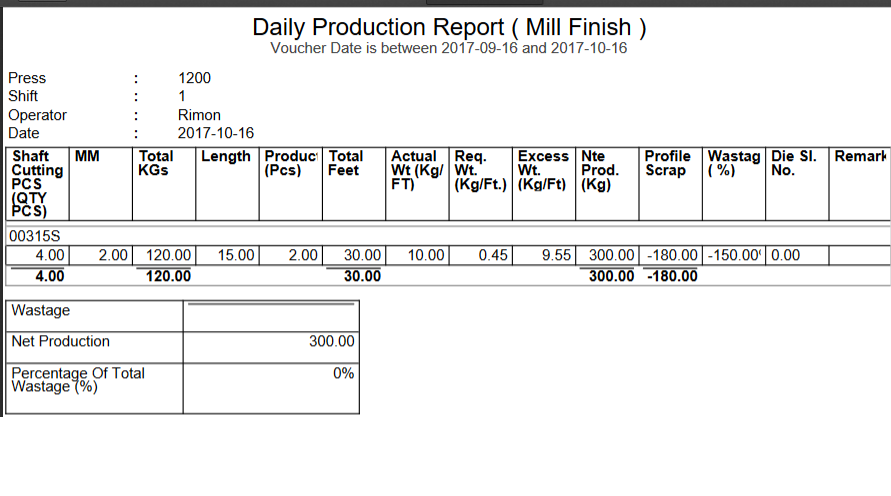
Print to Daily Production (Mill Finish)
Shows all the details of the Mill Finishing Production in the report as well as elaborating all the accurate data in the reporting.
-
Final Production:
Shows all the category and item of final production with their details
Print to Daily Production (Finish)
