MRP for General Industries
Material Resource Planning in ERP
Basically MRP defines as the production planning and inventory control system. The overall production planning concept and process can be defined through the MRP solution. Depending on the industry or the type of business different ways of MRP process can be functioned. Taking an example of a particular buying house business, the business will depend based on the type of vendor. Vendor will provide an order of 10,000 pieces of t-shirts but before that he needs a sample of 5-10 pieces to see whether the order can be placed to him or not. So basically many roles and features do play in the MRP section. Merchandising procedure do plays a role in MRP such as
- Style (Which is like the sample pieces and designing process for the sample pieces)
- Sample Development (Development stages that has been provided for the sample production in the factory) in the meantime quality control also plays an important role
- Shipment process
(Note that these three features are related to the solution of Merchandising Management System if the industry is garments, buying house etc.)
After shipping and getting the approval of sample from the vendor and receiving 10,000 pieces order, it will be generated as a work order from the system (In the mean time compliance also required for managing the resources and wastages) and then main functions of MRP starts to play. Following features of MRP which are basically common for all the industries are to be managed from the application:
(Note that if you are a merchandizer overall 3 things are beard in the mind for production process. They are
- Time and Action 2) Quality Control (QC) 3) Cost management )
The following features that are provided below for the MRP function is basically for all general industries or business related to MRP
- Work Order
- Material Requirements
- Then comes the under 3 stage section wise process of materials (Work in process):
i) Material Issue
ii) Material Consumption
iii) Section Delivery (Quality Assurance is important before delivering which can be managed)
iv) Section Transfer
v) Finish Product Delivery to Inventory. - After Finishing Product Delivery to Inventory next to go for the Production order to control the order management (Note that multiple production orders can be placed against a single work order from the system).
- Product Shipment to the vendor against the work order number or generating a Sale order with Delivery to the vendor against that specific work order.
Style Required before sample development
- Add Style
(Note that this style is provided in the MRP system if a vendor requires a sample of pariticular units or pieces before giving work order. It provides all the items required for the design of sample)
Addition of style, design or embroidary work in dress or any kind of sample's design is manageable from the MRP style feature
- Style List Page View:
In the list, it will show all the styles that are being created in the application. Left side views all the style name and on the right side shows the detail information of a specific styles selected. From the left side of the window you can select a style and can activate or deactivate a specific style.
(i) You can also add duplicate style from a specific style number
(ii) You can add raw materials which will be used for the production as well as product section style can be added
Sample Order
Sample order is the next step for developing the samples for the vendor of that specific style from the factory. In order to create a sample order from the application, the following procedure is given below:
- Add Sample Order:
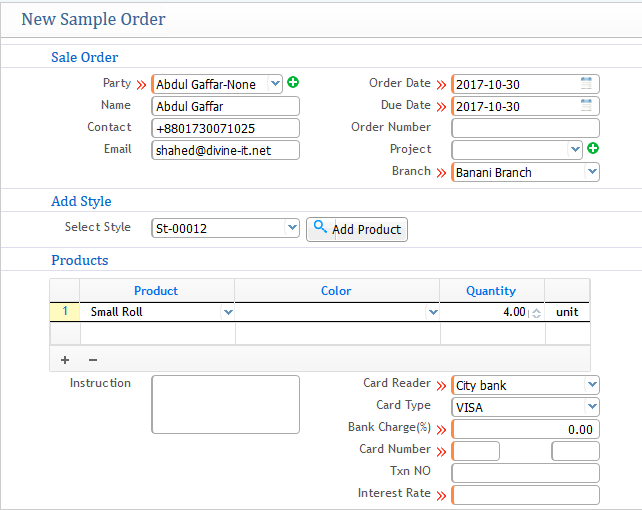
In the sample order process you need to fill up the following information stated in the screenshot below:
i) Name of the client and its contact details
ii) Order Date, Due Date Order number ( Note that as mentioned earlier while explaining concept that TNA plays a greater role for managing the time and calendar for the date order) It helps to track and monitor strictly from application
iii) Adding the style required for the sample product development
iv) Name of the product that needs to be develop as a sample to the party ( Note that the products are already created under inventory so that you can select, select the quantity)
v) Payment process and information of the charges for developing the sample order by which client is going to pay
- Sample order List:

After generating the sample order, all the sample orders can be shown and viewed in the order list. Sample orders are generated as SR-xxx
From the list you can check out the sample order status and detailed information for analysis and monitoring.
Sample Request
As a buyer you can also ask to the vendor about the a sample request of a product for which you might buy. PrismERP can manage that from the application as well to request the vendor for a sample product.
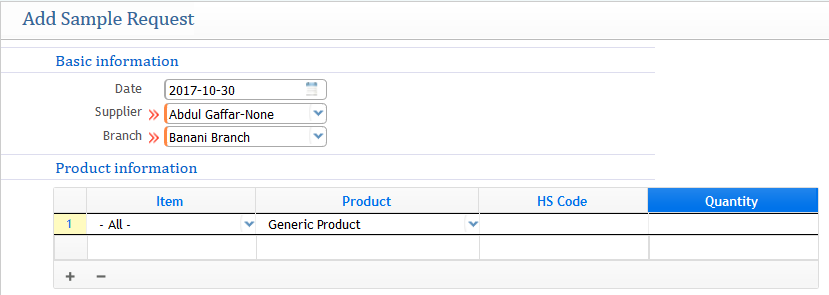
Date: Date of making the sample request
Supplier: Name of the Vendor
Branch: Choosing the branch of your company
Product Information: Providing the product and its quantity of sample
Sample Request List:
After generating the sample request, all the sample request can be seen in the sample request list page.

From the list page you can see all the request list with proper informations and has the provision of edit or modifying.
Sample Delivery
Sample Delivery explains the stage of delivering the sample products when it is ready
- Add Sample Delivery:
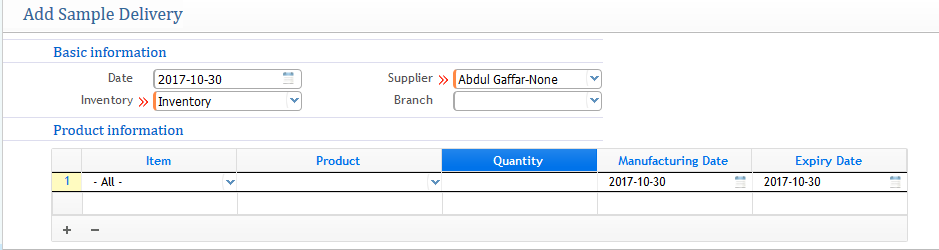
In the window
Date: Select the date of Delivery
Inventory: Choosing the inventory where the sample product is stocked
Supplier: Name of the Supplier
Branch: Choosing the branch of the company
Product Information: Choosing the sample product and the quantity that is needed to deliver, providing the manufacturing date and expiry date of the product or goods.
Receiving Work Order for Product
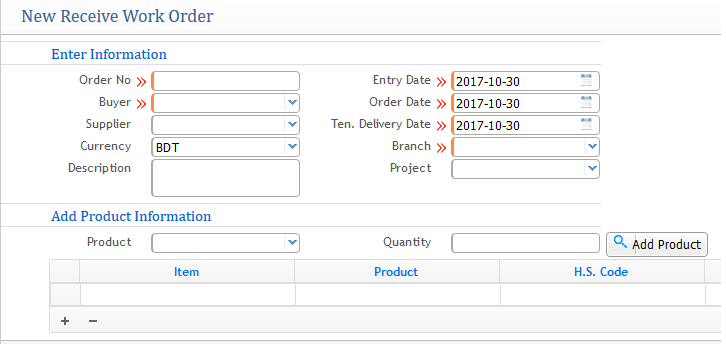
After getting the feedback or approved of the sample product from the client, Now comes the process of receiving the work order from the client of preparing certain amount of goods or products. So for that creating the work order in similar process as showin the LC management's Receiving Work Order from the application and then a work order will be generated as RWO-xxxx . In between that compliance also plays an important for maintaining the wastages or resources.
Similar process enter the section and mandatory requirement fields and choose the sample product for which work order is received along with quantity
Material Requirements
Material Requirements feature is basically provided in the application to provide an estimate amounts of raw materials requried for the production process of goods. In this feature you will provide all the raw materials along with their quantity and unit of measurements as an estimate required for the whole production process.
Note: If the production process is for the merchandiser or buying house then 3 factors plays here: 1) Time and Action 2) Quality Control 3) Cost
After estimating the material requirements then on that head of estimation you will go for product requisition of those products from the inventory for the approval of production.
Product requisition will be generated in similar process as mentioned in the procurement solution.
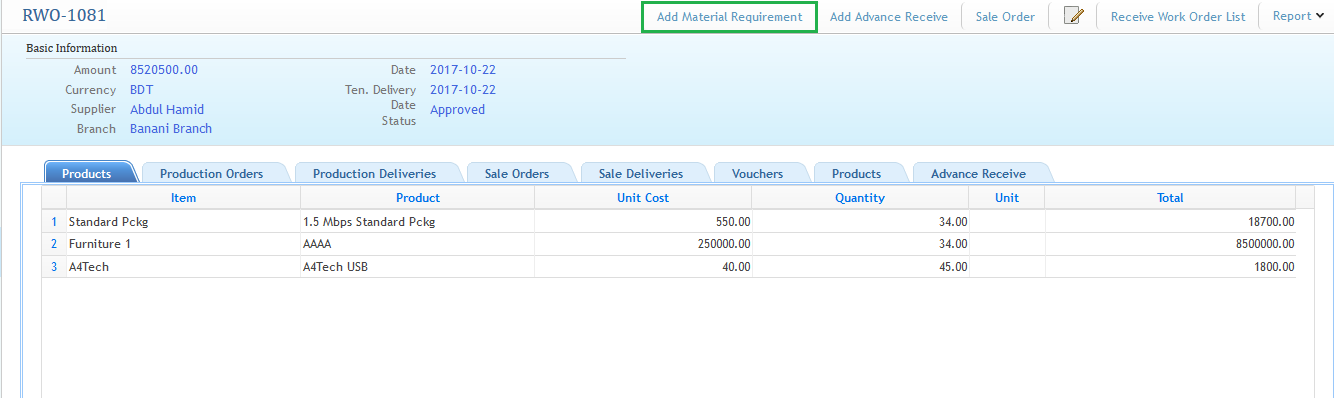
Generally Material Requirements estimation can be provided from a particular RWO-xxx (Receive Work order). From the Receive Work order list click on a specific RWO-xxx and then click on the add material requirement. The screenshot is shown below for understanding
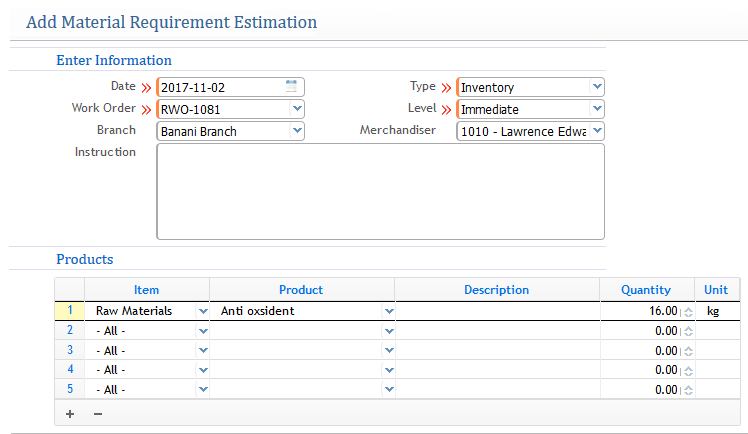
After going to the Raw Material Requirements window follow the process of filling up the requirement fields and then click on save to generate the raw materials requirement for the particular receive work order.

Production Order
After providing the estimation of material requirement as well as the work order next step comes for the production order to receive Add Production Order
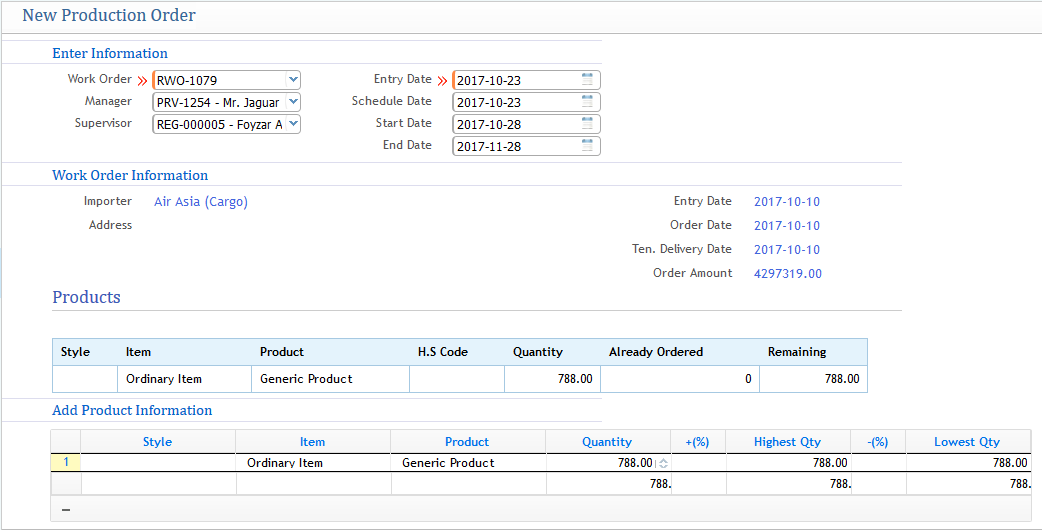
Select the receiving work order number of the sample in the first section field and then automatically in the work order information it will show all the product information of that specific work order along with quantity of production. As well as providing the entry, scheduled, start and end date.
After that a production order will be generated as PRD-xxx which will be showin in the production order list from there you need to accept or start progress the PRD since after generating it will be in pending. So an approval is required for further advancement.
Materials Issue & Consumption
Issue:
After generating the production order now it's time for the production process on factory. In order to manage step by step process for the production of goods. The first step comes is the materials issue section on the factory. All the amount of materials that are being estimated will be issued along with the quantity required for production in the factory.
Consumption:
In the consumption process section the materials will be consumed and used up to create up and bringing the shape and design of the products ( for example the raw materials are used up to create a big item which will be going to further step for cutting and shaping).
Section Delivery, Transfer & Production Delivery
After Consuming the Materials and going through work in procress then section wise delivery process will start, note and predict that each section is acting as an inventory, after consumption of production is transfered to individual section sequentially. Cost distribution of the finished Goods is calculated and measured out here.
After finishing goods of each section is delivered, Then when the final product is ready, it will be delivered from the section to the inventory as a final product.