Activity
PrismERP Activity feature enables efficient management of all business-related activities, including calls, meetings, follow-ups, and tasks. Users can create, assign, and track activities, link them to clients, organizations, or branches, and add detailed notes for proper follow-up. The module also allows searching, filtering, and updating activities in a centralized list, as well as adding multiple activities at once to streamline workflow and ensure no task is missed.
1. New Activity
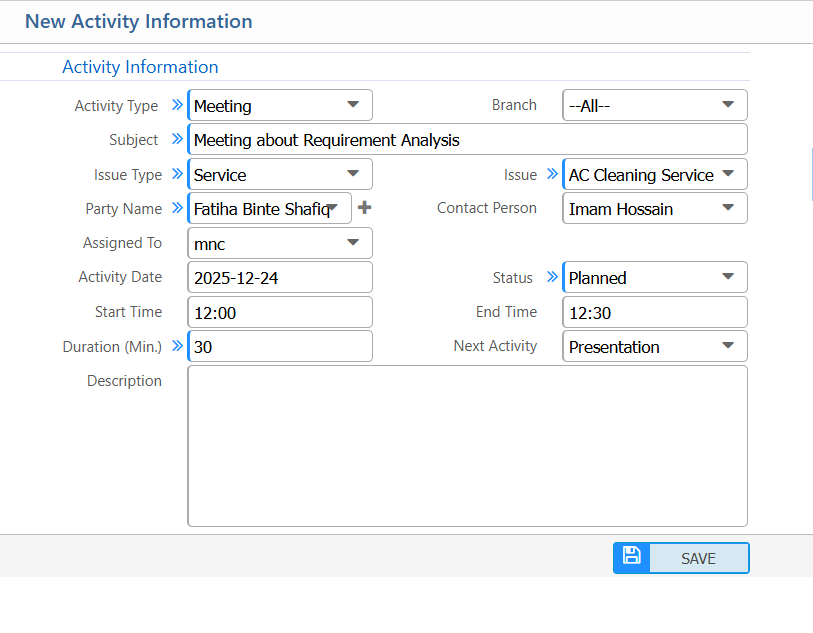
Activity Information:
| Field | Action |
|---|---|
| Activity Type | Select the type of activity |
| Branch | Select the branch where the activity is being recorded. |
| Subject | Enter a short subject or title for the activity. |
| Issue Type | Select the related issue type |
| Issue | Specify the issue or reference linked to the activity. |
| Party Name | Select the customer, organization, or party related to the activity. |
| Contact Person | Select or enter the contact person for this activity. |
| Assigned To | Select the user responsible for performing the activity. |
| Activity Date | Select the date when the activity is planned or occurred. |
| Status | Select the current activity status. |
| Start Time | Enter the start time of the activity. |
| End Time | Enter the end time of the activity. |
| Next Activity | Select or define the next follow-up activity, if required. |
| Description | Enter additional notes or details about the activity, if required. |
2. List of Activity
2.1 Search,Filter & Actions
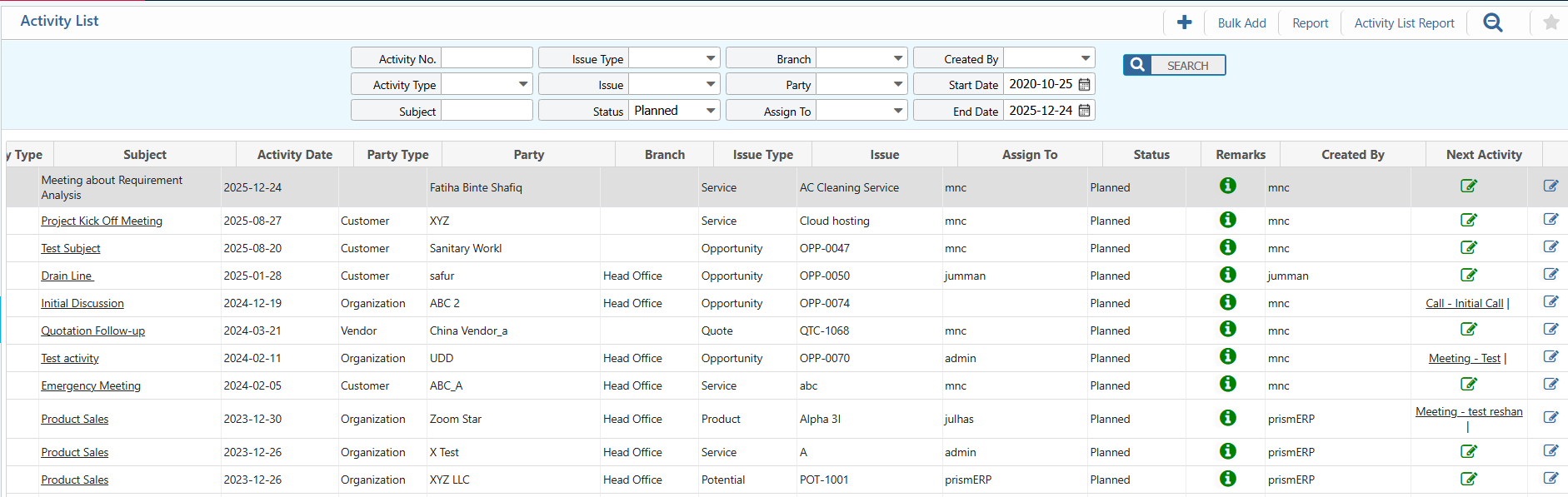
| Field | Action |
|---|---|
| Activity No. | Search activities using the unique activity number. |
| Activity Type | Filter activities by type. |
| Subject | Search activities by subject or title. |
| Issue Type | Filter activities based on the related issue type. |
| Issue | Search activities linked to a specific issue or reference. |
| Status | View and update the current activity status. |
| Branch | Filter activities by branch. |
| Party | Search activities by related parties. |
| Assign To | Filter activities assigned to a specific user. |
| Created By | Search activities created by a specific user. |
| Start Date | Select a start date to view activities from a specific date. |
| End Date | Select an end date to view activities up to a specific date. |
| Edit | Edit and update activity information directly from the list view. |
2.2 View Details & Actions
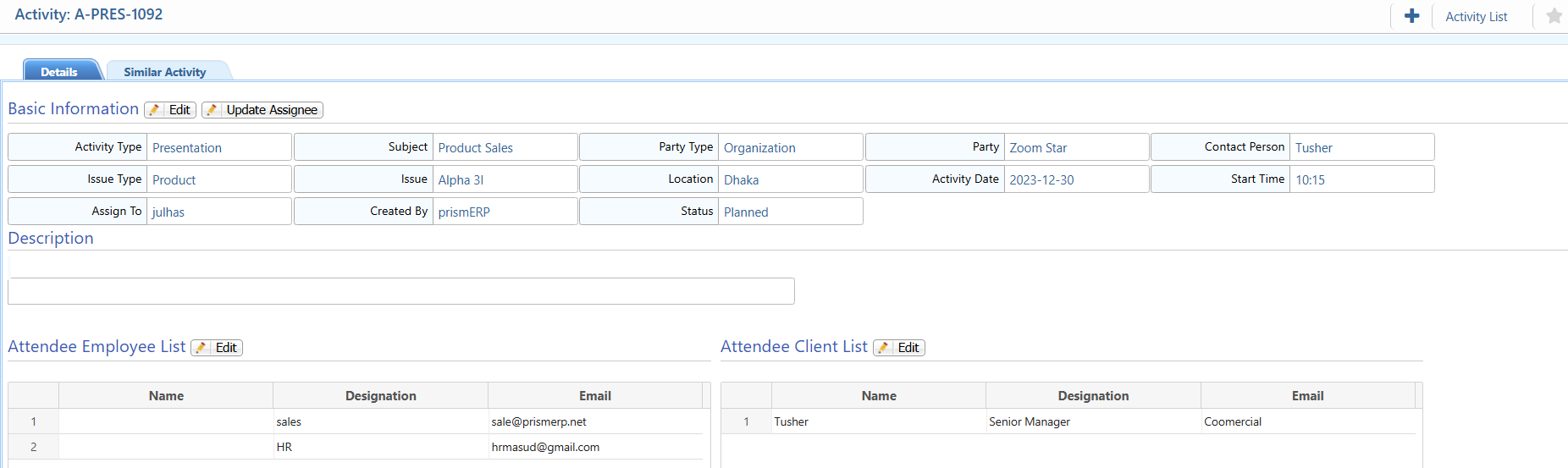
| Field | Action |
|---|---|
| Basic Information | View all key activity details such as Activity Type, Subject, Party, Contact Person, Issue Type, Issue, Location, Date, Time etc. Edit any field as needed. |
| Update Assignee | Reassign the activity to another user. |
| Attendee Employee | View and manage internal employee attendees and their information. |
| Attendee Client | View and manage client or external attendees and their information. |
| Similar Activity | View activities similar to this one for reference or follow-up. |
3. Add Bulk Activity
| Field | Action |
|---|---|
| Branch | Select the branch where the activity is to be recorded. |
| Activity Type | Choose the type of activity. |
| Subject | Enter the subject or title of the activity. |
| Issue Type | Specify the type of issue if applicable. |
| Issue | Enter the details of the issue related to the activity. |
| Party Name | Select or enter the organization or client associated with the activity. |
| Contact Person | Specify the person to contact within the organization. |
| Phone Type | Select the type of phone used. |
| Phone Number | Enter the contact number for the activity. |
| Call Type | Specify the call type if applicable. |
| Assigned To | Assign the activity to an employee or team member. |
| Location | Enter the location where the activity will take place. |
| SMS Type | Select the type of SMS if notifications are sent. |
| Activity Date | Select the date of the activity. |
| Status | Choose the current status. |
| Start Time | Enter the start time of the activity. |
| End Time | Enter the end time of the activity. |
| Duration (Min.) | Automatically calculated or manually entered duration in minutes. |
| Next Activity Type | Select the type of next activity to follow up. |
| Description | Enter additional notes or details about the activity. |
| Employee / Client | Add associated employees or clients. Use Add Employee or Add Client buttons. |
