Potential
The Potential module in PrismERP provides a structured way to manage all sales potentials. Users can create new potentials with detailed information, including related opportunities, products, sales stages, probability, expected revenue, and competitor details. The module allows tracking of activities, managing linked quotes, and updating the status of each potential as it progresses. Advanced search and filter options make it easy to locate specific potentials, while the details view offers comprehensive insights. Additionally, users can generate reports to analyze potential performance and support informed decision-making.
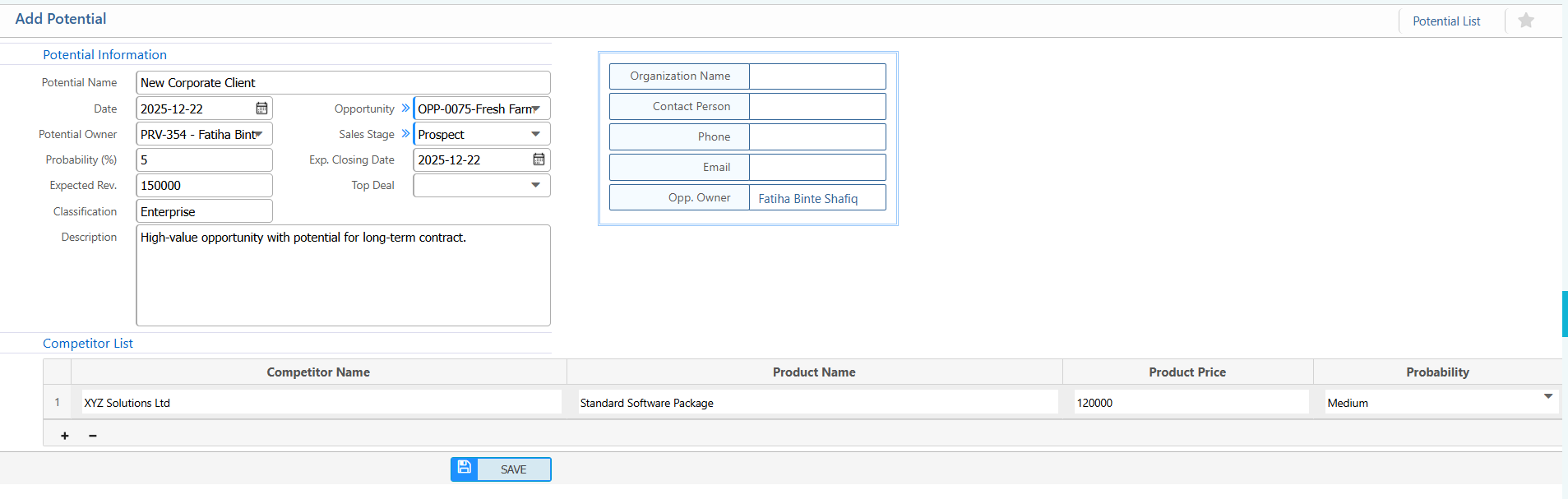
1. New Potential
Potential Information:
| Field | Description / Action |
|---|---|
| Potential Name | Enter the name of the potential or opportunity. |
| Date | Select the date when the potential was created. |
| Opportunity | Select the related opportunity for this potential. (if applicable) |
| Potential Owner | Assign the user responsible for managing this potential. |
| Sales Stage | Select the current sales stage of the potential. |
| Product | Select the product associated with this potential. |
| Probability (%) | Enter the probability of closing the deal in percentage. |
| Exp. Closing Date | Select the expected closing date for the potential. |
| Expected Rev. | Enter the expected revenue from this potential. |
| Top Deal | Mark if this is a top deal for tracking purposes. |
| Classification | Enter the classification or category of the potential. |
| Description | Enter additional notes or details about the potential. (if applicable) |
Competitor List:
| Field | Description / Action |
|---|---|
| Competitor Name | Enter the name of the competitor associated with this potential. |
| Product Name | Enter the competitor’s product name. |
| Product Price | Enter the competitor’s product price. |
| Probability | Select the probability of winning the deal against this competitor. |
2. List Of Potential
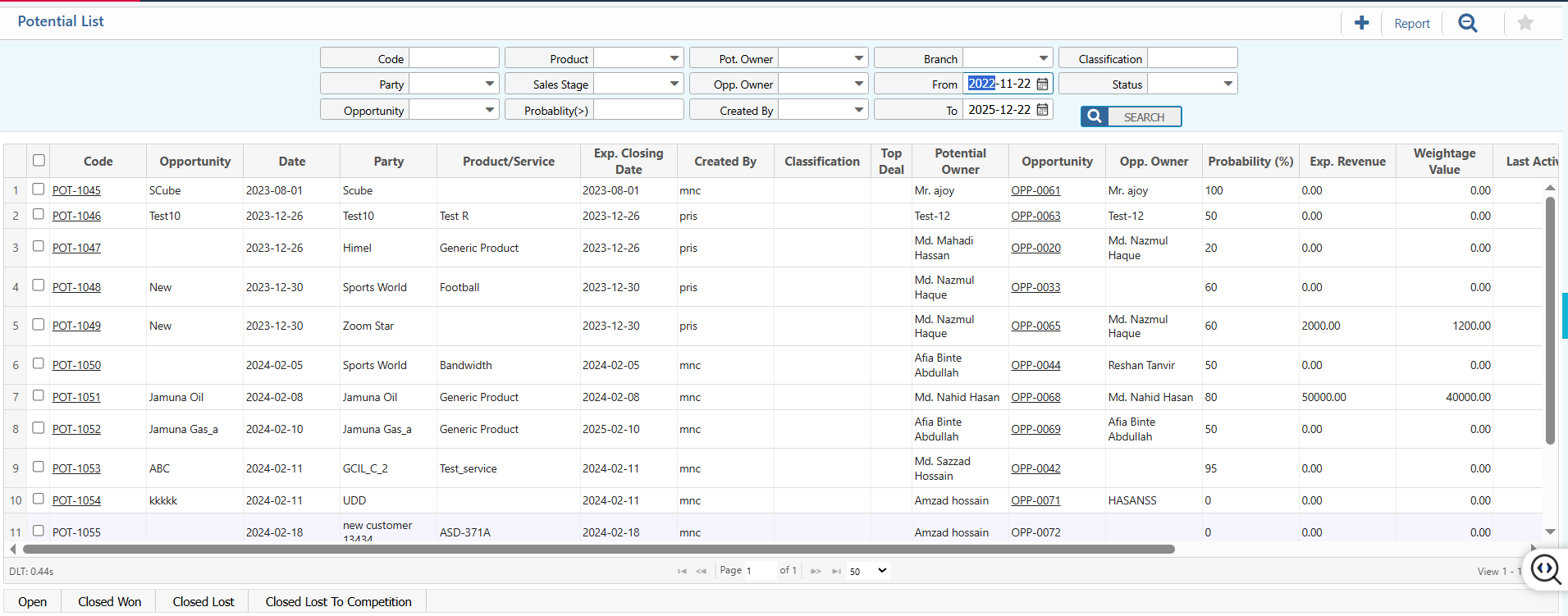
2.1 Search, Filter & Actions
| Field | Action |
|---|---|
| Code | Search potentials using the unique potential code. |
| Party | Filter potentials by the organization or customer name. |
| Opportunity | Filter potentials linked to a specific opportunity. |
| Product | Search potentials by associated product. |
| Sales Stage | Filter potentials based on the current sales stage (e.g., Qualification, Negotiation). |
| Probability (>) | Filter potentials with probability greater than a specified percentage. |
| Pot. Owner | Filter potentials by assigned potential owner. |
| Opp. Owner | Filter potentials by the opportunity owner. |
| Created By | Filter potentials based on the user who created the record. |
| Branch | View or filter potentials by branch or office. |
| From | Select the start date to filter potentials created from a specific date. |
| To | Select the end date to filter potentials created up to a specific date. |
| Classification | Filter potentials by classification or category (e.g., Enterprise, SMB). |
| Status | Filter potentials based on the current status and update status as needed. |
| Edit Potential | Edit and update potential details directly from the list view. |
2.2 Details View & Action
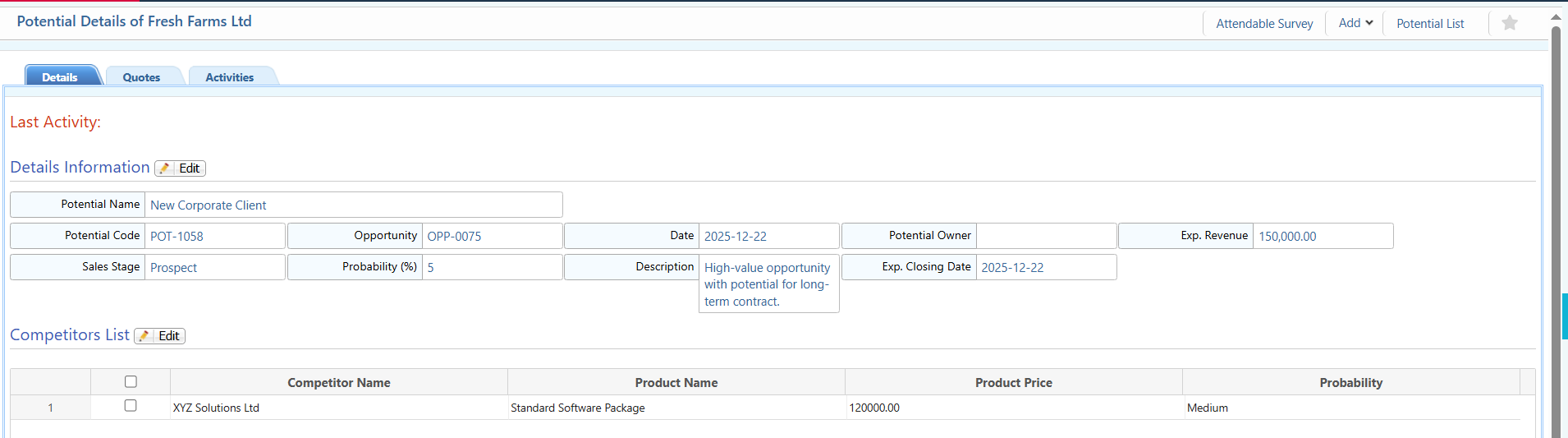
| Field | Action |
|---|---|
| Details | Access and edit detailed information of the potential. |
| Quotes | View and manage quotes linked to this potential. |
| Activities | Track and manage activities scheduled or performed for this potential. |
| Last Activity | View the most recent action performed on the potential. |
3. Potential List Report
| Field | Action |
|---|---|
| Report | Preview and Download Report in multiple formats. |