Survey
PrismERP enables efficient survey management, allowing users to create and schedule surveys with detailed information, budgets, and linked projects or campaigns. It supports adding question groups and queries, using templates for recurring surveys, and assigning surveys to target parties. Users can submit responses with ratings and remarks, search and filter surveys, and generate comprehensive response reports for analysis.
1. New Survey
Survey Information:
| Field | Action |
|---|---|
| Title | Enter the title of the survey. |
| Topic | Enter the main topic or subject of the survey. |
| Type | Select the type of survey (e.g., Feedback, Market Research). |
| Target Party | Enter the target party name. |
| Estimated Outcome | Enter the expected result or objective of the survey. |
| Budget | Enter the allocated budget for conducting the survey. |
| Campaign | Link the survey to an existing campaign, if applicable. |
| Survey Lead | Select the user responsible for leading the survey. |
| Assigned To | Select users who will conduct or participate in the survey. |
| Branch | Select the branch responsible for the survey. |
| Start Date | Select the start date of the survey. |
| End Date | Select the end date of the survey. |
| Project | Link the survey to a project, if applicable. |
| Description | Enter additional notes or description of the survey. |
Survey Question:
| Field | Action |
|---|---|
| Question | Enter the survey question text. |
| Question Type | Select the type of response (e.g., Short Answer, Multiple Choice). |
| Narration | Enter any explanatory notes or context for the question. |
| Delete | Remove a question from the survey. |
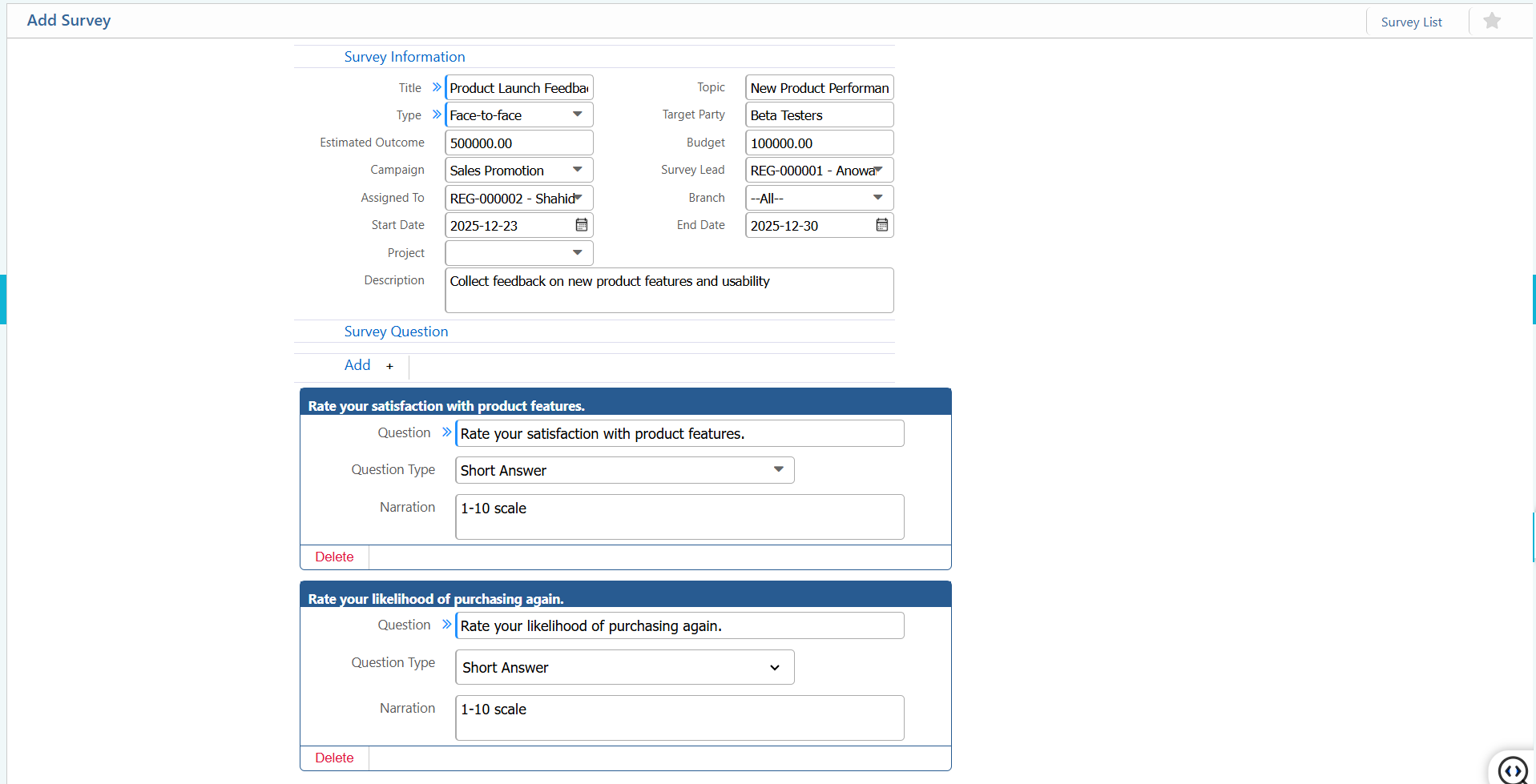
2. List of Survey
2.1 Survey List-Search, Filter & Action
| Field | Action |
|---|---|
| Survey | Filter by survey number. |
| Title | Search surveys by title. |
| Survey Number | Search by survey number. |
| Topic | Search by topic of survey. |
| Target Party | Search surveys by the organization, customer, or party targeted. |
| Branch | Filter surveys by branch or office. |
| Type | Filter surveys by type (e.g., Feedback, Market Research). |
| Assigned To | Filter surveys assigned to a specific user or team. |
| Project | Filter surveys linked to a specific project. |
| From | Select the start date to view surveys created from a specific date. |
| To | Select the end date to view surveys created up to a specific date. |
| Status | View the current status of the survey and update it as needed. |
| Edit | Edit and update survey information directly from the list view. |
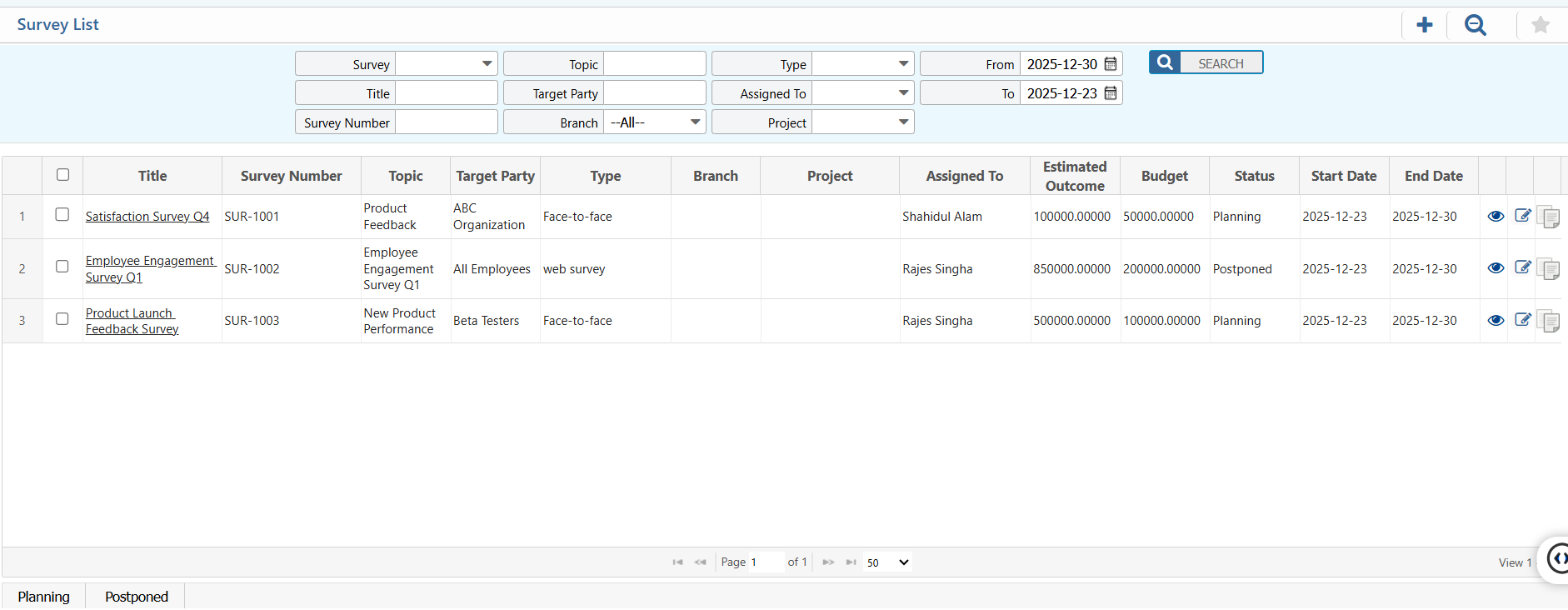
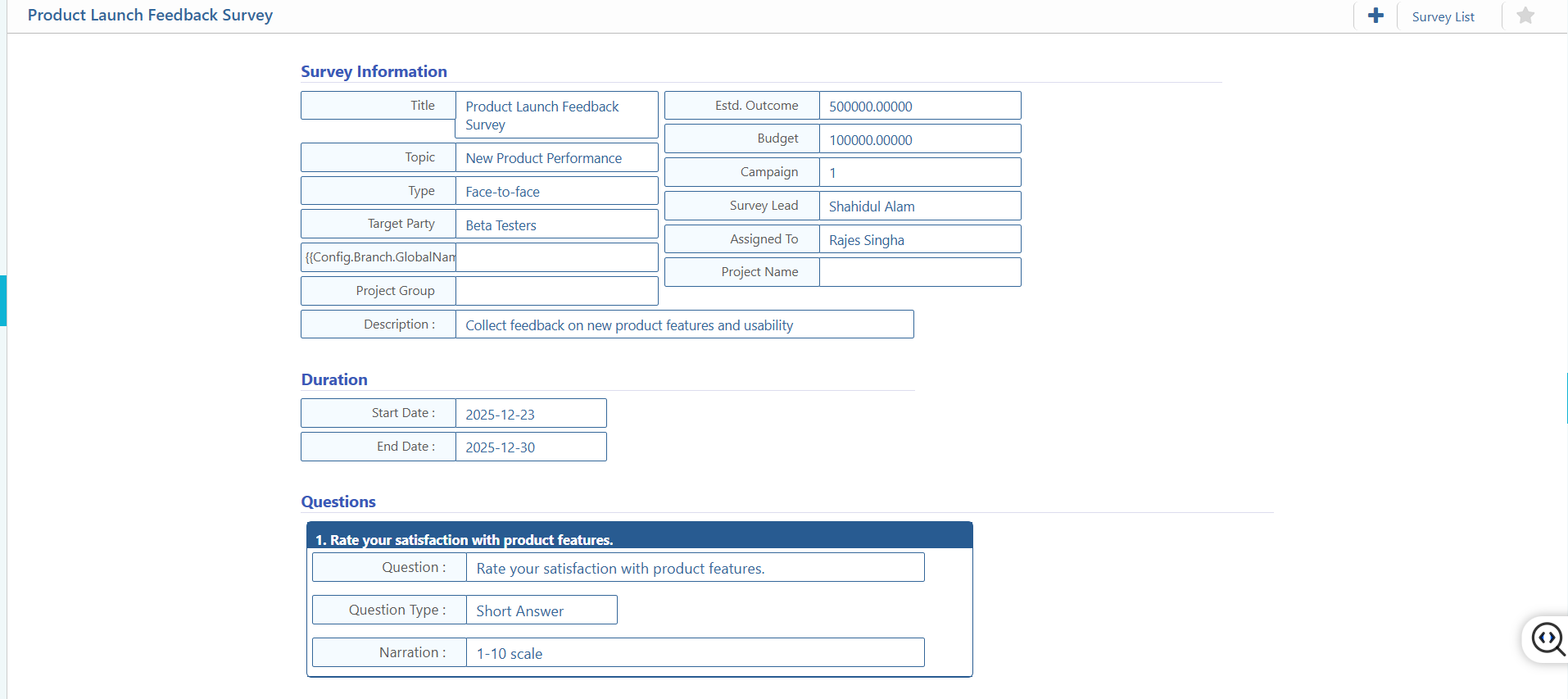
2.2 Survey List-Details View
| Field | Action |
|---|---|
| Basic Information | View all survey details, including title, topic, type, target party, project, duration and survey questions. |
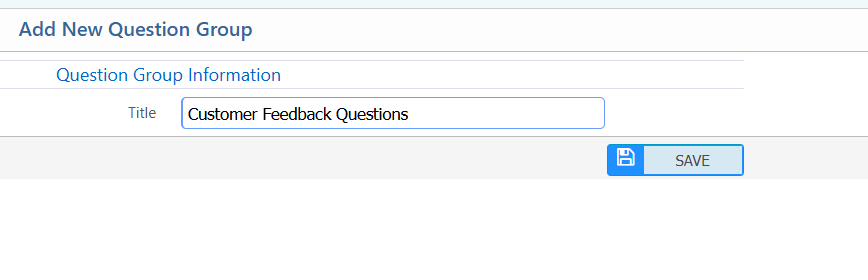
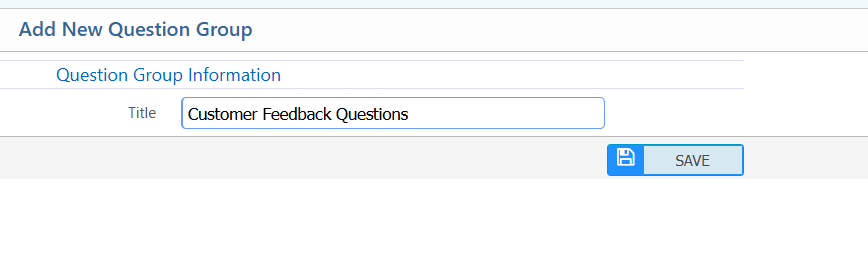
3. Add Question Group
| Field | Action |
|---|---|
| Title | Enter the title or name of the question group. |
4. Question Group List-Search & Action
| Field | Action |
|---|---|
| Title | Search by question group name. |
| Edit | Edit question group information directly from the list. |
5. Add Questions
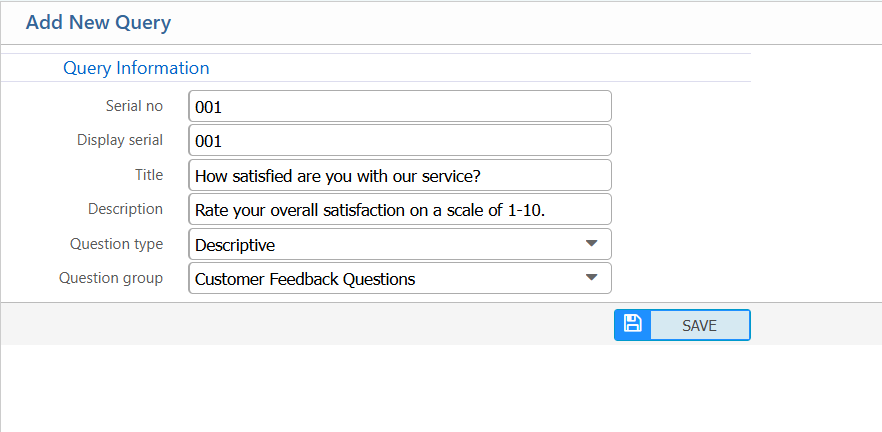
Query Information:
| Field | Action |
|---|---|
| Serial No | Enter a unique serial number for the query. |
| Display Serial | Enter the display order for the query in the survey or form. |
| Title | Enter the title or main text of the query. |
| Description | Enter additional details or context for the query. |
| Question Type | Select the type of question (e.g., Short Answer, Multiple Choice). |
| Question Group | Select the question group to which this query belongs. |
Actions:
| Field | Action |
|---|---|
| Add New Query | Create and save a new query. |
| Query List | View the list of all queries. |
6. Queries List-Search & Action
| Field | Action |
|---|---|
| Serial No | Search queries using their unique serial number. |
| Display Serial | Search queries by their display order. |
| Title | Search queries by title or main text. |
| Description | Search queries by description or additional details. |
| Question Type | Filter queries by question type |
| Question Group | Filter queries based on the question group they belong to. |
| Edit | Edit and update query information directly from the list view. |

7. Add Survey Template
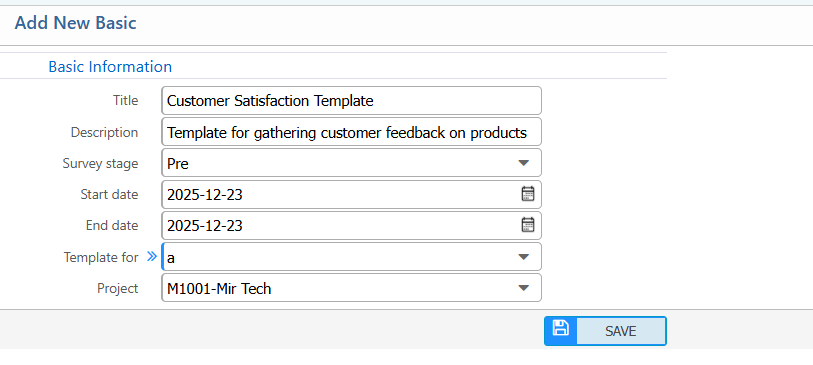
| Field | Action |
|---|---|
| Title | Enter the title or name of the survey template. |
| Description | Enter a brief description of the template. |
| Survey Stage | Select the current stage of the survey. |
| Start Date | Select the start date for the survey using this template. |
| End Date | Select the end date for the survey using this template. |
| Template For | Select the purpose or category for which this template is intended. |
| Project | Link the template to a specific project, if applicable. |
8. Survey Template List-Search & Actions
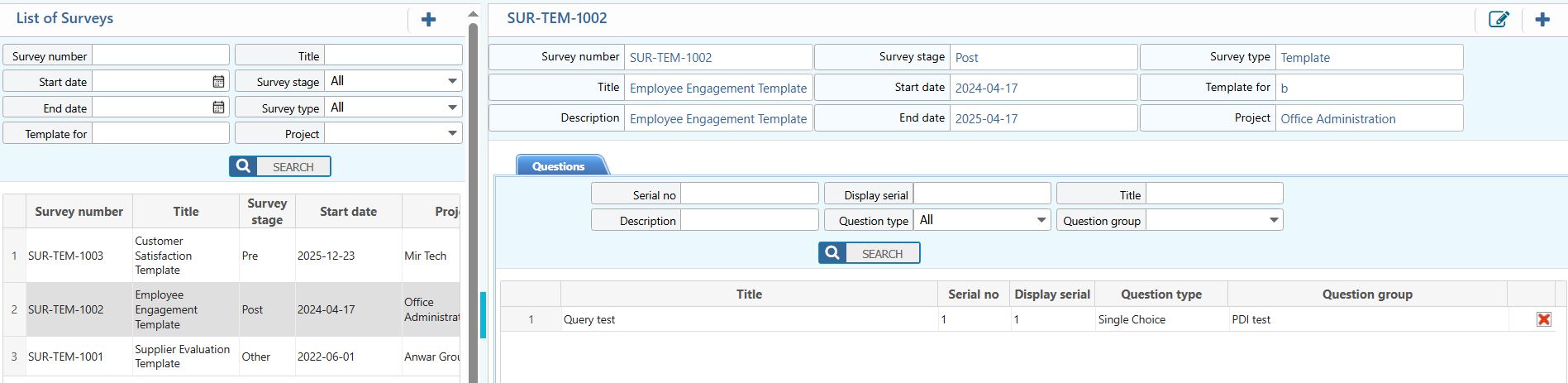
| Field | Description / Action |
|---|---|
| Survey Number | Search surveys using the unique survey number. |
| Title | Filter surveys by title or name. |
| Start Date | Select a start date to view surveys created or scheduled from that date. |
| End Date | Select an end date to view surveys up to a specific date. |
| Survey Stage | Filter surveys by stage (e.g., Planning, Ongoing, Completed). |
| Survey Type | Filter surveys based on type (e.g., Feedback, Market Research). |
| Template For | Search surveys based on the template purpose or category. |
| Project | Filter surveys linked to a specific project. |
| Edit | Edit and update survey information directly from the list view. |
9. Attend Survey
Your Information:
| Field | Action |
|---|---|
| Party | Select the organization or customer submitting the survey response. |
| Ref Survey | Select the related survey reference, if applicable. |
| Issue Type | Select the issue category related to the survey. |
| Issue | Enter the specific issue based on the selected issue type. |
| Remarks | Enter short remarks related to the survey response. |
| Description | Enter additional details or explanation related to the survey response. (if needed) |
Submit Your Opinion:
| Field | Action |
|---|---|
| Ratings | Enter you ratings for the survey. |
| Your Answer | Enter the response to the survey question. |
| Submit | Submit the completed survey response. |

10. Survey Response List
10.1 Survey Response List-Search & Filter
| Field | Action |
|---|---|
| Party | Filter survey responses by party name. |
| Branch | Filter survey responses by branch or office. |
| Survey | Filter responses by the related survey. |
| Res. Survey Number | Search survey responses using the response survey number. |
| Title | Search responses by survey title. |
| Rating | Search responses based on the given rating. |
| Created By | Search survey responses by the user who submitted or recorded the response. |
