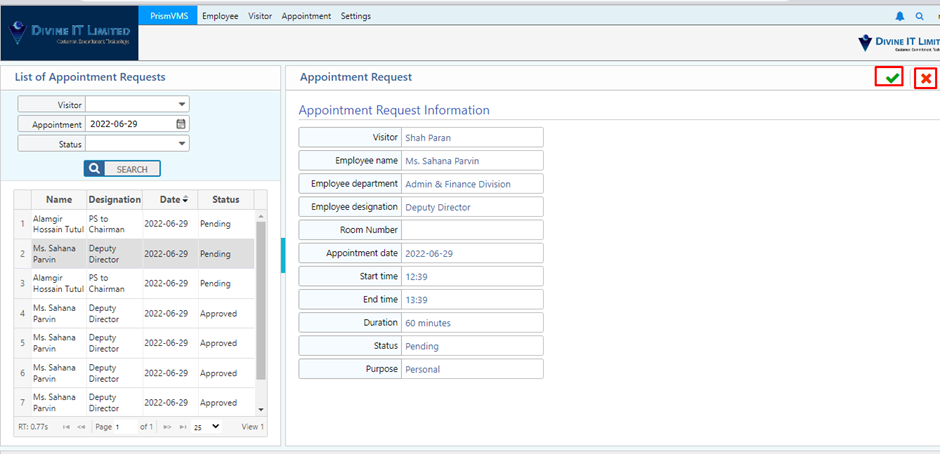
Authorize Appointment
The Authorize Appointment feature in PrismERP enables designated users (such as department heads, hosts, or security personnel) to review and approve or reject visitor appointment requests before confirming access. This ensures secure, scheduled, and controlled visitor flow into the organization by validating the purpose and legitimacy of each appointment.
Key Features
- Appointment Request Review Panel
- Approve / Reject Appointment Requests
- Automatic Notification to Requester and Host
- Pre-visit Validation (ID, Company, Purpose)
- Integration with Lobby-Free Appointment System
- Approval Timeline & Reminder Alerts
Use This Feature in PrismERP
Visitor submits an appointment request via:
- Lobby-Free Appointment Portal
- Company Website or Visitor portal
The request is routed to the designated approver based on department, host, or visitor type.
- Login to PrismERP as an approve or administrator.
- Navigate to Authorize Appointment
- View the list of pending appointments
- Click on each request to see:
- Visitor Name & Contact
- Date & Time of Appointment
- Purpose of Visit
- Host Details
- Supporting documents or notes
Choose to Approve or Reject:
- On approval: Visitor receives a confirmation
- On rejection: A message is sent explaining the reason
- The appointment is then visible in the Visitor Schedule and integrated with Visitor Check-in on the scheduled day.
Appointment Request:
Admin will be able to confirm or reject appointment requests if needed. Mostly this task will be done by the employee and his/her assigned employee (if available). By clicking the green button will confirm the appointment and clicking the red button will reject the request.