Employee Retirement
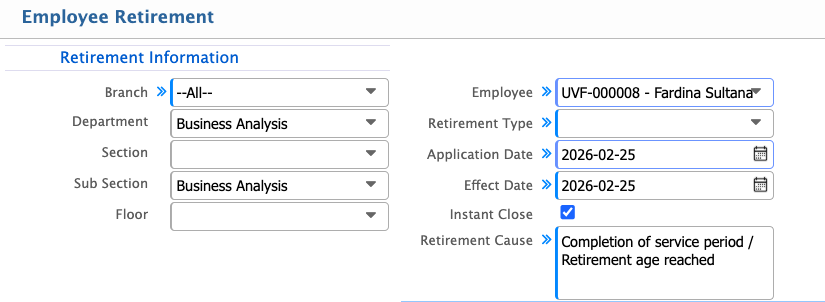
Employee Retirement allows users to manage retirement applications by entering details such as branch, sub-department, section, floor, employee, retirement type, application and effect dates, and the reason for retirement. Once submitted, the application can be processed, and the final settlement can be calculated automatically, ensuring all payables and deductions are accurately recorded in PrismERP.
| Field | Action |
|---|---|
| Branch | Select the branch of the employee. |
| Sub Department | Select the sub-department of the employee. |
| Section | Select the section where the employee works. |
| Floor | Select the floor where the employee is assigned. |
| Employee | Select the employee who is retiring. |
| Retirement Type | Select the type of retirement (e.g., normal, early, superannuation). |
| Application Date | Enter the date when the retirement application was submitted. |
| Effect Date | Enter the date when the retirement will take effect. |
| Instant Close | Select if the retirement should be processed immediately. |
| Retirement Cause | Enter the reason or circumstances for the retirement. |