Instant Release
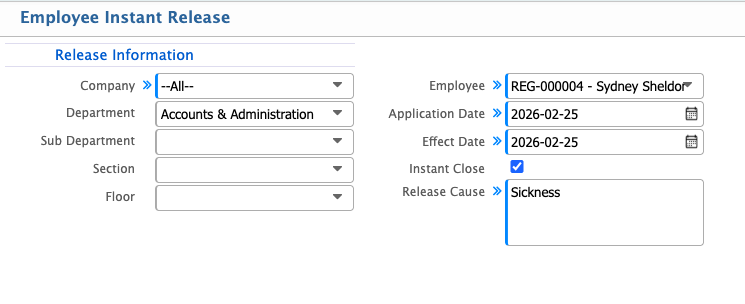
In PrismERP, Employee Instant Release lets users create and manage instant release applications by entering details like company, department, employee, application date, effect date, and release reason. Applications can be recommended, canceled, or rejected, and after approval, the final settlement can be processed with earnings and deductions automatically calculated. Users can view totals, add payments, rollback, approve, or reject settlements to complete the process.
| Field | Action |
|---|---|
| Company | Select the company for which the instant release is being processed. |
| Department | Select the department of the employee. |
| Sub Department | Select the sub-department of the employee. |
| Section | Select the section where the employee works. |
| Floor | Select the floor where the employee is assigned. |
| Employee | Select the employee to be released. |
| Application Date | Enter the date when the release application was submitted. |
| Effect Date | Enter the date when the release will take effect. |
| Instant Close | Select if the release should be processed immediately. |
| Release Cause | Enter the reason for the instant release. |
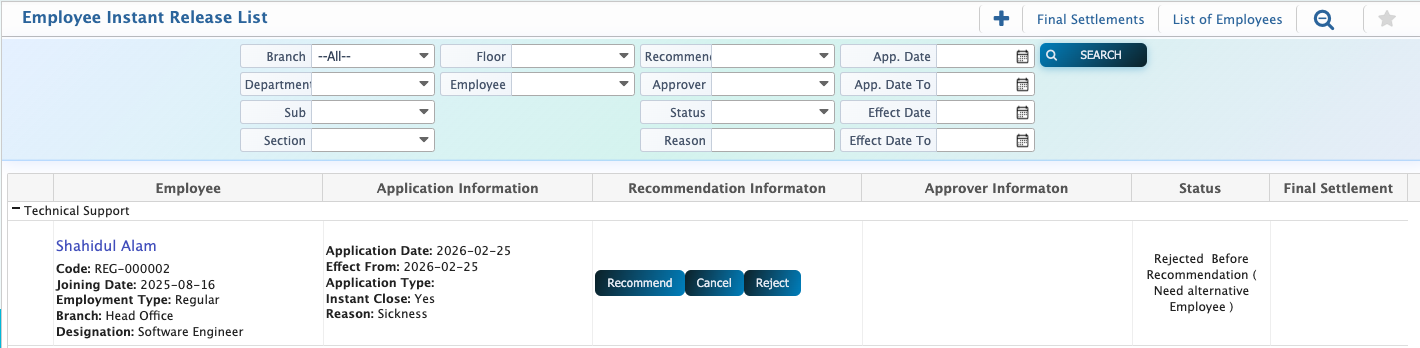
For Employee Instant Release, the same process as recommendations applies. Users can search and filter applications by company, department, sub-department, section, floor, employee, application date, effect date, and release cause. Once an application is selected, users can recommend, cancel, or reject it by clicking the corresponding button, which opens a pop-up window to complete the action. This ensures that instant release requests are handled accurately and efficiently. After an instant release is approved, the final settlement can be prepared by entering any additional amounts and deductions, with the system automatically calculating totals. Users can view total payable and receivable, add payments, rollback, approve, or reject the settlement to ensure accuracy.