Service Benefit
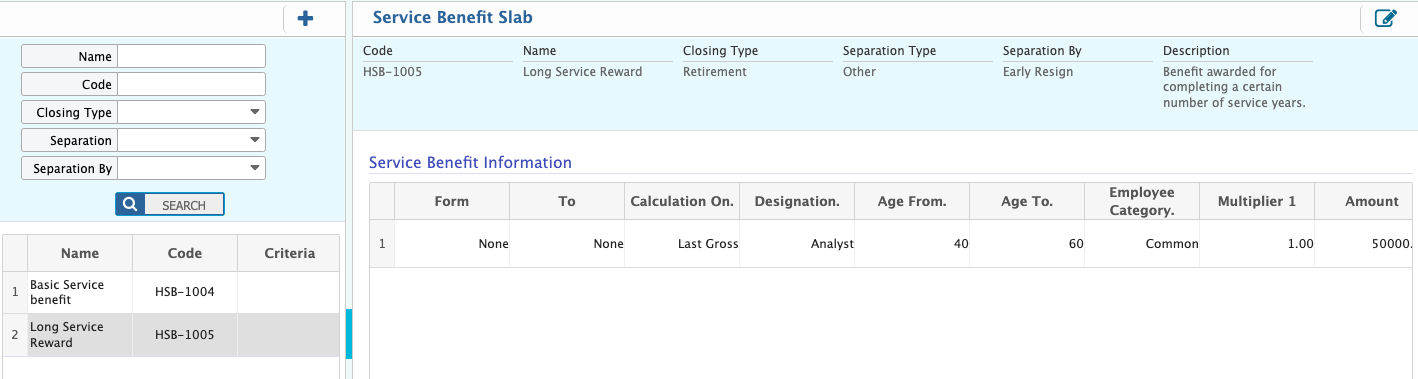
Service Benefit allows users to define and manage employee benefits based on separation type, years of service, designation, age, and other criteria. Users can enter details such as benefit name, applicable closing type, separation type, calculation basis, amount, and any multipliers or slabs. All service benefits can be viewed, filtered, edited, or added from the list and applied automatically during the employee’s final settlement in PrismERP.
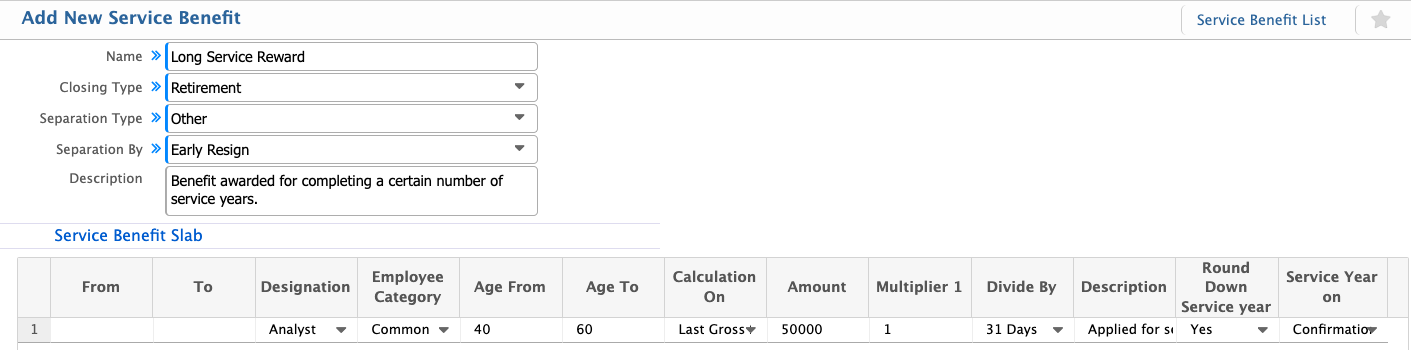
Add Service Benefit
| Field | Action |
|---|---|
| Name | Enter the name of the service benefit. |
| Closing Type | Select the type of closing the benefit applies to (e.g., resignation, termination, retirement). |
| Separation Type | Select the type of separation for which this benefit is applicable. |
| Separation By | Specify whether the separation is initiated by the employee or the employer. |
| Description | Enter a description or notes about the service benefit. |
| From | Enter the starting range for the slab (e.g., years of service, age). |
| To | Enter the ending range for the slab. |
| Designation | Select the designation(s) this slab applies to. |
| Employee Category | Select the employee category applicable for this benefit. |
| Age From | Enter the minimum age for eligibility. |
| Age To | Enter the maximum age for eligibility. |
| Calculation On | Specify the basis for calculation (e.g., basic salary, gross salary). |
| Amount | Enter the amount of benefit applicable. |
| Multiplier | Enter any multiplier to be applied in the calculation. |
| Divide By | Enter any divisor to be applied in the calculation. |
| Description | Enter additional notes or explanations for the slab. |
| Round Down Service Year | Select if the service year should be rounded down for calculation. |
| Service Year On | Specify the reference date or basis for calculating service years. |
Users can view all service benefits from the list and filter them by name, code, closing type, separation type, or separation by. From the list, users can also edit existing service benefits or add new ones. These service benefits can then be applied during the final settlement process for employees.