Employee Performance Appraisal
Functional KPI:
- Employee: Enter the employee’s name.
- Appraisal Form: Select the appraisal form.
- Rating System: Choose the rating system.
- KPI Details: Enter Strategic Pillar, Parameter, KRA, KPI, Timeline, Weightage, Type, Target, and Max Target.

Self Performance Appraisal
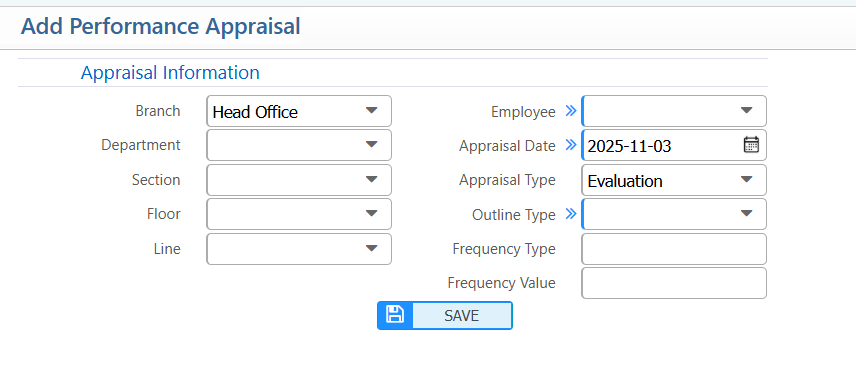
- Branch: Enter branch name
- Department: Enter department name
- Employee: Enter employee name
- Appraisal Date: Enter the appraisal date
- Appraisal Type: Enter evaluation type
- Outline Type: Enter outline type
- Frequency Type: Enter frequency type
- Frequency Value: Enter frequency value
Self Performance Scoring
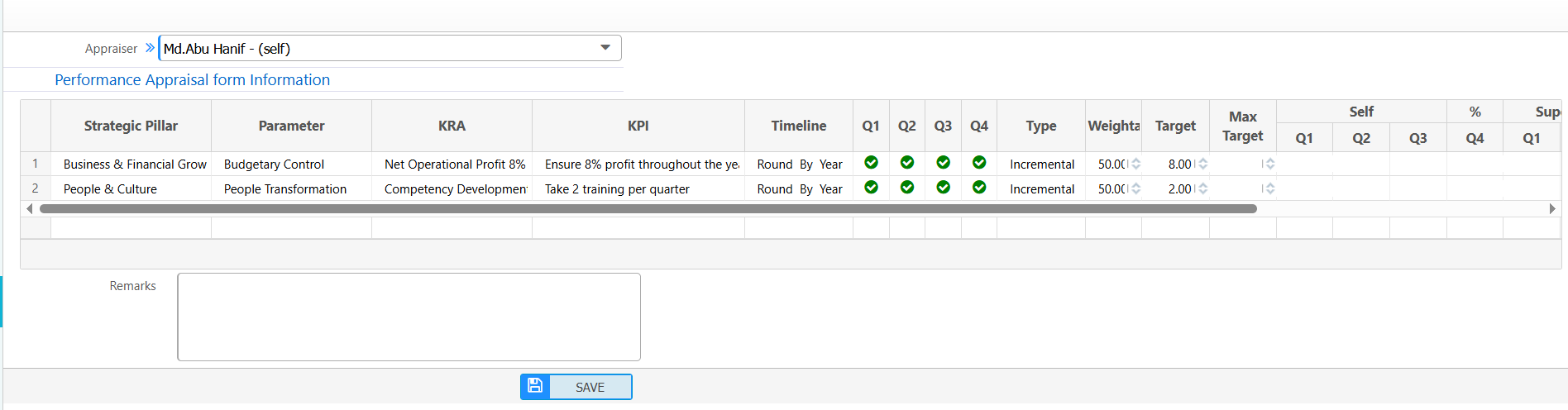
Users can enter self-assessment scores for their assigned KPIs.
- Strategic Pillar: Enter the main goal area (e.g., Business Growth).
- Parameter / KRA / KPI: Enter the specific goal or metric.
- Timeline / Quarter: Select the period the KPI applies to.
- Type: Enter KPI type (e.g., Quantitative, Incremental).
- Weightage: Enter how important this KPI is.
- Target / Max Target: Enter the expected achievement and maximum possible score.
- Self Score: Enter your score for each KPI.
- Submit: Save or submit the scores for supervisor review.
Assigned Appraisals for Score
Users can view all appraisals assigned to them and start entering their self-scores.