Product Category
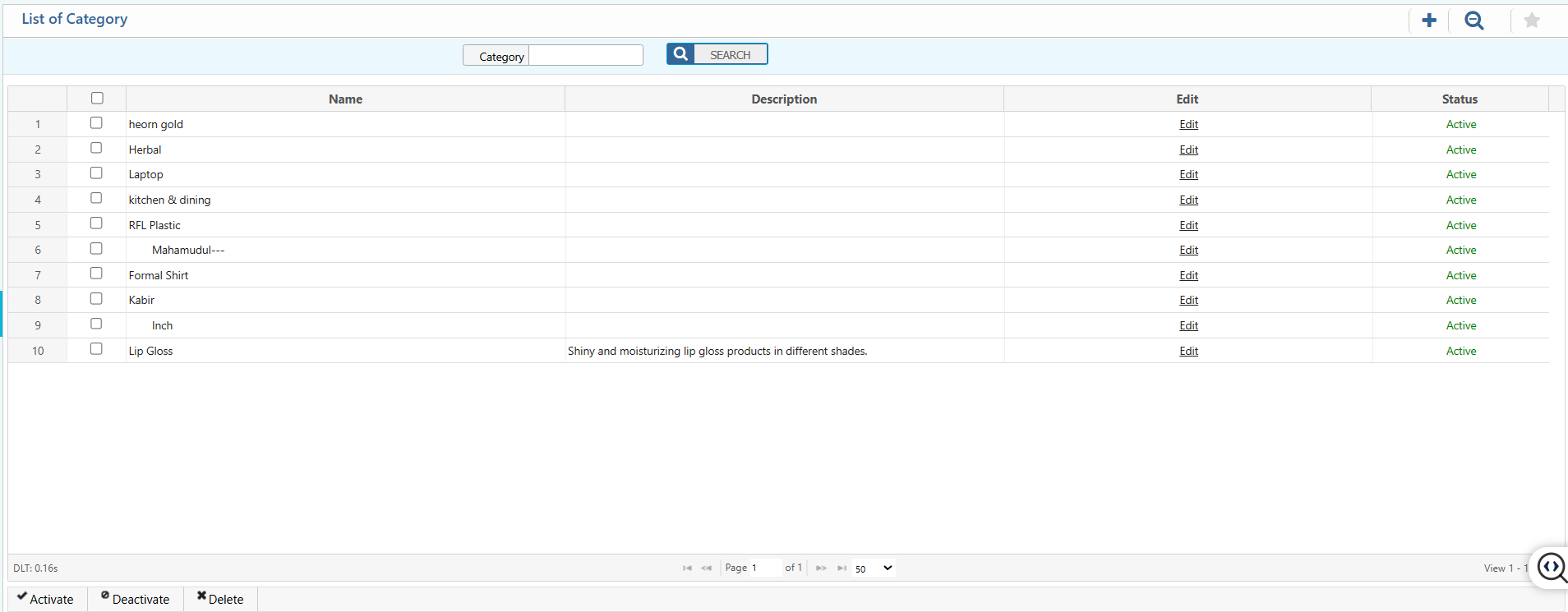
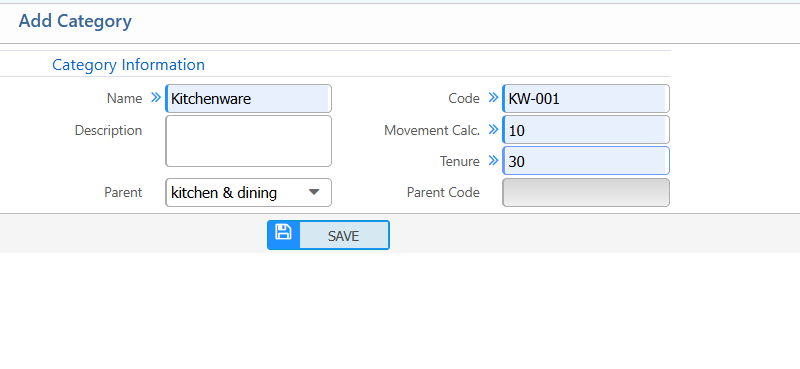
PrismERP’s Product Category allows users to create, manage, and organize product categories efficiently. Users can add new categories by entering details such as name, code, description, movement calculation, tenure, and parent category, ensuring products are grouped logically within the system. It also provides a search and filter function to quickly find categories by name. Users can view detailed information, including name, description, and current status, and edit or update category details to keep product data accurate and organized.
1. New Product Category
| Field | Action |
|---|---|
| Name | Enter the name of the category. |
| Code | Enter a unique code to identify the category. |
| Description | Provide a short description of the category. |
| Movement Calc. | Enter the movement calculation |
| Tenure | Enter the tenure (in days) for the category, if applicable. |
| Parent | Select the parent category, if this is a sub-category; leave blank if none. |
2. List of Product Category
2.1 Product Category Search,Action and Details
| Field | Action |
|---|---|
| Category | Search by category name. |
| Category Details | View all details information of category including name, description and status. |
| Edit | Edit and update the category information. |
| Status | View the current status of the category and update the status of category. |