Product Control Configuration
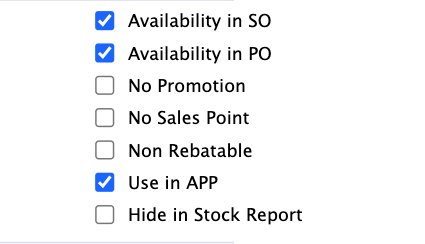
Product Control Configuration in PrismERP is used to control how a product behaves in different operational modules such as sales, purchase, stock, promotions, and reporting. It helps define where a product can be used and where it should be restricted based on business requirements.
| Field | Action |
|---|---|
| Availability in SO | Controls whether the product can be selected in Sales Orders. If disabled, the product will not appear during sales order entry. |
| Availability in PO | Controls whether the product can be selected in Purchase Orders. If disabled, the product cannot be added in purchase transactions. |
| No Promotion | Prevents the product from being included in promotional campaigns or discount offers. |
| No Sales Point | Restricts the product from being used in POS or sales point operations. |
| Non Rebatable | Defines whether the product is excluded from rebate or cashback calculations. |
| Use in APP | Controls whether the product is visible and usable in mobile or application-based interfaces. |
| Hide in Stock Report | Hides the product from stock reports to prevent it from appearing in inventory summaries. |