Product Group
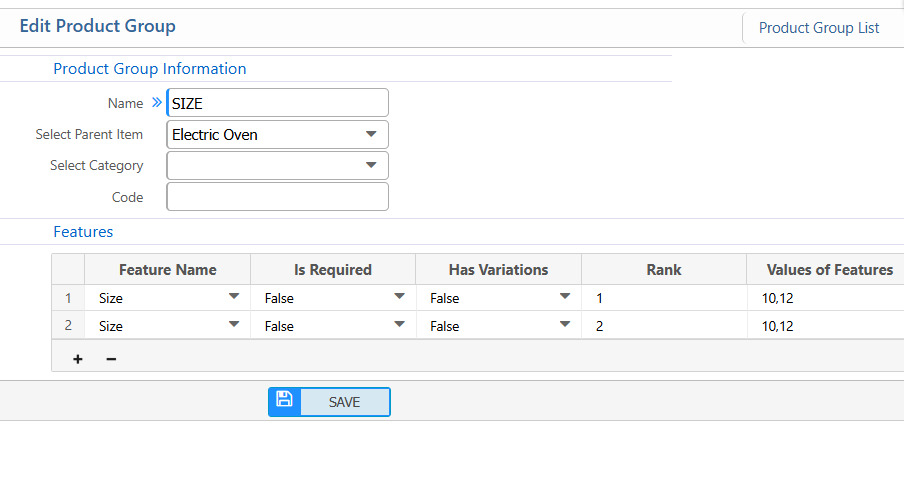
The Product Group feature in PrismERP allows users to create, manage, and organize groups of products efficiently. Users can add new product groups by specifying details such as name, parent item, category, code, and associated features. Each feature can be configured with settings like whether it is required, has variations, its rank, and possible values. It also provides a search and filter functionality to quickly locate product groups by item, name, or date range. Once found, users can view detailed information of each product group and edit or update its information as needed, ensuring accurate and up-to-date product management.
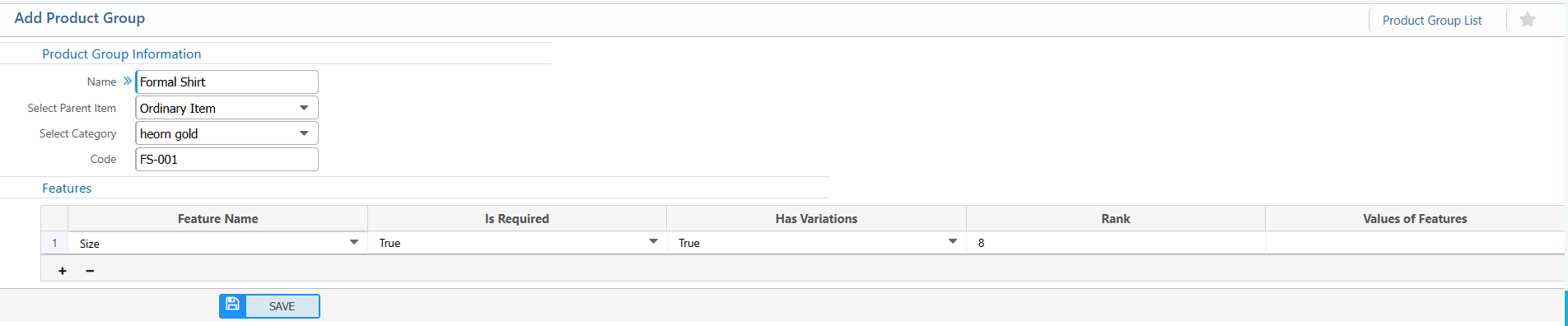
1. New Product Group
Product Group Information:
| Field | Action |
|---|---|
| Name | Enter the name of the product group. |
| Parent Item | Select the parent item under which the product group will be created. |
| Category | Select the category related to the product group. |
| Code | Enter a unique code to identify the product group. |
Features:
| Field | Action |
|---|---|
| Feature Name | Select a feature from the dropdown list (e.g., Expiration Date). |
| Is Required | Specify whether the feature is mandatory for products under this group (True / False). |
| Has Variations | Specify whether the feature supports variations (True / False). |
| Rank | Enter the rank of the features.(if applicable) |
| Values of Features | Enter values of the features (if applicable) |
2. List of Product Group
2.1 Product Group Search,Action & Details
| Field | Action |
|---|---|
| Item | Filter product groups by selecting an item from the list |
| Product Group | Search by product group name. |
| Date From | Filter product groups created or applicable from the selected start date |
| Date To | Filter product groups up to the selected end date. |
| Details View | View detailed information of the product group, including Item, Product Group Name, and Product Group Code. |
| Edit | Edit or update the product group information. |