Author Management
Author Management is a library module feature that allows institutions to maintain a centralized and structured database of authors whose books, articles, or publications are part of the library or academic repository. It supports easy cataloging, searchability, and proper attribution of all resources to their respective authors.
This is especially useful in academic institutions, research organizations, and public libraries that handle a wide range of literature from multiple authors.
Key Features
- Author Registration – Add and manage author profiles (name, bio, nationality, etc.)
- Link Books to Authors – Automatically associate books with respective authors
- Advanced Author Search – Search by name, genre, origin, or number of books
- Author Biography Management – Store short bios, photos, and academic background
- Edit/Update Author Info – Easily update details if needed
- Reports & Analytics – View author-wise book count, popular authors, etc.
- Duplicate Prevention – Avoid repeated entries for the same author
How to Use This Feature in PrismERP?
Add a New Author
- Click “Add New Author”
- Fill in fields: Name, Nationality, Biography, Specialization (optional), Photo
- Save the record
Link Authors to Books
- When entering or editing a book record, select the author from the dropdown
- If the author is not listed, you can create a new one directly from the book entry form
View and Edit Author Profiles
- Click on any author name to view profile and associated books
- Edit/update author information as needed
Generate Reports
- Use filters to generate author-wise reports
Author Management
Manage and store author details.
Adding a New Author
- Go to Add Author.
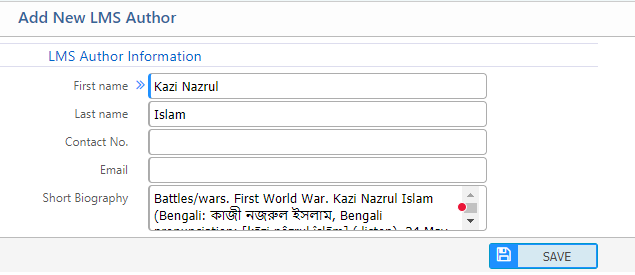
- Enter the following details:
- Name – Author's full name.
- Contact No. – Author's phone number.
- Short Biography – A brief introduction about the author.
- Click Save.
Author List
View and manage all registered authors.
- Navigate to Author List
