📊 Line Item-wise Tax
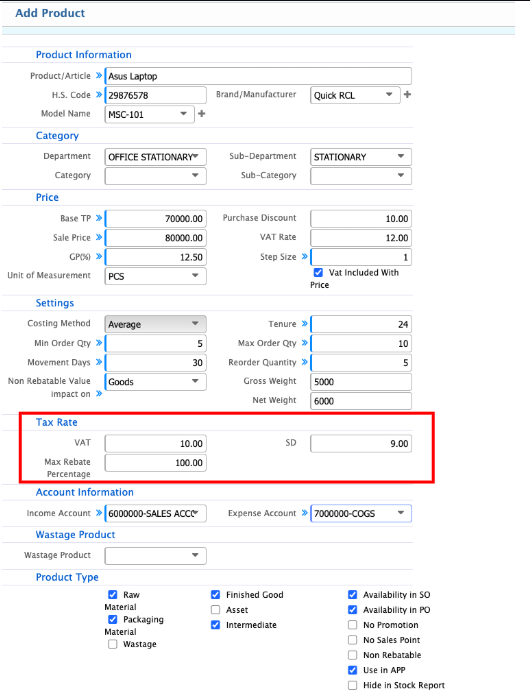
Line Item-wise Tax in PrismERP allows tax to be configured at the product level so that it is applied automatically during purchase and sales transactions. Each product can have a Purchase VAT (%), a Sale VAT (%), and a Max Rebate Percentage. Once these fields are configured, PrismERP calculates the tax for each product automatically when it is purchased from a vendor or sold to a customer. The tax is recorded in the appropriate ledger accounts without manual intervention, ensuring accurate accounting and reporting. Unlike VAT, the tax amount is generally not displayed on the invoice but is tracked in the system for accounting purposes.
Tax Configuration Steps
-
Purchase VAT (%): Enter the tax rate applicable when the product is purchased.
-
Sale VAT (%): Enter the tax rate applicable when the product is sold.
-
Max Rebate Percentage: Set the maximum discount allowed on the product while keeping the tax calculation accurate.
Once these fields are configured, the system uses them automatically for all future purchase and sales invoices involving the product. When a product with configured tax is included in a purchase or sales invoice, PrismERP calculates the tax for that line item based on the product’s Purchase or Sale VAT (%).