⚖️ VAT Calculation on Sales Invoices
VAT on Sales Invoice in PrismERP calculates the Value Added Tax for each product or service sold. Each product has a VAT rate assigned when it is created in the system. When a sales invoice is generated, PrismERP automatically calculates the VAT based on the product’s rate, the quantity sold, and the unit price, and posts it to the appropriate ledger account.
VAT Processing Steps
-
Assign VAT to Product: While creating a product in PrismERP, the applicable VAT rate is entered for that product. This rate is saved with the product and used for all future sales transactions.
-
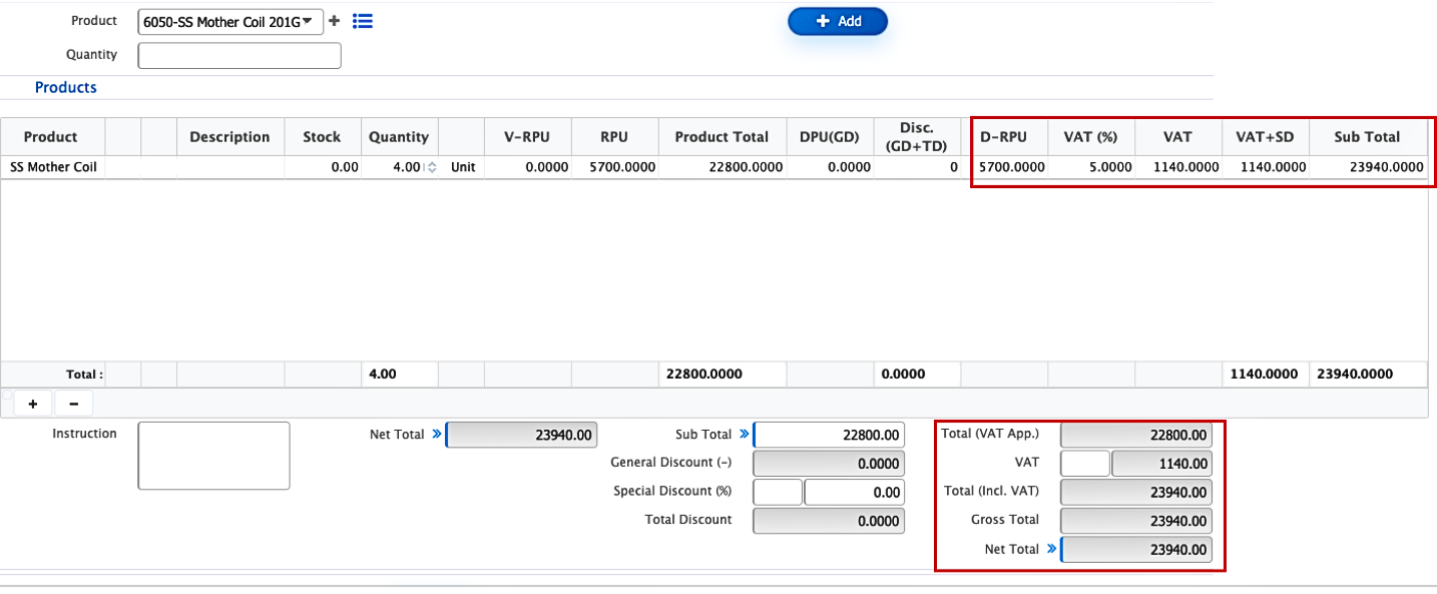
Create Sales Invoice: When a user creates a sales invoice, they select the product, enter the quantity, and set the unit price. PrismERP automatically calculates the VAT for the product based on the assigned rate.
-
Invoice Display: The invoice shows the net amount (quantity × unit price), the calculated VAT amount, and the total amount including VAT.
-
Ledger Posting: The VAT amount is automatically posted to the configured VAT or tax payable account in the ledger, while the net amount is recorded as revenue in the respective income account.