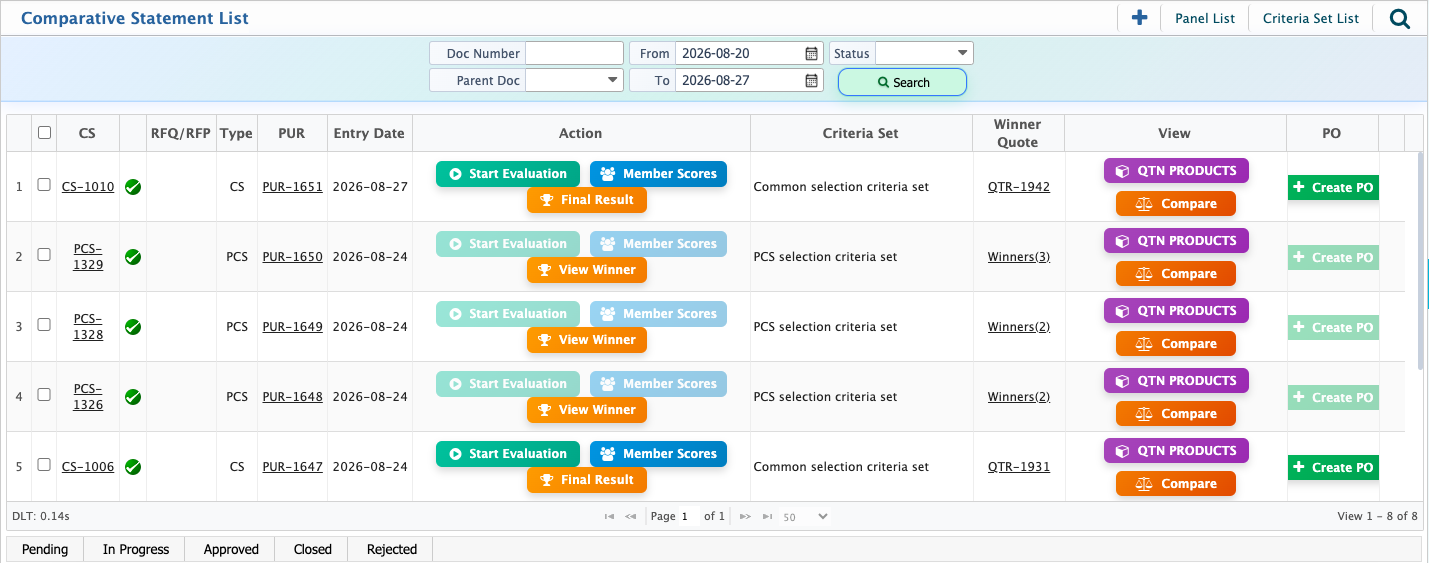
Quotation Comparison
The Quotation Comparison process in PrismERP helps evaluate quotations received from multiple vendors and select the most suitable one based on defined criteria. The process starts with a Purchase Request, followed by an RFQ, receiving vendor quotations, defining the evaluation criteria and panel, evaluating the quotations, and finally creating a Purchase Order for the selected vendor.
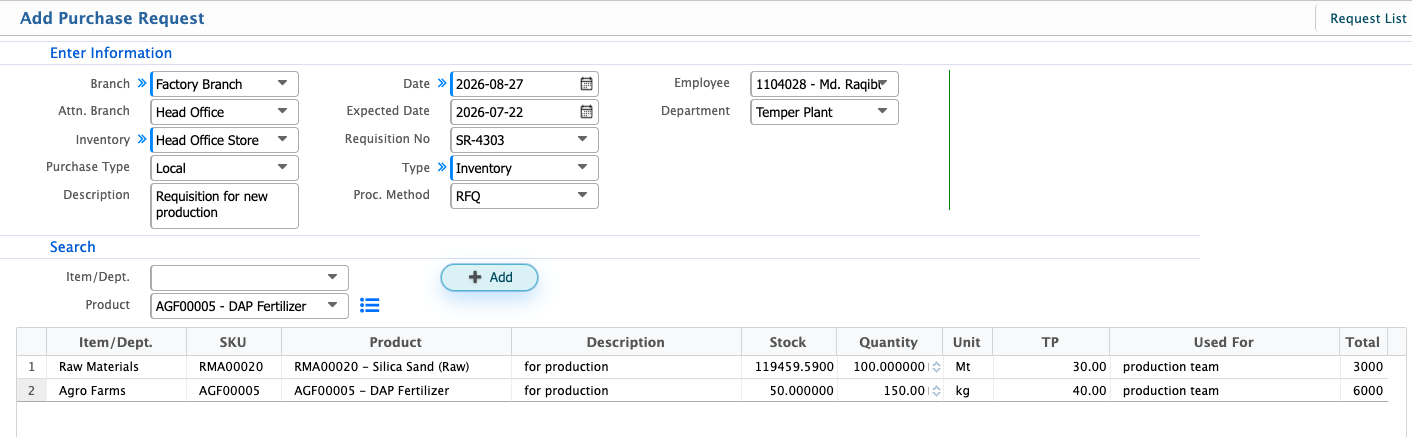
Add Purchase Request
The quotation comparison process starts with creating a Purchase Request for the products that need to be purchased. The request captures the basic purchase information along with the required products, quantities, and other details.For quotation comparison, select RFQ as the Proc. Method. The procurement method determines how the purchase will be handled:
- Direct Purchase: Used when the required product is purchased directly from a selected vendor without requesting quotations from multiple vendors.
- RFP (Request for Proposal): Used when vendors are asked to submit proposals that may include detailed solutions, terms, or approaches in addition to pricing.
- RFQ (Request for Quotation): Used when quotations are requested from multiple vendors for the required products. The received quotations can then be reviewed and compared to select the most suitable vendor.
Since the purpose here is to compare quotations from different vendors, select RFQ as the procurement method.
| Field | Action |
|---|---|
| Branch | Select the branch for which the purchase request is being created. |
| Attn. Branch | Select the branch responsible for handling the request. |
| Inventory | Select the inventory where the purchased items will be received or stored. |
| Purchase Type | Select the purchase type: Local, Foreign, EPZ, or DFD. |
| Description | Enter a description or additional information about the purchase request. |
| Date | Select the date of the purchase request. |
| Expected Date | Select the expected date by which the required items should be available. |
| Requisition No | Select the relevant requisition number, if applicable. |
| Type | Select Inventory or Asset based on the type of purchase. |
| Proc. Method | Select RFQ when quotations will be collected from multiple vendors for comparison. |
| Employee | Select the employee responsible for the purchase request. |
| Department | Select the department making the request. |
| Item/Dept. | Select the relevant item or department, if applicable. |
| Product | Select the product to be purchased. |
| Description | Enter any additional details about the product or requirement. |
| Stock | View the available stock of the selected product. |
| Quantity | Enter the required quantity. |
| Unit | Select the unit of measurement for the product. |
| TP | Enter the applicable price, if required. |
| Used For | Specify the purpose for which the product will be used. |
| Total | View the total calculated for the product based on the entered quantity and price. |
Add Request for Quotation
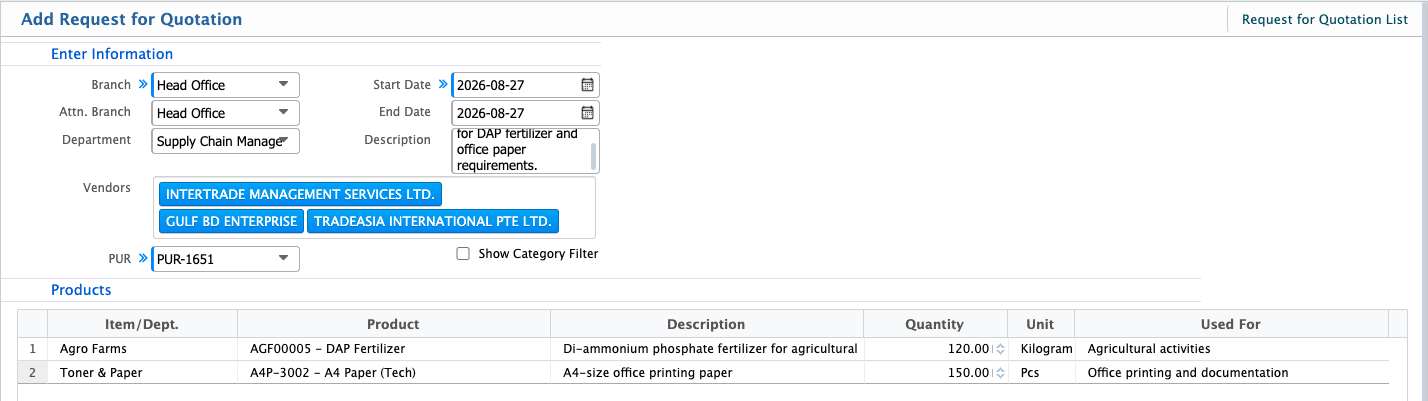
Once the Purchase Request has been created and approved, the next step is to create a Request for Quotation (RFQ). An RFQ is used to request prices and other relevant details from selected vendors for the products listed in the purchase request.
| Field | Action |
|---|---|
| Branch | Select the branch for which the quotation is being requested. |
| Attn. Branch | Select the branch responsible for handling the quotation request. |
| Department | Select the department requesting the quotation. |
| Start Date | Select the date from which the quotation request is valid. |
| End Date | Select the deadline by which vendors should submit their quotations. |
| Description | Enter any additional information or instructions related to the quotation request. |
| Vendors | Select the vendors from whom quotations will be requested. Multiple vendors can be selected so their quotations can later be compared. |
| PUR | Select the relevant Purchase Request from the available requests. The products from the selected purchase request can then be added to the RFQ. |
| Item/Dept. | Select the relevant item or department, if applicable. |
| Product | Select the product for which the quotation is being requested. |
| Description | Enter any additional details or specifications for the product. |
| Quantity | Enter the quantity required from the vendor. |
| Unit | Select the unit of measurement for the product. |
| Used For | Specify the purpose for which the product will be used. |
After entering the required information and adding the products, save the Request for Quotation and approve it. The RFQ can then be used to collect quotations from the selected vendors for the quotation comparison process.
Receive Quotation
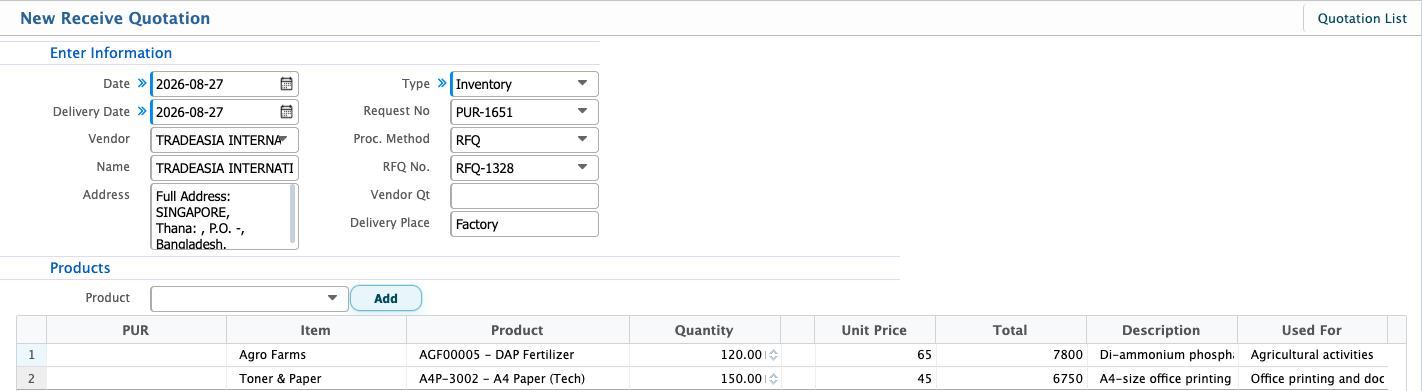
After creating the Request for Quotation (RFQ) and sending it to the selected vendors, the vendors' quotations can be recorded in Receive Quotation.When creating a quotation, the system will only show the vendors that were included in the selected RFQ. This ensures that quotations are recorded only against the vendors who were originally invited to submit their offers.Select the relevant Request No. and RFQ No. to load the products from the request. Enter the vendor's quoted prices, delivery information, and other relevant details before saving the quotation.
| Field | Action |
|---|---|
| Date | Select the date on which the quotation was received. |
| Delivery Date | Select the expected delivery date provided by the vendor. |
| Vendor | Select the vendor that submitted the quotation. The system will only display vendors that were included in the selected RFQ. |
| Type | Select Inventory or Asset based on the type of purchase. |
| Request No | Select the relevant Purchase Request. |
| RFQ No. | Select the relevant RFQ number. |
| Vendor Qt | Enter the quotation or reference number provided by the vendor. |
| Delivery Place | Enter the location where the products should be delivered. |
| Unit Price | Enter the price quoted by the vendor for each unit. |
Selection Criteria and Selection Criteria Set
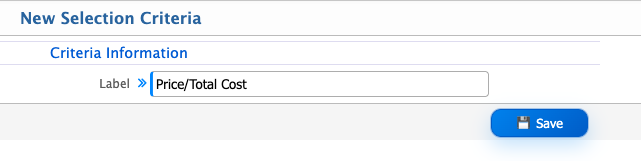
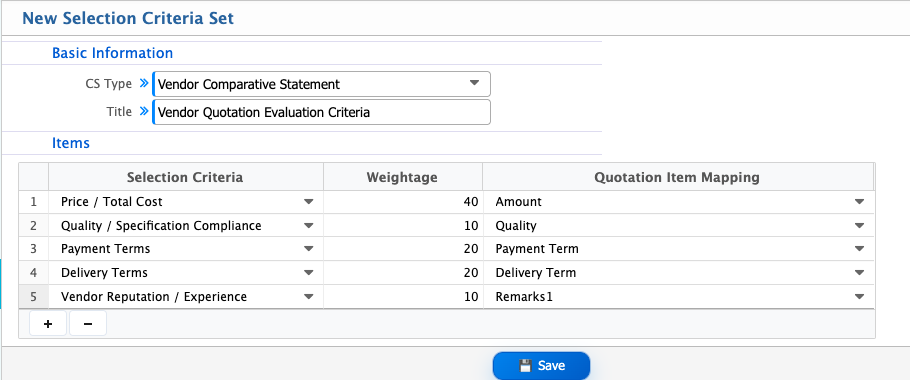
Once quotations have been added for the vendors included in the RFQ and the quotations have been approved, the next step is to define the Selection Criteria for quotation comparison.A Selection Criteria is an individual factor used to evaluate and compare quotations. Criteria can include Price / Total Cost, Delivery Time / Lead Time, Quality / Specification Compliance, Payment Terms**, or Vendor Reputation / Experience**. Each criterion can be given a Weightage according to its importance in the evaluation.A Selection Criteria Set is a collection of selection criteria grouped together for a particular type of comparison. The criteria set can then be used during quotation comparison to evaluate the approved quotations consistently and support the vendor selection process.
Add Selection Criteria
| Field | Action |
|---|---|
| Label | Enter a label for the selection criteria. |
Add Selection Criteria Set
| Field | Action |
|---|---|
| CS Type | Select the type of comparative statement to be used for the evaluation. |
| Title | Enter the title of the selection criteria set. |
| Selection Criteria | Select the factor that will be used to evaluate the quotation. |
| Weightage | Enter the weightage assigned to the selected criterion based on its importance in the evaluation. |
| Quotation Item Mapping | Map the selection criterion to the relevant quotation field used for evaluation. |
CS Evaluation Panel
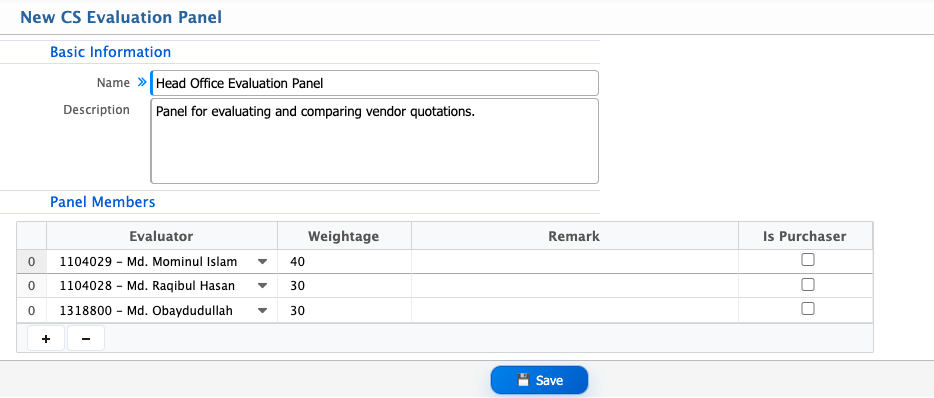
A CS Evaluation Panel defines the group of employees who will evaluate the quotations during the quotation comparison process. Instead of relying on a single person, multiple evaluators can be assigned to review the quotations based on the defined selection criteria.
| Field | Action |
|---|---|
| Name | Enter a name for the evaluation panel. |
| Description | Enter a brief description of the evaluation panel and its purpose. |
| Evaluator | Select the employee who will evaluate the quotations. |
| Weightage | Enter the weightage assigned to the evaluator's assessment. |
| Remark | Enter any relevant remark or note about the evaluator's role. |
| Is Purchaser | Select this option if the evaluator is the purchaser responsible for the procurement. |
Comparative Statement
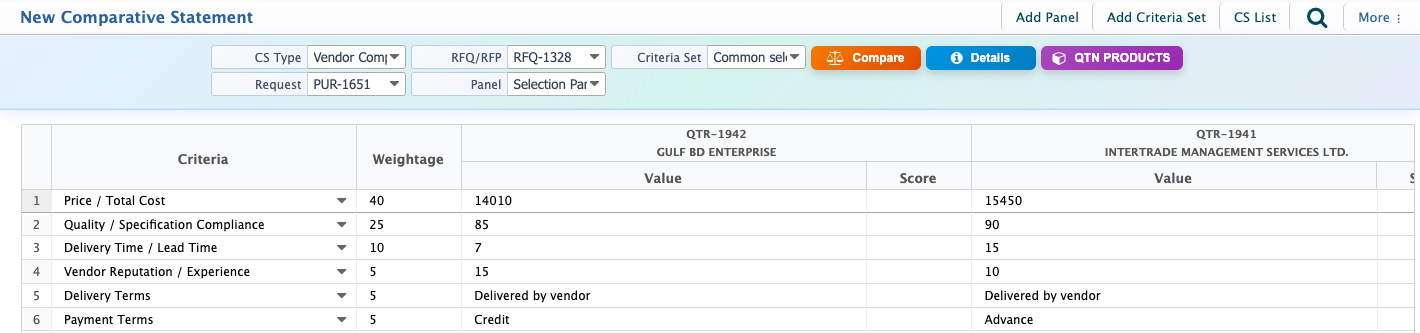
After the quotations have been added and approved, the Comparative Statement (CS) is used to evaluate and compare the quotations received from different vendors. It brings the quotation information together with the selected Selection Criteria Set** and Evaluation Panel, allowing the quotations to be reviewed and scored in a structured way.Before creating the Comparative Statement, select the appropriate CS Type based on what needs to be evaluated. PrismERP provides several types of Comparative Statements:
- Vendor Comparative Statement (VCS): Used to compare different vendors based on criteria such as price, payment terms, delivery time, quality, and vendor experience. VCS is the most commonly used type** when the goal is to evaluate and select the best vendor from multiple quotations.
- Product Comparative Statement (PCS): Used to compare products or product-level quotation details, particularly when the evaluation needs to focus on individual products rather than vendors as a whole.
- Technical Evaluation Statement (TES): Used to evaluate quotations based on technical requirements, specifications, and technical compliance.
- Financial Evaluation Statement (FES): Used to evaluate quotations primarily from a financial perspective, such as pricing and other cost-related factors.
- Cumulative Comparative Statement (CCS): Used to combine different evaluation aspects into an overall comparison, providing a cumulative view of the evaluation results.
For a standard quotation comparison where multiple vendors have submitted quotations for the same purchase request, Vendor Comparative Statement (VCS) is generally the most appropriate choice.
| Field | Action |
|---|---|
| CS Type | Select the appropriate type of Comparative Statement. For standard vendor quotation comparison, selecVendor Comparative Statement. |
| Request | Select the Purchase Request for which the quotations need to be compared. |
| RFQ/RFP | Select the relevant RFQ or RFP associated with the purchase request. |
| Panel | Select the evaluation panel responsible for reviewing and scoring the quotations. |
| Criteria Set | Select the Selection Criteria Set that will be used for the evaluation. |
| Value | Enter the value offered by each vendor against the selected criterion. |
| Details | Review the quotation and product details included in the comparison. |
Evaluation
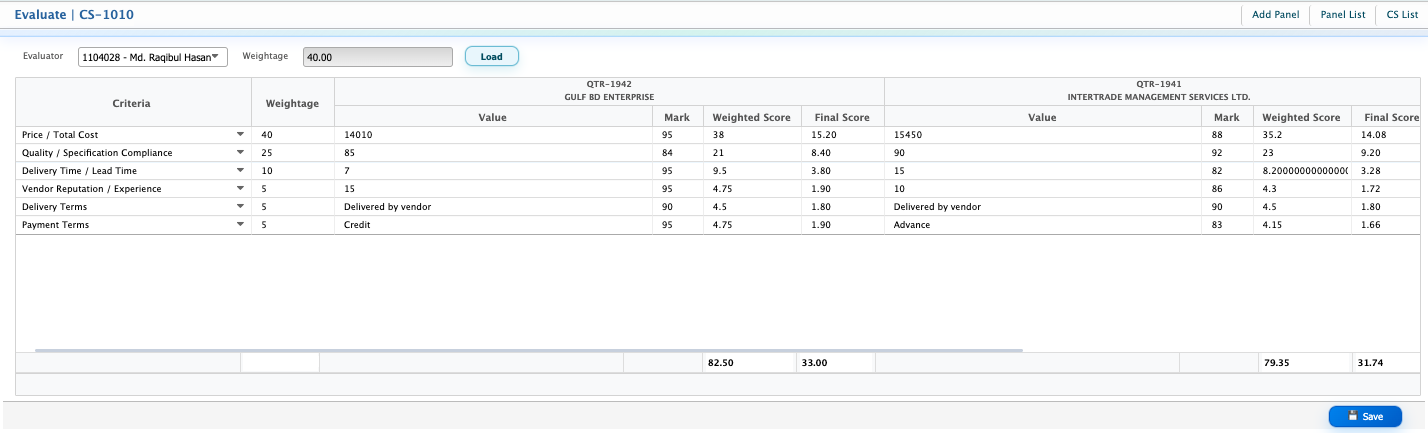
Once the values for each vendor have been entered, the next step is to evaluate the quotations. The evaluator reviews each criterion and assigns a score based on the defined evaluation scale.First, select the Evaluator from the evaluation panel. The evaluator's assigned Weightage determines how much their assessment contributes to the final evaluation score. The evaluator can then enter a score for each criterion based on the value provided by the vendor.The score must follow the scale defined for the evaluation, with 100 as the highest allowed score. Once the evaluation is completed, the system calculates the final score according to the evaluator's weightage.
Final Result
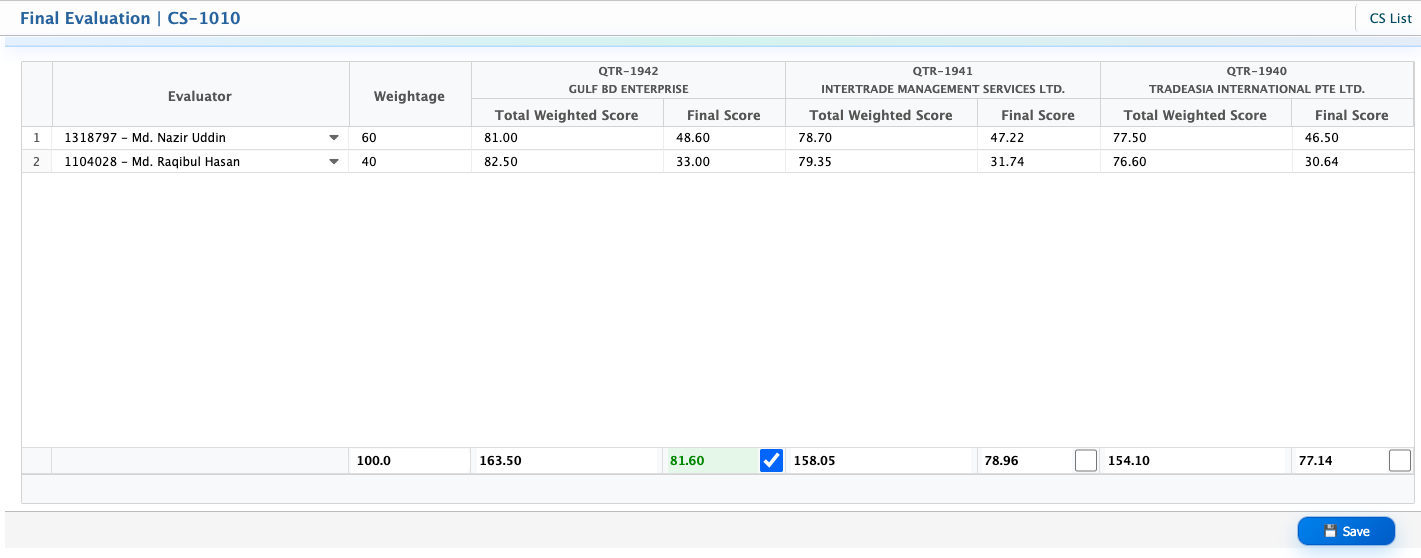
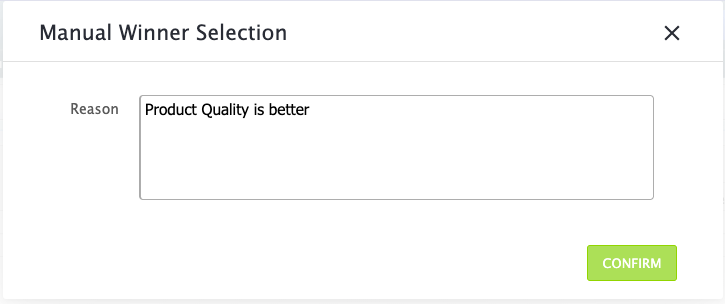
If the evaluation panel has multiple evaluators, the evaluation is completed separately by each evaluator. Select an evaluator, review the criteria, and enter the appropriate score for each vendor. Repeat the same process for all evaluators assigned to the panel.Once all evaluators have completed their evaluations, the system calculates the final scores based on the weightage assigned to each evaluator. The quotation with the highest final score is automatically selected as the winner.If the evaluator or authorized user wants to select a different quotation instead, the winner can be selected manually by providing a remark explaining the reason for the selection.
Create Purchase Order
After the winner has been declared, approve the Comparative Statement to finalize the quotation comparison.Once the comparison is approved, the system provides an option to create a Purchase Order (PO) directly from the Comparative Statement.The Purchase Order is created for the selected winning vendor, allowing the purchase process to continue without manually entering the quotation and vendor details again. The generated PO can then be reviewed and sent directly to the winning vendor.