Fleet Services
Fleet Services in PrismERP helps organizations schedule, manage, and track all maintenance and servicing activities for their vehicle fleets. It ensures timely upkeep of fleets through automated service schedules, status tracking, and comprehensive service records. This module supports operational efficiency and prolongs fleet lifespan by preventing missed maintenance.
Key Features
- Add and manage different types of fleet services.
- Automatically repeat scheduled services based on defined intervals.
- View and filter all scheduled services in list views.
- Track service status including ongoing, pending, and completed.
- Edit and modify service details easily from list views.
- Manage ongoing fleet services with real-time status updates.
Add Fleet Services
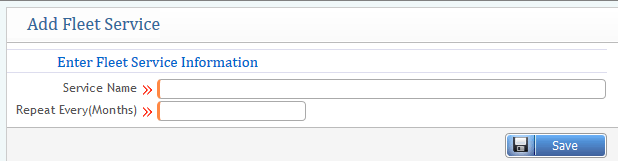
Type of Service you want for using the Fleet.
Feature Includes
- Service Name: The name or description of the service being scheduled for the fleet.
- Repeat Every (Months): Specifies how often the service should be automatically repeated. You can set the number of months after which the service will be automatically scheduled again, ensuring that regular maintenance or services are not overlooked.
2) Fleet Service List
Shows a list of all Fleet services in a list page view.
Features
- Track all services: View details of all scheduled services for each fleet.
- Check the status: Monitor the current status of services, such as active or inactive.
- Take action: Edit service details or change the service status (activate or deactivate) directly from the list page.

3) Add Service Schedule
Service Schedule defines the schedule when the service will be added as an assignment to a particular fleet.
Interface Includes
From the window, you need to fill up some information to add a new service schedule to a specific fleet:
- Service Assignment: Schedule services for a particular fleet to ensure timely maintenance.
- Ease of Management: The application provides a user-friendly interface to manage and update service schedules effortlessly.
- Select Fleet: Choose the fleet by providing the fleet number to assign the service.
- Select Service: Specify the type of service you want to include in the fleet's schedule.
- Entry Date: Date the entry is assigned
- Due Date: Due date for the service schedule
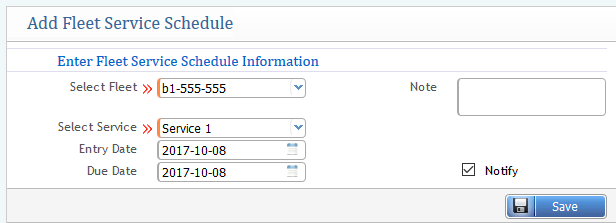
This straightforward process ensures accurate scheduling and tracking of fleet services, maintaining efficiency and operational readiness.
4) Service Schedule List:
The Fleet Service Schedule feature displays all scheduled services for a fleet in a list page view. This provides a clear and organized overview of all assigned service schedules. Key functionalities include:
Search Filter:
Easily locate specific service schedules using filters such as:
- Fleet Number: Search by the specific fleet's identification number.
- Name of Service: Filter by the type of service scheduled.
- From and To Date: Search within a specific date range for scheduled services.

The Fleet Service Schedule List offers comprehensive tracking and management of service schedules. Key functionalities include:
Fleet Details:
- View all fleet numbers alongside their corresponding service names and entry dates.
Service Status:
Check the status of each scheduled service, such as:
- On Service: The service is currently in progress.
- Pending: The service is scheduled but not yet started.
- Completed: The service has been successfully finished.
Actionable Controls:
Users can take actions directly from the list, such as:
- Change Status: Update the status of a scheduled service.
- Edit/Modify: Make changes to the service details, such as rescheduling or updating fleet/service information.
5) On Service Fleet List:
The Ongoing Fleet Services feature provides a detailed view of all fleet services that are currently in progress. Key functionalities include:
Ongoing Services List:
- Displays all services for fleets marked as "On Service."
Search Filter:
Allows users to search for specific services or fleets using parameters such as:
- Service Name: Locate a particular type of service.
- Fleet Number: Find ongoing services for a specific fleet.
Actionable Controls:
Users can:
- Take Actions: Update the status of ongoing services.
- Edit Details: Modify or update service information as needed.
