Budget Comparison
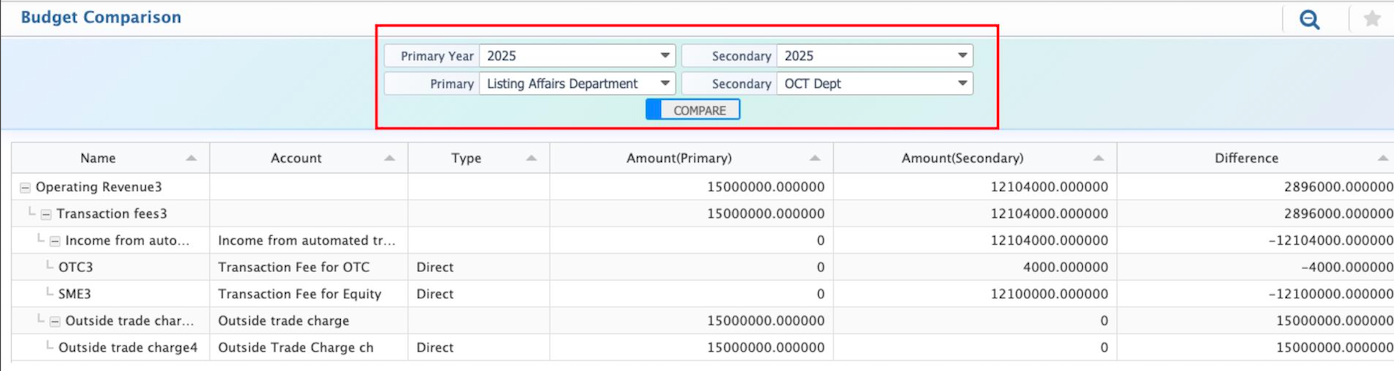
The Budget Comparison feature allows users to review two budgets side by side. It shows how amounts are allocated in each budget and highlights the differences between them. This makes it easier to understand changes in allocation across accounts, departments, or categories.
Users first select one budget as the Primary Budget and another as the Secondary Budget. The comparison can be done within the same year or between different years, depending on the requirement. Once selected, the system displays both budgets together, along with the difference in allocated amounts for each account.This view is mainly used to review revisions, compare planned budgets with updated versions, or examine allocation differences between financial years.
| Field | Action |
|---|---|
| Primary Year | Select the financial year of the primary budget (e.g., 2016). |
| Primary Budget | Select the budget that will be used as the base for comparison. |
| Secondary Year | Select the financial year of the secondary budget. |
| Secondary Budget | Select the budget that will be compared against the primary budget. |