Cost Center Master Setup
In any organization, tracking costs at the right level is critical for effective budgeting, performance analysis, and financial control. PrismERP’s Cost Center Master Setup enables businesses to define a structured list of cost centers—such as departments, business units, projects, or profit centers—to ensure accurate expense allocation and reporting.
This centralized setup is seamlessly integrated across all financial modules in PrismERP, making it easy to tag transactions, generate cost center-wise reports, and drive accountability across functions.
The Cost Center Master is a core configuration module within PrismERP where users can define, edit, and manage cost centers. Each cost center can be uniquely coded, named, and described, allowing organizations to mirror their operational and reporting structures.
Once configured, cost centers are available throughout the ERP for tagging and tracking expenses.
Create cost centers like “Sales Division - North Zone” or “Project ABC – Marketing” to trace specific expenses.
Core Features
- Flexible Definition: Define unlimited cost centers based on organizational needs.
- Hierarchical Grouping: Nest sub-cost centers under broader parent categories.
- Cross-Module Integration: Tag cost centers in transactions across Finance, HR, Projects, Procurement, and more.
- User Role Management: Restrict setup/edit access by user roles and permissions.
- Edit Access: Modify or deactivate cost centers when required.
- Search & Filter: Quickly locate specific cost centers by name, type, or status.
Navigation and Setup
Cost Center Type
- Use Cost Center Type Add to create a new cost center type.
- Enter Type Name, Code, and Description.
- Click Save to store the information.
- Review the list to check if the required cost center type already exists.
- Active/Inactive Status:
- Active: The cost center type is in use and available for selection.
- Inactive: The cost center type is disabled and cannot be assigned.

Types of Cost Centers
- Production Cost Centers: Departments directly involved in manufacturing.
- Service Cost Centers: Support functions assisting production or operations.
- Revenue Cost Centers: Sales or marketing units generating revenue but also incurring costs.
- Profit Centers: Units responsible for both revenue and expenses (e.g., business divisions).
- Investment Center: Monitors investment-related financial activities.
Adding a Cost Center
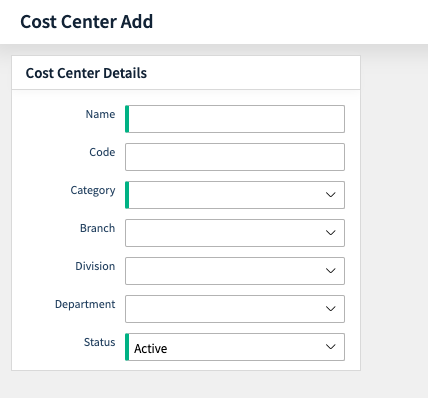
- Use Cost Center Add to create a new cost center.
- Select the Cost Center Type from the dropdown list.
- Select the Category Cost Center from the dropdown list.
- Enter Cost Center Name, Code (if applicable), and other details.
- Click Save to complete the setup.
Viewing & Managing Cost Centers
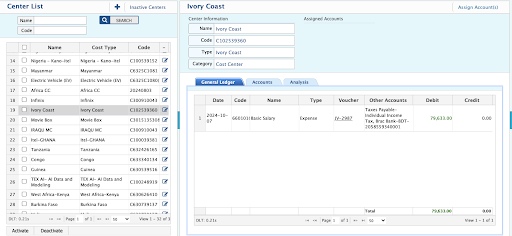
- Go to Cost Center List to view all existing cost centers.
- Review Name, Type, Category, and Code.
- Check Active/Inactive Status:
- Active: Available for transactions.
- Inactive: Cannot be used for new transactions.
- Use Search or Filter options to find specific cost centers.
- Click on a cost center to edit, update, or deactivate if needed.