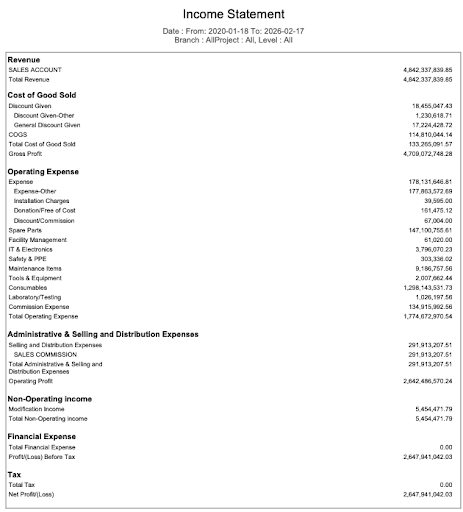
Income Statement
Income Statement in PrismERP provides a detailed view of revenues, expenses, and net profit for a selected period. Users can generate the report for a specific branch or for all branches, choose the level of detail, and view the report with header or without header.
Details View & Action Table
| Field | Action |
|---|---|
| Go to | Navigate to Reports → Financial Statements → Income Statement to open the report screen. |
| From | Select the starting date for the reporting period. Transactions from this date onward will be included in the report. |
| To | Select the ending date for the reporting period. All transactions up to this date will be included. |
| Branch | Select the branch for which the report will be generated. Selecting All includes all branches. |
| Level | Select the level of detail for the reports. |
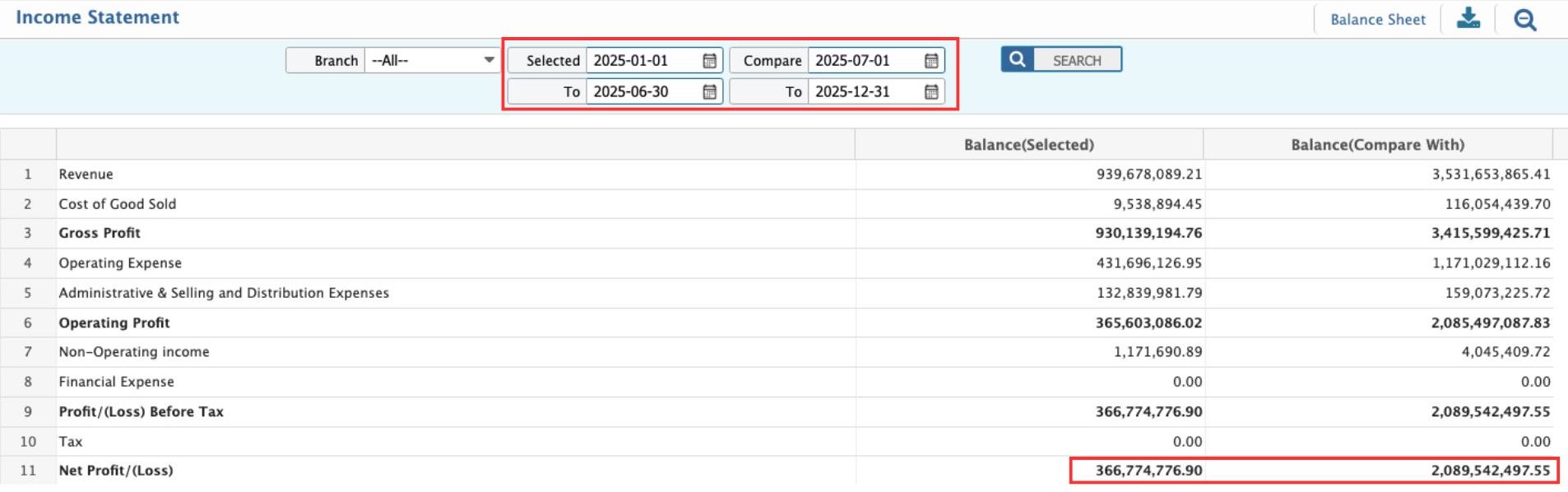
Income Statement Comparison
Income Statement Comparison in PrismERP allows users to analyze financial performance between two periods. It displays key financial items— Revenue, Cost of Goods Sold, Gross Profit, Operating Expenses, and Net Profit —side by side for a selected period and a comparison period, helping management understand changes in profitability, expenses, and overall performance.
Details View & Action Table
| Field | Action |
|---|---|
| Go to | Navigate to Accounts → Income Statement Comparison to open the screen. |
| Branch | Select the branch for which the data should be displayed. Only transactions of the selected branch will be included. |
| Selected From | Enter the starting date of the first period. Transactions from this date will appear in the first period column. |
| Selected To | Enter the ending date of the first period. Transactions up to this date will appear in the first period column. |
| Compare From | Enter the starting date of the comparison period. Transactions from this date will appear in the comparison period column. |
| Compare To | Enter the ending date of the comparison period. Transactions up to this date will appear in the comparison period column. |