Investment Profile
The Investment Profile feature in PrismERP is designed to manage organizational and employee-linked investments with clear financial control and accounting accuracy. It supports defining structured investment types, configuring required ledger accounts, and maintaining detailed investment records from issuance to maturity. This module ensures proper handling of interest calculation, tax implications, bank charges, and renewals within a single workflow. With built-in search, reporting, and voucher integration, investment activities remain traceable and audit-ready. The module fits seamlessly into PrismERP’s core accounting and financial management processes.
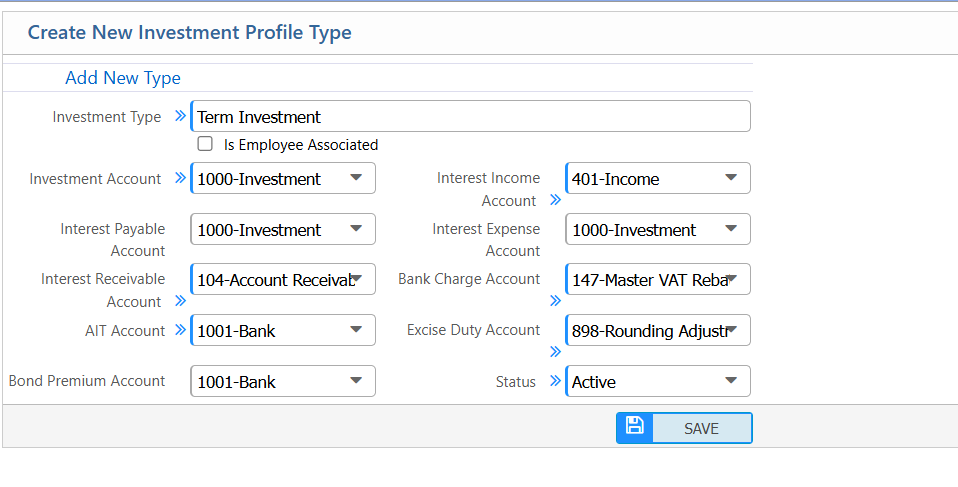
Add New Investment Profile Type
| Field | Action |
|---|---|
| Add New Type | Enter the name of the investment profile type. |
| Is Employee Associated | Specify if the investment is linked to an employee. |
| Investment Account | Select the main account for recording the investment. |
| Interest Income Account | Select the account where interest income will be posted. |
| Interest Payable Account | Select the account where interest payable will be recorded. |
| Interest Expense Account | Select the account for interest expense entries. |
| Interest Receivable Account | Select the account for interest receivable entries. |
| Bank Charge Account | Select the account for bank charges related to the investment. |
| AIT Account | Select the account for Advance Income Tax (AIT) related to the investment. |
| Excise Duty Account | Select the account for excise duty, if applicable. |
| Bond Premium Account | Select the account for any bond premium transactions. |
| Status | Set the status of the investment profile type (Active/Inactive). |
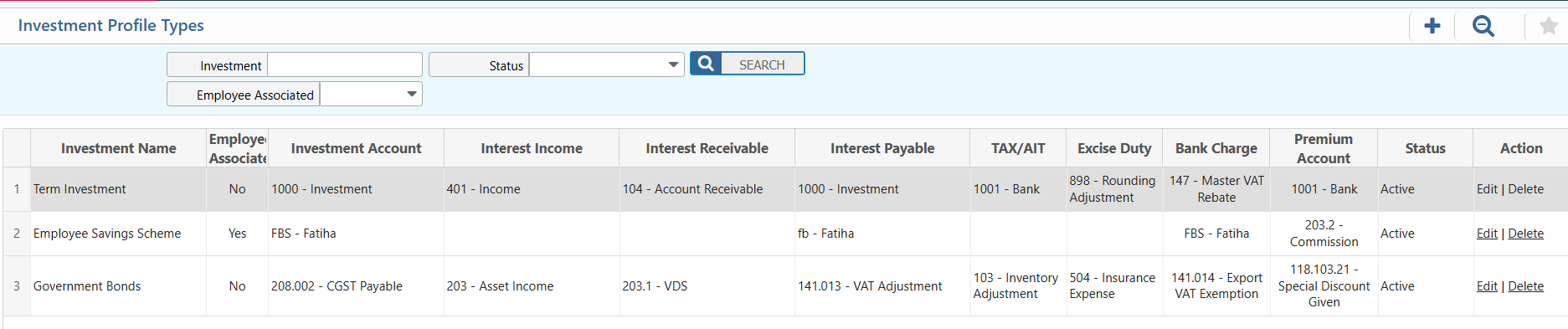
Investment Profile Type List – Search & Actions
| Field | Action |
|---|---|
| Investment Name | Search investment profiles by entering the name of the investment. |
| Employee Associated | Filter investments based on whether they are linked to an employee. |
| Status | Filter investments by status (Active/Inactive) and update status if needed. |
| Add | Add a new investment profile by entering all required details. |
| Edit | Edit an existing investment profile to update its details. |
| Delete | Remove an investment profile from the system permanently. |
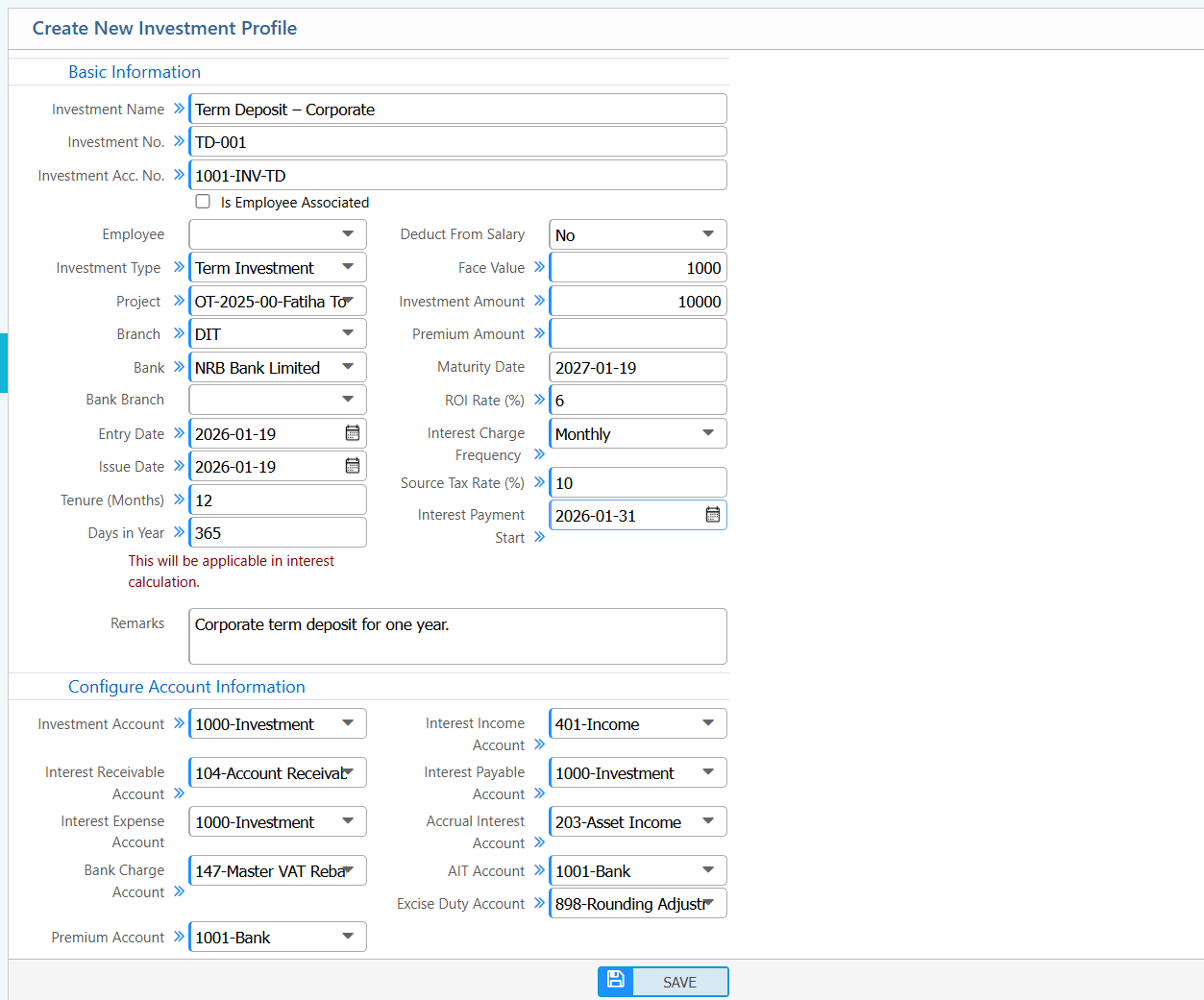
Add New Investment Profile
| Field | Action |
|---|---|
| Investment Name | Enter the name of the investment profile. |
| Investment No. | Enter a unique number to identify the investment. |
| Investment Acc. No. | Enter the main account number linked to the investment. |
| Is Employee Associated | Specify whether the investment is linked to an employee (Yes/No). |
| Employee | Select the employee associated with this investment, if applicable. |
| Investment Type | Select the type of investment (e.g., Fixed Deposit, Government Bond). |
| Project | Select the project associated with the investment, if any. |
| Branch | Select the branch where the investment applies. |
| Bank | Select the bank handling the investment. |
| Bank Branch | Select the specific branch of the bank. |
| Entry Date | Enter the date when the investment is recorded in the system. |
| Issue Date | Enter the date when the investment is issued. |
| Tenure (Months) | Enter the duration of the investment in months. |
| Days in Year | Enter the number of days considered for interest calculation (default 365). |
| Deduct From Salary | Specify whether the investment amount will be deducted from employee salary (Yes/No). |
| Face Value | Enter the face value of the investment. |
| Investment Amount | Enter the total investment amount. |
| Premium Amount | Enter any premium amount associated with the investment. |
| Maturity Date | Enter the date when the investment matures. |
| ROI Rate (%) | Enter the rate of interest applicable to the investment. |
| Interest Charge Frequency | Select how often interest is charged (e.g., monthly, quarterly). |
| Source Tax Rate (%) | Enter the tax rate applicable to the investment source. |
| Interest Payment Start | Select the date when interest payments start. |
| Remarks | Enter any additional notes or instructions regarding the investment. |
| Investment Account | Select the account for recording the investment. |
| Interest Income Account | Select the account where interest income is recorded. |
| Interest Receivable Account | Select the account for interest receivable entries. |
| Interest Payable Account | Select the account for interest payable entries. |
| Interest Expense Account | Select the account for interest expense entries. |
| Accrual Interest Account | Select the account for accrued interest. |
| Bank Charge Account | Select the account for bank charges related to this investment. |
| AIT Account | Select the account for Advance Income Tax (AIT). |
| Excise Duty Account | Select the account for excise duty, if applicable. |
| Premium Account | Select the account for any bond or investment premium. |
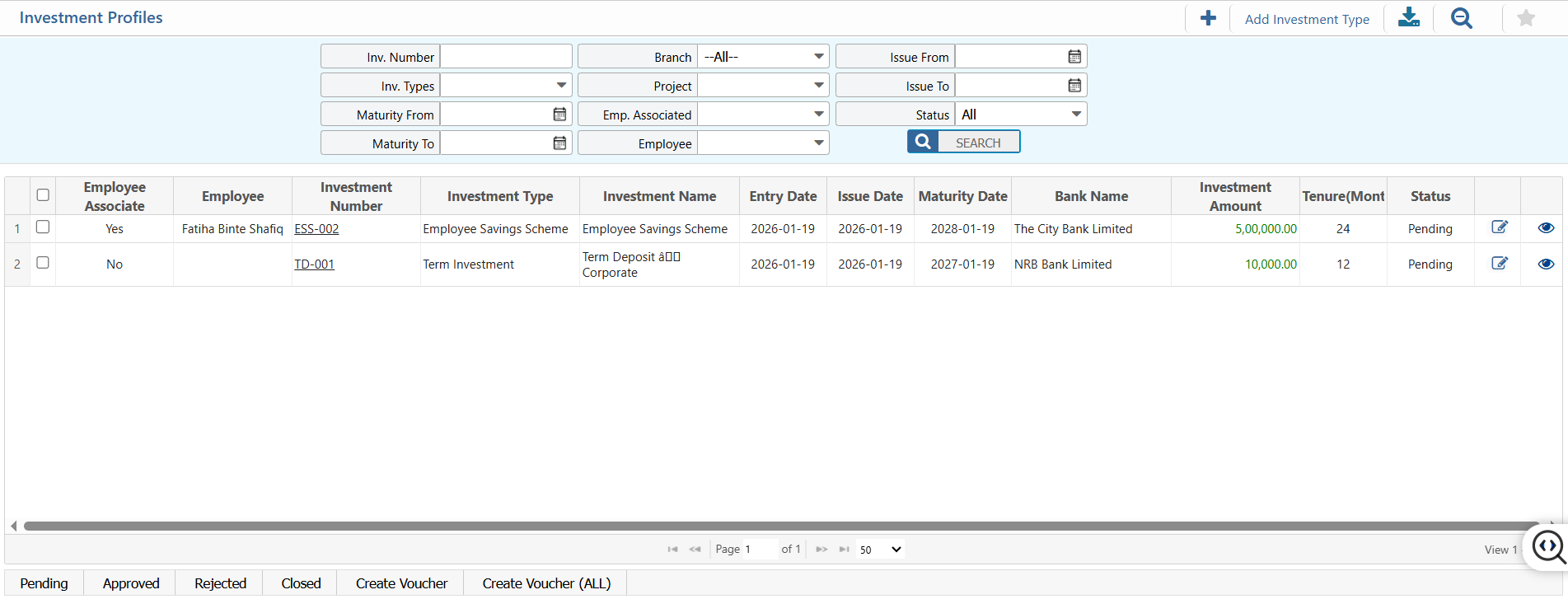
Investment Profile List – Search & Actions
| Field | Action |
|---|---|
| Inv. Number | Search investment profiles using the investment number. |
| Inv. Types | Filter investment profiles by investment type. |
| Branch | Filter investment profiles by branch. |
| Project | Filter investment profiles by associated project. |
| Issue From | Select a start date to filter investments issued from a specific date. |
| Issue To | Select an end date to filter investments issued up to a specific date. |
| Maturity From | Filter investment profiles based on maturity start date. |
| Maturity To | Filter investment profiles based on maturity end date. |
| Emp. Associated | Filter investment profiles based on employee association (Yes/No). |
| Employee | Filter investment profiles by employee name if employee-associated. |
| Status | Filter investment profiles by status (Pending, Approved, Closed) and update as needed. |
| Add Investment Type | Add a new investment profile type directly from this screen. |
| Add | Add a new investment profile. |
| Edit | Edit an existing investment profile’s details. |
| Create Voucher | Create Voucher for all employee directly from the profile list. |
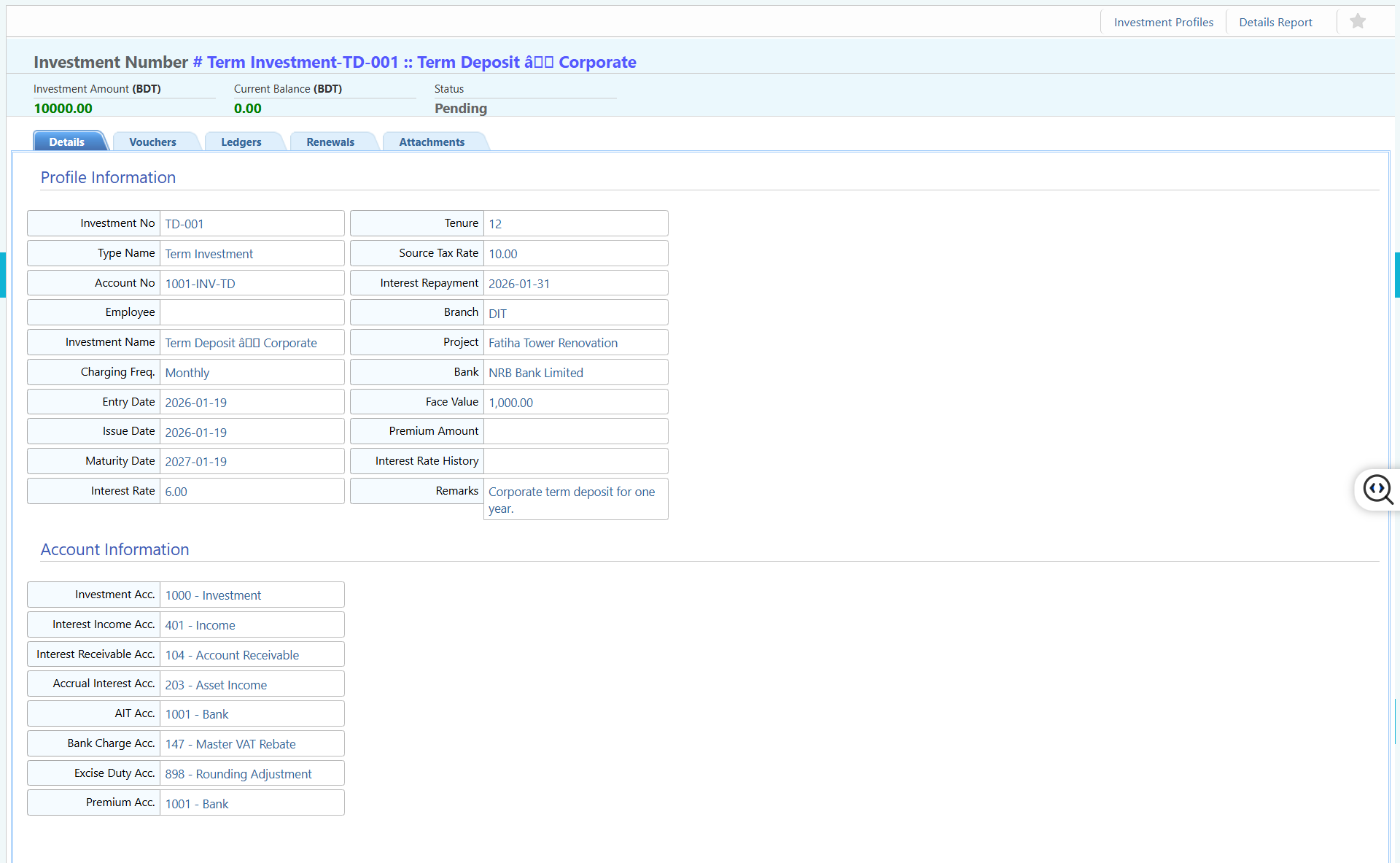
Investment Profile Details View & Action
| Field | Action |
|---|---|
| Details | View complete investment profile information including bank, tenure, ROI, employee association, and configured accounts. |
| Vouchers | View all accounting vouchers generated against this investment, including interest postings and adjustments. |
| Ledgers | View ledger entries related to the investment and associated financial accounts. |
| Renewals | View and manage renewal records for matured or ongoing investments. |
| Attachments | Upload, view, download, or manage documents related to the investment profile. |
| Report | Generate and download investment reports for review, audit, or record-keeping purposes in multiple formats. |