Treasury Management
Treasury Management is a key module in PrismERP designed to handle financial planning and cash flow management efficiently. It ensures that businesses can maintain liquidity, manage financial risks, and optimize cash utilization effectively.
Features of Treasury Management
- Account Receivable Planning
- Account Payable Planning
- Dynamic Scheduling
- Cash Flow Analysis
Account Receivable Scheduling
The Account Receivable Scheduling feature in PrismERP enables users to manage, schedule, and track receivable payments effectively. This functionality ensures a systematic approach to managing customer dues and maintaining a healthy cash flow.
Navigation:
Go to AR Scheduling

Interface Overview:
The interface is divided into three sections:
- Customer List:
- Displays a list of customers with outstanding dues.
- Select a customer to view and manage their account details.
- AR Scheduling & Pending Voucher List:
- Displays scheduled plans and pending vouchers for the selected customer.
- Allows you to add or update schedules for pending amounts.
- Balance with Last 5 Transactions:
- Shows the current balance of the selected customer.
- Displays the last 5 transactions for quick reference.
How to Add a Schedule for Receivables:
- Select a Customer:
- From the Customer List, choose the customer for whom you want to create or update a schedule.
- View Pending Vouchers:
- Check the Pending Voucher List for unpaid invoices or balances due.
- Add a Schedule:
- In the AR Scheduling section:
- Enter the scheduled date for the receivable.
- Define the amount to be received.
- Add the schedule.
- In the AR Scheduling section:

After adding a schedule for a selected customer, the details will appear in the Schedule List. This section provides flexibility to edit, reschedule, or delete previously created schedules, ensuring that your receivable plans remain accurate and up-to-date.

Actions You Can Perform on the Schedule List:
- Edit a Schedule:
- Select the schedule from the list that needs modification.
- Update the scheduled date, amount, or other necessary details.
- Save the changes to reflect the updated schedule.
- Reschedule a Previous Plan:
- Choose an existing schedule that requires rescheduling.
- Modify the payment plan, such as adjusting the due date or amount to align with the customer’s circumstances.
- Save the updated schedule to ensure accurate planning.
- Delete a Schedule:
- If a schedule is no longer needed, select it from the list.
- Confirm deletion to remove it from the schedule list permanently.

Account Receivable Analysis:
The Account Receivable Analysis feature provides a comprehensive summary and overview of all customer-related receivables. This is a powerful tool for evaluating the status of your accounts receivable and making informed decisions about collections and customer accounts.
Navigate to:
AR Analysis

The interface displays summarized data regarding receivables across all customers.
Key Sections of AR Analysis:
- Customer Balance:
- Displays the total outstanding balances for all customers.
- Helps in identifying high-value receivables and prioritizing collection efforts.
- Collectible Amount:
- Shows the amount that is scheduled to be collected within the selected period.
- Enables tracking of upcoming payments to manage cash flow effectively.
- Collected Amount:
- Provides data on the amount already collected from customers.
- Offers insights into collection performance and customer payment behavior.
- Unapproved Balances:
- Displays balances that are pending approval.
- Ensures a clear view of what’s yet to be finalized or confirmed in receivables.
Benefits of AR Scheduling:
- Streamlined Receivable Management: Organize and monitor customer dues efficiently.
- Improved Cash Flow Forecasting: Schedule payments to align with cash flow requirements.
- Customer Insights: Quickly view balance and transaction history for better customer relationship management.
- Dynamic Updates: Automatically update payment statuses as Paid or Partially Paid upon receiving payments.
Account Payable Scheduling
The Account Payable Scheduling feature in PrismERP enables users to manage, schedule, and track payable payments effectively. This functionality ensures a systematic approach to managing vendor dues and maintaining a healthy cash flow.
Navigation:
Go to AP Scheduling.

Interface Overview:
The interface is divided into three sections:
- Vendor List:
- Displays a list of Vendors with outstanding dues.
- Select a vendor to view and manage their account details.
- AP Scheduling & Pending Voucher List:
- Displays scheduled plans and pending vouchers for the selected vendor.
- Allows you to add or update schedules for pending amounts.
- Balance with Last 5 Transactions:
- Shows the current balance of the selected vendor.
- Displays the last 5 transactions for quick reference.
How to Add a Schedule for Payables:
- Select a Vendor:
- From the Vendor List, choose the vendor for whom you want to create or update a schedule.
- View Pending Vouchers:
- Check the Pending Voucher List for unpaid invoices or balances due.
- Add a Schedule:
- In the AP Scheduling section:
- Enter the scheduled date for the payable.
- Define the amount to be paid.
- Add the schedule.
- In the AP Scheduling section:

After adding a schedule for a selected vendor, the details will appear in the Schedule List. This section provides flexibility to edit, reschedule, or delete previously created schedules, ensuring that your payable plans remain accurate and up-to-date.

Actions You Can Perform on the Schedule List:
- Edit a Schedule:
- Select the schedule from the list that needs modification.
- Update the scheduled date, amount, or other necessary details.
- Save the changes to reflect the updated schedule.
- Reschedule a Previous Plan:
- Choose an existing schedule that requires rescheduling.
- Modify the payment plan, such as adjusting the due date or amount to align with the vendor’s circumstances.
- Save the updated schedule to ensure accurate planning.
- Delete a Schedule:
- If a schedule is no longer needed, select it from the list.
- Confirm deletion to remove it from the schedule list permanently.

Account Payable Analysis:
The Account Payable Analysis feature provides a comprehensive summary and overview of all vendor-related payables. This is a powerful tool for evaluating the status of your accounts payable and making informed decisions about payments and vendor accounts.
Navigate to:
AP Analysis

The interface displays summarized data regarding receivables across all vendors.
Key Sections of AP Analysis:
- Vendor Balance:
- Displays the total outstanding balances for all vendors.
- Helps in identifying high-value payables and prioritizing payments efforts.
- Payable Amount:
- Shows the amount that is scheduled to be paid within the selected period.
- Enables tracking of upcoming payments to manage cash flow effectively.
- Paid Amount:
- Provides data on the amount already paid to vendors.
- Offers insights into payment performance and vendor payment behavior.
- Unapproved Balances:
- Displays balances that are pending approval.
- Ensures a clear view of what’s yet to be finalized or confirmed in payables.
Benefits of AP Scheduling:
- Streamlined Payable Management: Organize and monitor vendor dues efficiently.
- Improved Cash Flow Forecasting: Schedule payments to align with cash flow requirements.
- Vendor Insights: Quickly view balance and transaction history for better vendor relationship management.
- Dynamic Updates: Automatically update payment statuses as Paid or Partially Paid upon processing payments.
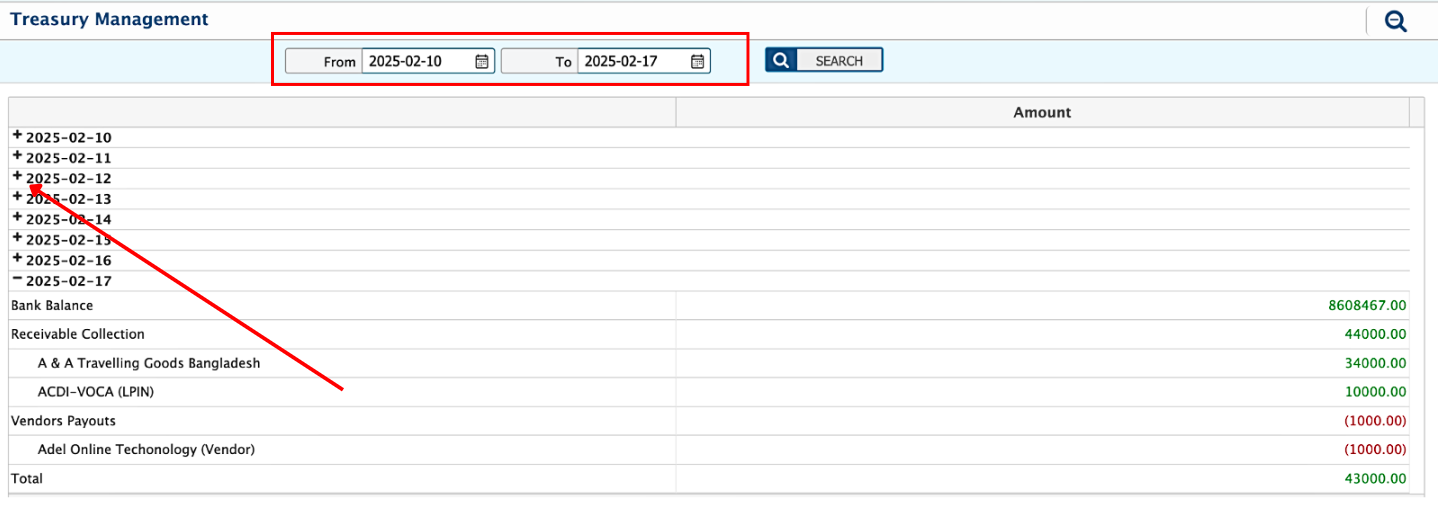
Treasury Management
This section provides a comprehensive summary to help manage financial operations effectively. Key insights available:
- Date-wise Bank Balance:
- Displays the current balance in the bank accounts for selected dates.
- Helps track available funds at any point in time.
- Receivable Collection:
- Shows scheduled receivables along with customer names.
- Enables easy identification of customers and the amounts they are expected to pay based on the schedule.
- Vendor Payouts:
- Lists vendor payouts along with vendor names.
- Highlights which vendors need to be paid, aligned with the payment schedule.
This consolidated view allows businesses to monitor receivables and payables at a glance, ensuring efficient cash flow management and better decision-making.