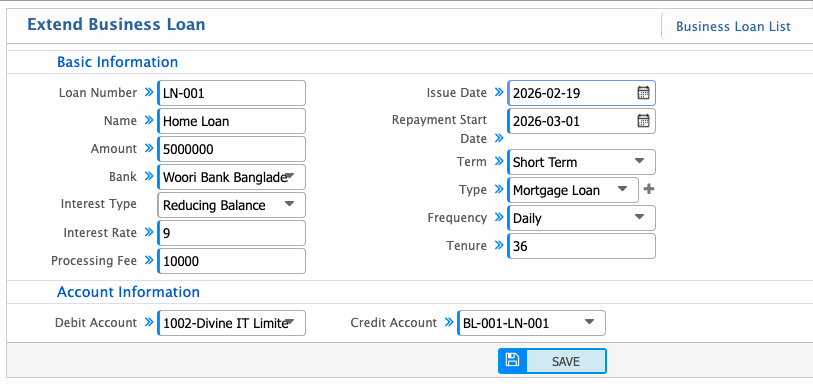
Extend Business Loan
Users can extend an existing loan if additional funds are needed or the repayment schedule changes. When extending a loan, the new terms such as repayment start date, frequency, tenure, and interest rate can be updated while keeping the original loan details intact. The system allows users to adjust the principal, add any applicable processing fees, and ensure all changes are reflected in the ledger accounts.
| Field | Action |
|---|---|
| Loan Number | Select the loan you want to extend from the Business Loan List. |
| Amount | Review the original loan amount; adjust if the extension affects the principal. |
| Bank | Select the bank associated with the loan. |
| Interest Rate | Enter the interest rate required for the extension. |
| Processing Fee | Enter any processing fee applicable for the loan extension. |
| Issue Date | Enter the original loan issue date. |
| Repayment Start Date | Update the new repayment start date for the extended period. |
| Term | Review or update the loan term type (Short Term / Long Term). |
| Frequency | Update repayment frequency (e.g., Daily, Monthly) for the extended term. |
| Tenure | Update the total number of installments for the extended loan period. |
| Debit Account | Select the account to be debited for any additional funds or adjustments. |
| Credit Account | Select the loan receivable account to credit for the extension. |