 Cost Center Management
Cost center management involves organizing, monitoring, and controlling expenses related to different units within an organization. By categorizing costs under specific departments or business units, organizations ensure efficient allocation and alignment with financial strategies.
Types of Cost Centers
- Production Cost Centers – Departments directly involved in manufacturing.
- Service Cost Centers – Support functions assisting production or operations.
- Revenue Cost Centers – Sales or marketing units generating revenue but also incurring costs.
- Profit Centers – Units responsible for both revenue and expenses (e.g., business divisions).
- Investment Center – Monitors investment-related financial activities.
Managing Cost Center Types in ERP
Adding a Cost Center Type
info
- Click "Cost Center Type Add" to create a new cost center type.
- Enter Type Name, Code, and Description.
- Click "Save" to store the information.
- Review the list to check if the required cost center type already exists.
- Check Active/Inactive Status:
- Active: The cost center type is in use and available for selection.
- Inactive: The cost center type is disabled and cannot be assigned.

Adding a Cost Center
info
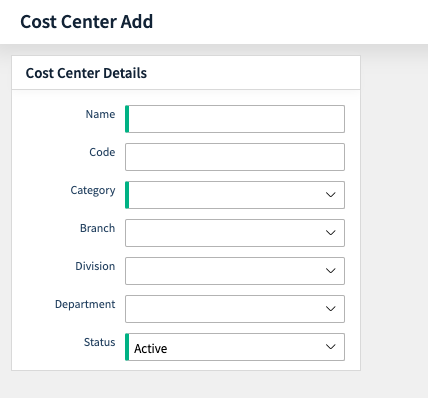
- Click "Cost Center Add" to create a new cost center.
- Select the Cost Center Type from the dropdown list.
- Select the Category Cost Center from the dropdown list.
- Enter Cost Center Name, Code (if applicable), and other details.
- Click "Save" to complete the setup.
Viewing & Managing Cost Centers
info
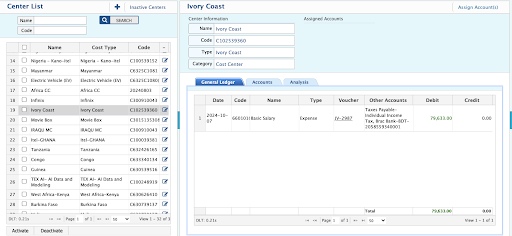
- Click "Cost Center List" to view all existing cost centers.
- Review the list for Name, Type, Category, and Code.
- Check Active/Inactive Status:
- Active: Available for transactions.
- Inactive: Cannot be used for new transactions.
- Use Search or Filter options to find specific cost centers.
- Click on a cost center to edit, update, or deactivate if needed.
Additional Features
- General Ledger – Cost center-wise transaction view.
- Analysis – Fiscal year-wise income and expense data analytics.
Importance of Cost Centers in Accounting
- Improves financial control and reduces unnecessary expenses.
- Enhances decision-making with department-wise cost tracking.
- Ensures regulatory compliance with clear cost allocation.
- Boosts profitability by optimizing resource allocation.
- Improved Budgeting – Enables accurate allocation of funds to different departments.
- Performance Evaluation – Assesses efficiency by comparing actual vs. budgeted costs.
Key Features in PrismERP
tip
- Monitor and manage expenses associated with specific cost centers.
- Provides a clear view of spending patterns across business units.
- Cost allocation.
- Performance Measurement – Helps evaluate department-wise efficiency.
Cost Center-Wise Expense Report
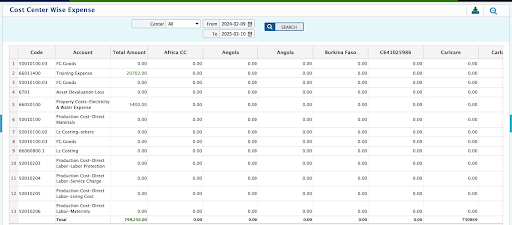
- View expenses categorized by cost center.
- Filters available: Users can filter reports by date range and cost center.
How Cost Centers Work in PrismERP
tip
- Identification of Cost Centers – Define departments, business units, or divisions as cost centers.
- Cost Allocation – Assign direct and indirect costs to each cost center.
- Monitoring & Reporting – Track expenses through financial reports.
Multi-Dimension Cost Center - Cost Allocation
- Structure where costs are allocated across multiple centers, such as departments, Production & Business Units.
- Costs and Income can be split across multiple cost centers on various criteria.
- Complex allocation methods enable better decision-making.
Cost Allocation Methods
- Department-Based: Costs allocated to multiple departments.
- Activity-Based: Costs distributed based on specific activities.
- Time-Based: Various costs allocated per month, quarter, or year.
Classify Costs and Allocation Methods:
| Cost Category | Example |
|---|---|
| Direct Costs | Costs directly attributable to a specific cost center (Material, Factory Overhead) |
| Indirect Costs | Costs shared among multiple cost centers (Administrative, Sales Distribution, Others (Finance)) |
Cost Allocation Process
- Use Monthly Allocation: For regular expenses reporting.
- Use Quarterly Allocation: For seasonal or strategic expenses.
- Use Annual Allocation: For fixed, long-term, and regulatory costs.
Allocation Basis:
| Category | Accounts & Allocation Method | Process Timeline |
|---|---|---|
| Direct Allocation | If a cost is entirely related to one cost center, assign it directly. | Immediate |
| Fixed Percentage | Predefined percentage allocation for shared costs. | Periodic |
| Proportional Allocation | Based on the ratio of relevant data like revenue or production. | Periodic |
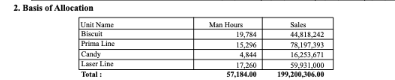
| Revenue-Based | Allocate based on each cost center’s revenue contribution. | Monthly, Quarterly, Yearly |
| Production-Based | Allocate based on each cost center’s production unit. | Monthly, Quarterly, Yearly |
Allocation Methods for Specific Categories
- Usage-Based: Allocate based on resource usage (Rent, Utility, Transportation, Fuel, Maintenance).
- Activity-Based: Allocate based on actual cost-driving activities.
- Headcount-Based: Allocate based on the number of employees in a cost center.
- Labor Hours: If production is labor-intensive.
Apply Review & Validate Allocation:
- Ensure accuracy by reconciling total allocated costs with actual expenditures.
- Validate with finance teams and department heads for alignment.
Use Case
Various Cost Centers:
- Production/Operational Cost Centers
- Service Cost Centers
- Administrative Cost Centers
- Sales & Marketing Cost Centers
- Distribution & Logistics Cost Centers
Cost Category
| Direct Cost | Indirect Cost | Administrative Cost | Sales Cost | Distribution Cost |
|---|---|---|---|---|
| Raw materials | Production | Office expenses | Advertising & promotions | Rent & Warehousing |
| Direct labor costs | Factory Overheads | Salaries & wages | Sales commissions | Inventory handling |
| Equipment Depreciation | Compliance costs | Trade shows & sponsorships | Fuel & vehicle maintenance |
Cost Allocation Process for Production Costs
Efficient cost allocation is essential for tracking Factory Overheads, Equipment Depreciation, Utilities, and Repair & Maintenance in production.
Step-by-Step Cost Allocation Process
- Identify Total Costs for Each Category & COA
| Cost Category | Total Cost |
|---|---|
| Factory Overheads | $50,000/month |
| Equipment Depreciation | $20,000/month |
| Utilities (Electricity, Gas, Water) | $30,000/month |
| Repair & Maintenance | $15,000/month |
- Determine Allocation Bases
| Cost Category | Allocation Basis | Example Calculation |
|---|---|---|
| Factory Overheads | Production Volume | Overhead Rate = $50,000 ÷ 10,000 tons = $5 per ton |
| Equipment Depreciation | Machine Hours | Depreciation Rate = $20,000 ÷ 10,000 hours = $2 per machine hour |
| Utilities | Usage (kWh) | Allocate based on machine usage (e.g., Machine X: $10,800) |
| Repair & Maintenance | Historical Repair Costs | Allocate based on past maintenance costs per machine (e.g., Machine X: $4,500) |
Sales
- Identify Total Sales Costs
| Sales Cost Category | Total Cost |
|---|---|
| Advertising & Promotions | $50,000 |
| Sales Commissions (Direct) | $30,000 |
| Sales Commissions (Indirect) | $20,000 |
| Trade Shows & Sponsorships | $15,000 |
| Customer Acquisition Costs | $25,000 |
| Total Sales Costs | $140,000 |
- Choose Allocation Bases
| Sales Cost Category | Allocation Basis | Basis Details |
|---|---|---|
| Advertising & Promotions | Sales Revenue | Allocate based on sales revenue generated by each department. |
| Sales Commissions (Direct) | Sales Volume | Allocate based on sales volume or revenue generated by sales reps. |
| Sales Commissions (Indirect) | Headcount or Sales Revenue | Allocate based on indirect commissions. |
| Trade Shows & Sponsorships | Sales Volume or Product Focus | Allocate based on sales volume or products promoted. |
| Customer Acquisition Costs | New Customers or Revenue | Allocate based on new customers acquired. |
- Calculate Allocations Based on Chosen Basis
| Sales Cost Category | Dept A Allocation | Dept B Allocation | Dept C Allocation |
|---|---|---|---|
| Advertising & Promotions | $12,500 | $20,000 | $17,500 |
| Sales Commissions (Direct) | $7,500 | $11,250 | $11,250 |
| Sales Commissions (Indirect) | $5,000 | $8,000 | $7,000 |
| Trade Shows & Sponsorships | $3,750 | $6,000 | $5,250 |
| Customer Acquisition Costs | $6,250 | $9,375 | $9,375 |
- Final Summary of Allocated Sales Costs
| Department | Advertising & Promotions | Direct Sales Commissions | Indirect Sales Commissions | Trade Shows & Sponsorships | Customer Acquisition Costs | Total Sales Costs |
|---|---|---|---|---|---|---|
| Dept A | $12,500 | $7,500 | $5,000 | $3,750 | $6,250 | $35,000 |
| Dept B | $20,000 | $11,250 | $8,000 | $6,000 | $9,375 | $54,625 |
| Dept C | $17,500 | $11,250 | $7,000 | $5,250 | $9,375 | $50,375 |
Distribution
- Identify Total Distribution Costs
| Distribution Cost Category | Total Cost |
|---|---|
| Rent & Warehousing | $40,000 |
| Inventory Handling | $25,000 |
| Fuel & Vehicle Maintenance | $15,000 |
| Third-Party Logistics Fees | $20,000 |
| Total Distribution Costs | $100,000 |
- Choose Allocation Bases
| Distribution Cost Category | Allocation Basis | Basis Details |
|---|---|---|
| Rent & Warehousing | Warehouse Space | Allocate based on space occupied in the warehouse. |
| Inventory Handling | Units Handled | Allocate based on units handled by each department. |
| Fuel & Vehicle Maintenance | Distribution Volume | Allocate based on miles or volume traveled. |
| Third-Party Logistics Fees | Units Shipped | Allocate based on the volume of goods shipped. |
- Calculate Allocations Based on Chosen Basis
| Distribution Cost Category | Dept A Allocation | Dept B Allocation | Dept C Allocation |
|---|---|---|---|
| Rent & Warehousing | $10,000 | $15,000 | $15,000 |
| Inventory Handling | $6,250 | $9,375 | $9,375 |
| Fuel & Vehicle Maintenance | $3,750 | $5,625 | $5,625 |
| Third-Party Logistics Fees | $5,000 | $7,500 | $7,500 |
- Final Summary of Allocated Distribution Costs
| Department | Rent & Warehousing | Inventory Handling | Fuel & Vehicle Maintenance | Third-Party Logistics Fees | Total Distribution Costs |
|---|---|---|---|---|---|
| Dept A | $10,000 | $6,250 | $3,750 | $5,000 | $25,000 |
| Dept B | $15,000 | $9,375 | $5,625 | $7,500 | $37,500 |
| Dept C | $15,000 | $9,375 | $5,625 | $7,500 | $37,500 |