Customer Management
PrismERP’s Customer Management makes it simple to add and manage customers, track their details, transactions, and contacts, and configure credit limits. Customers can be quickly searched and filtered, with all actions and activity accessible from a clear, organized interface.
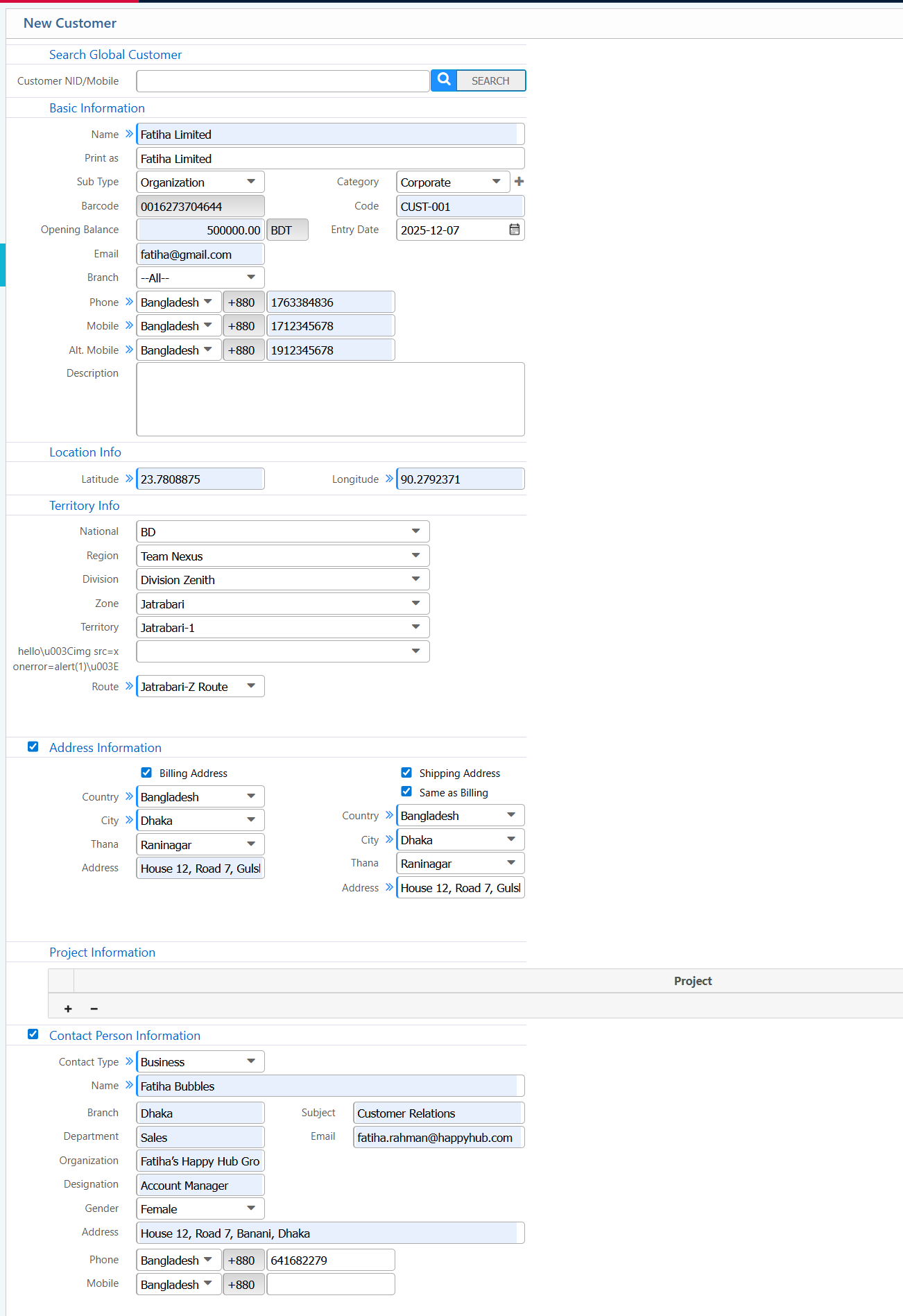
1. Add New Customer
Basic Information:
| Field | Description |
|---|---|
| Customer NID/Mobile | Enter the customer's NID or mobile number to search or register. |
| Name | Enter the customer’s full name. |
| Print As | Specify how the customer name will appear in print documents. |
| Sub Type | Select the customer subtype (e.g., Individual, Corporate). |
| Organization | Enter the organization name if the customer belongs to one. |
| Category | Choose the customer category/group. |
| Opening Balance (BDT) | Enter the customer’s opening balance, if any. |
| Code | Enter or review the customer code (auto or manual). |
| Entry Date | The date the customer record is created. |
| Enter the customer’s email address. | |
| Branch | Select the branch where the customer will be managed. |
| Phone | Enter the customer’s landline number. |
| Mobile | Enter the customer’s mobile number. |
| Alt. Mobile | Enter an alternative mobile number. |
| Description | Add any additional notes about the customer. |
Location Information:
| Field | Description |
|---|---|
| Latitude | Enter the customer’s latitude (optional). |
| Longitude | Enter the customer’s longitude (optional). |
Territory Information:
| Field | Description |
|---|---|
| National | Select the national category/coverage. |
| Region | Select the region of the customer. |
| Division | Choose the division. |
| Zone | Select the zone. |
| Territory | Select the territory assigned to the customer. |
| Route | Select the route for this customer. |
Address Information:
| Field | Description |
|---|---|
| Billing Address | Enter the full billing address. |
| Billing Country | Select the billing country. |
| Billing City | Enter the billing city. |
| Billing Thana | Enter the billing thana. |
| Shipping Address | Enter the shipping address (if different). |
Project Information:
| Field | Description |
|---|---|
| Project | Select the linked project, if applicable. |
Contact Person Information:
| Field | Description |
|---|---|
| Contact Type | Choose the type of contact (e.g., Business, Personal). |
| Contact Name | Enter the contact person’s full name. |
| Contact Branch | Select the branch linked to this contact. |
| Contact Department | Enter the department of the contact. |
| Contact Organization | Enter the organization name (if applicable). |
| Contact Designation | Enter the contact person’s designation. |
| Gender | Select the gender. |
| Contact Address | Enter the contact person’s address. |
| Subject | Enter a remark or subject for this contact. |
| Contact Email | Enter the contact person’s email. |
| Contact Phone | Enter the contact person’s phone number. |
| Contact Mobile | Enter the contact person’s mobile number. |
2. Customer List
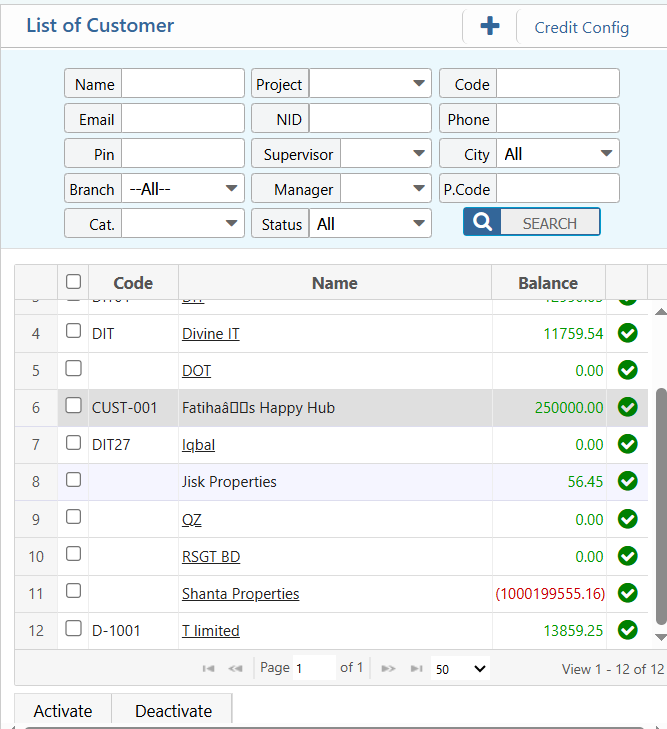
2.1 Search and Filter Option
| Field | Description |
|---|---|
| Name | Search customers by full or partial name. |
| Filter customers by email address. | |
| PIN | Filter customers using their PIN number. |
| Branch | Select a specific branch. |
| Category (Cat.) | Filter customers by category |
| Project | Filter customers by linked project. |
| NID | Search by customer National ID number. |
| Supervisor | Filter customers by supervisor name. |
| Manager | Filter customers by manager name. |
| Status | Filter customers by status (Active, Inactive, All). |
| Code | Search customers by their unique code. |
| Phone | Filter customers by phone number. |
| City | Filter customers by city. |
| P.Code | Filter customers by postal or area code. |
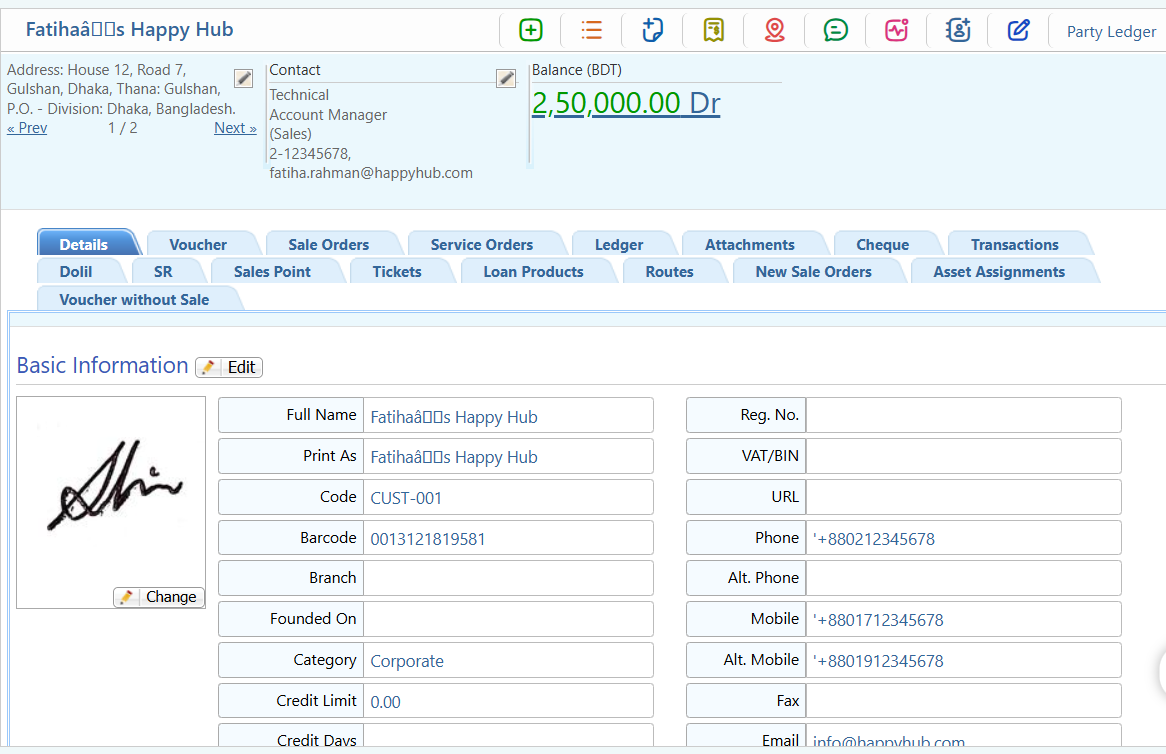
2.2 Customer Details View
| Field / Module | Description |
|---|---|
| Details | View all basic and extended customer information. |
| Voucher | Access all vouchers related to this customer. |
| Sale Orders | View all sales orders for the customer. |
| Service Orders | View service orders linked to the customer. |
| Ledger | View ledger and balance details. |
| Attachments | Upload or view documents related to the customer. |
| Cheque | View or manage cheques linked to the customer. |
| Dolil | Access Dolil details (if applicable). |
| SR | View Service Request information. |
| Sales Point | Access point-of-sale related data. |
| Tickets | View and search tickets associated with the customer. |
| Loan Products | View loans linked to the customer. |
| Routes | View routes assigned to this customer. |
| New Sale Orders | View new sale orders. |
| Asset Assignments | View aassets assigned to the customer. |
| Voucher without Sale | View vouchers not linked to sales. |
2.3 Customer Actions
| Action | Description |
|---|---|
| Add New Sale Invoice | Create a new sales invoice for the customer. |
| View SI List | View the list of all sales invoices. |
| Add New SSO | Create a new Service Sales Order (SSO). |
| Add New Receipt | Record a new payment receipt for the customer. |
| Assign Route | Assign a delivery or sales route to the customer. |
| Send SMS | Send SMS messages to the customer. |
| View Customer Category Change Log | Track changes in customer category over time. |
| Add Contact Information | Add or update contact persons for the customer. |
| Edit Opening Balance | Modify the customer’s opening balance. |
| View Party Ledger | Open the ledger to see all debit/credit transactions. |
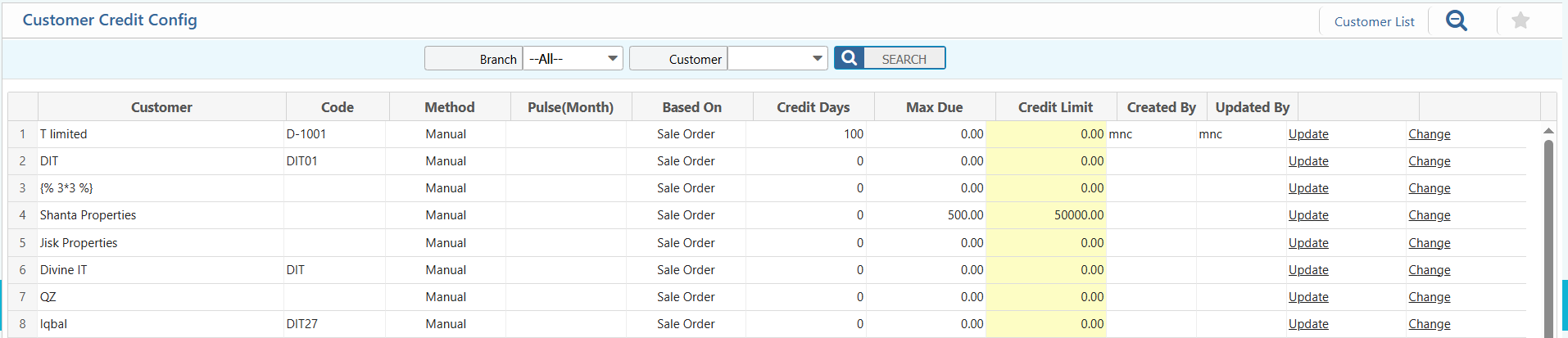
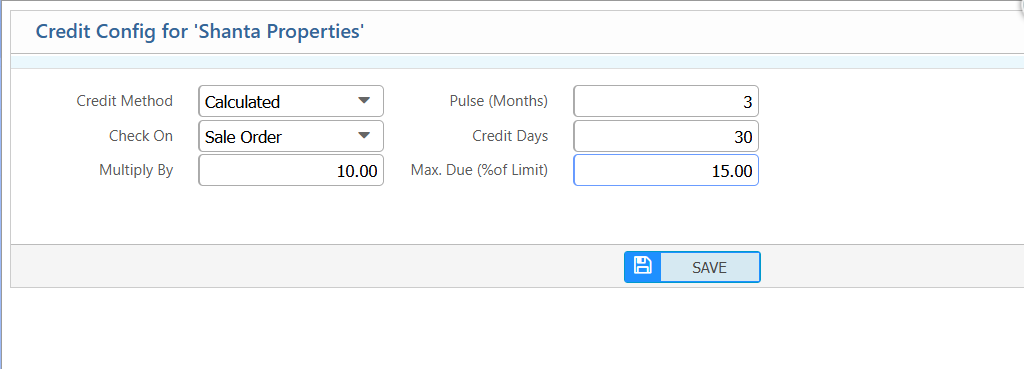
2.4 Customer Credit Configuration
| Field | Description |
|---|---|
| Credit Method | Select the credit method for the customer (e.g., Manual, Automatic). |
| Pulse (Months) | Specify the pulse period in months for credit calculation. |
| Check On | Select the module/event on which credit is checked (e.g., Sale Order). |
| Credit Days | Enter the number of days allowed for credit. |
| Multiply By | Enter a multiplier for credit calculation (if applicable). |
| Max. Due (% of Limit) | Enter the maximum allowable due as a percentage of the customer’s credit limit. |
| Branch (Filter) | Select a specific branch to filter the customer list or credit configurations. |
| Customer (Filter) | Select a specific customer to view or edit credit configuration. |