Proforma Invoice
PrismERP’s LC Management can manage the received Proforma invoice which is sent by the exporter. Currency can be managed as well as payment terms, advising bank, partial shipment, Terms & Conditions, and Additional Clauses.
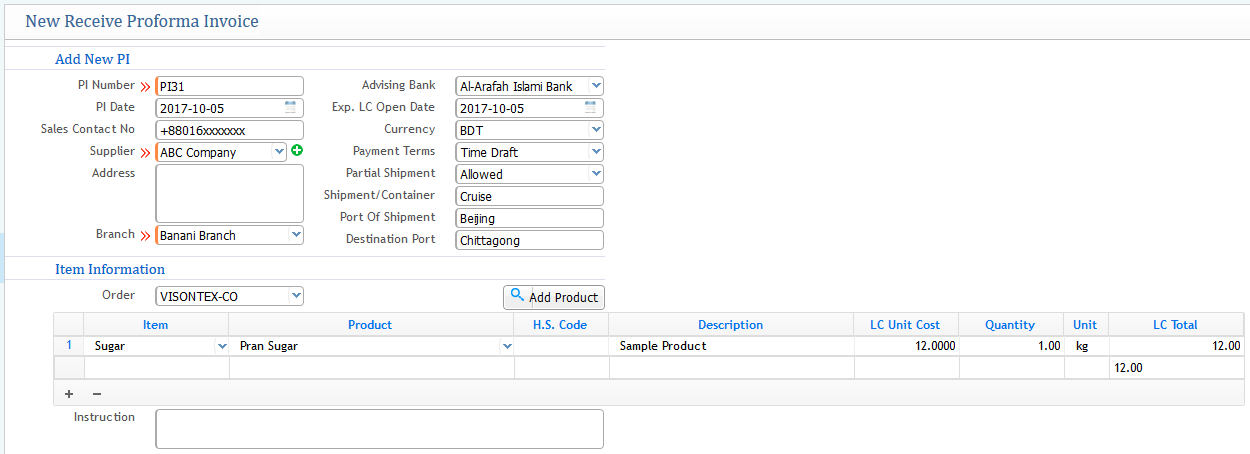
Proforma Invoice Details
- PI Number: Represents the invoice number of the exporter.
- PI Date: Date of the Proforma Invoice created.
- Advising Bank: Bank of the Buyer/Exporter from where the LC is generated.
- Exp LC Open Date: Date of expiration of the opening LC.
- Currency: Under what currency will the payment be made.
- Payment Terms: Terms & Conditions of Payment, whether it will be in time draft, deferred, Sight Draft, Usance.
- Partial Shipment: Defines the breakdown of shipment whether you want the product to come in breakdown or altogether (Allow or Not Allowed).
- Shipment/Container: Name of the shipment or the container from where the product is coming.
- Port of Shipment: Place from where the buyer or exporter shipment is occurring (e.g., Name of the port of the country, for example: Beijing, Hong Kong, etc.).
- Destination Port: Destination of delivering the goods from where you will receive the product.
- Order: Represents the name of the work order that has been performed.
By clicking the "Add Product" button, the product name will be shown in the box below the button along with its information (e.g., LC Unit cost, Quantity, LC Total, etc.).
An instruction box below represents the manual or instruction provided for the product (optional).
PROFORMA INVOICE LIST VIEW:
Shows all the list of invoices.
From the above screenshot, it displays all the PI Numbers that have been performed in the system along with the PI date, Name of the Supplier, Branch, LC Total, Currency, LC No. & Status of the Invoice, whether it is approved or not. From the list page, you can even customize or change the status from the buttons below such as Pending, Approved, Complete, Rejected, Closed, etc.
The search filter option will also help to search individual PIs from different categories of search filters such as inserting PI No, Supplier, etc., and more.