Customer Category
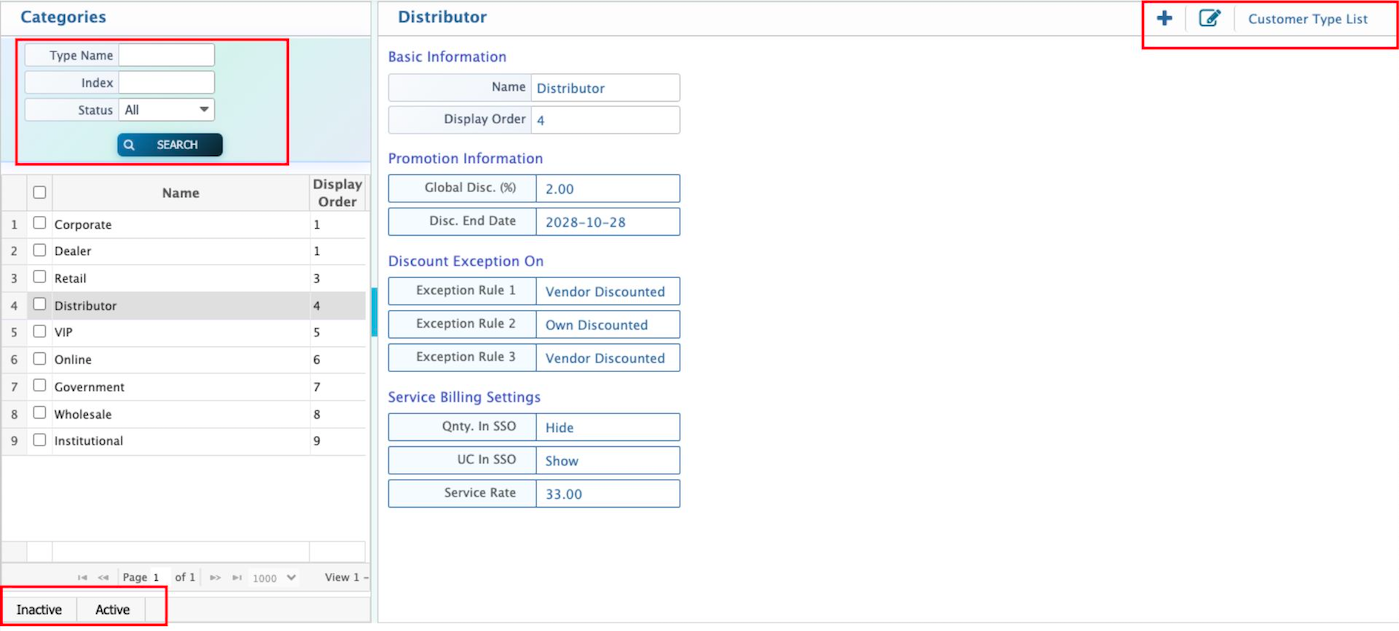
The Customer Category feature in PrismERP helps organize customers into groups like Dealer, Corporate, or Retail, making it easy to manage discounts and service rates consistently. Users can define the category name, display order, default global discount, exceptions, and invoice settings while adding a new category. The Customer Category List in PrismERP allows searching, filtering, and marking categories as active or inactive for smooth management. Users can also view all key details and edit any information to keep customer settings accurate and up-to-date.
Add Customer Category
| Field | Action |
|---|---|
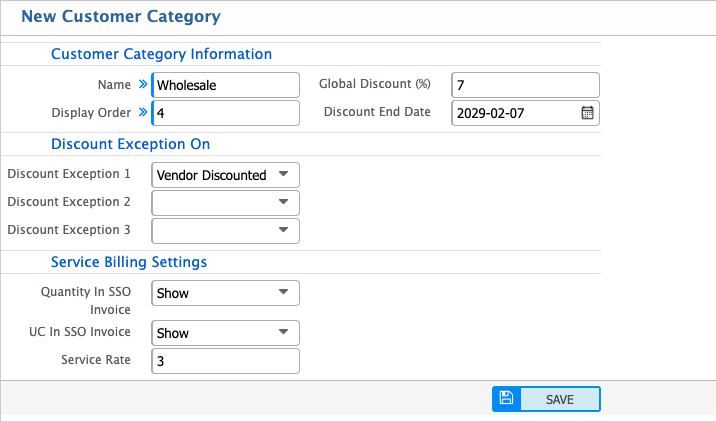
| Name | Enter the name of the customer category (e.g., Dealer, Corporate, Retail). |
| Display Order | Enter a numeric value to control the position of the category in dropdown lists. Lower numbers appear first. |
| Global Discount (%) | Enter the default discount percentage that will automatically apply to this customer category during sales transactions. |
| Discount End Date | Select the date until which the global discount will remain active. After this date, the discount will stop automatically. |
| Discount Exception 1 | Select or configure the first exception rule where the global discount will not apply. |
| Discount Exception 2 | Select or configure the second exception rule if applicable. |
| Discount Exception 3 | Select or configure the third exception rule if applicable. |
| Quantity In SSO Invoice | Select Show to display service quantity in the Service Sales Order (SSO) invoice. |
| UC In SSO Invoice | Select Show to display Unit Cost (UC) in the Service Sales Order invoice. |
| Service Rate | Enter the default service rate applicable for this customer category during service billing. |
Users can navigate to the Customer Category List to efficiently manage all customer categories. They can search and filter categories by Type / Name, Index, or Status to quickly locate specific entries. Each category can be marked as Active or Inactive to control whether it is currently usable in the system. Users can also view all the basic details of a customer category, including its name, display order, global discount, discount exceptions, and service billing settings, and edit any of these details if required to keep the information accurate and up-to-date.