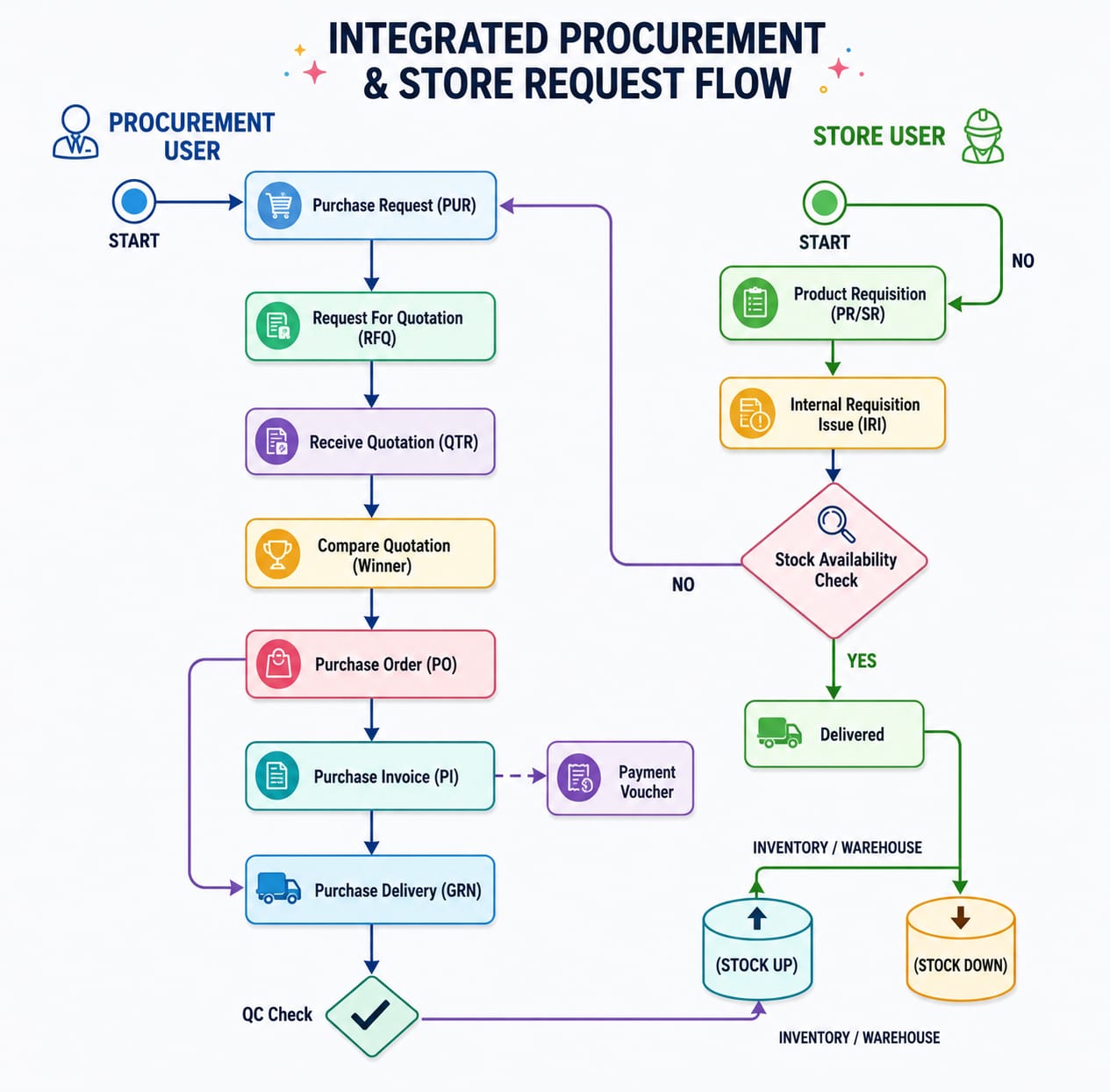
Quotation Comparison Workflow
The Quotation Comparison Workflow provides a high-level view of how a purchase requirement moves between the Store and Procurement teams. It starts with a product requirement at the store and determines whether the item can be fulfilled from existing stock or needs to be purchased.When the required product is not available, the requirement moves into the procurement flow, where quotations are requested from vendors, received, evaluated, and used to select a suitable vendor. The process then continues through Purchase Order, delivery, quality checking, inventory update, and payment.
Product Requisition
The workflow starts with the Store User, who creates a Product Requisition (PR/SR) when a product is required.The requisition contains the products and quantities requested by the concerned department. It serves as the starting point for the store-side process and allows the system to determine whether the requirement can be fulfilled from existing inventory.
Internal Requisition Issue
After the Product Requisition is created, the Store User processes it through Internal Requisition Issue (IRI).The IRI is used to process the requested items from the store and determine whether they can be issued from the available inventory.
Stock Availability Check
The system checks the available stock against the requested quantity. At this stage, the workflow follows one of two paths:
- Stock Available: The requested items can be delivered from the store.
- Stock Not Available: The requirement triggers the Purchase Request (PUR) flow and moves to Procurement.
This ensures that the procurement process is only initiated when the required products cannot be fulfilled from available inventory.
Delivered
When the required stock is available, the Store User can deliver the requested products to the concerned department.The issued quantity is deducted from the available inventory as part of the store issue process.
Stock Down
Once the products are delivered from the store, the corresponding quantity is reduced from the Inventory/Warehouse.This represents the Stock Down movement caused by issuing products against the internal requirement.
Purchase Request
If the required products are not available in stock, the workflow moves to the Procurement User, who creates a Purchase Request (PUR).The Purchase Request defines the products that need to be purchased, along with their required quantities and other relevant purchasing information.This becomes the basis for starting the external procurement process.
Request for Quotation
The Purchase Request is then used to initiate the Request for Quotation (RFQ) process.The RFQ allows the Procurement User to request quotations from selected vendors for the required products. The vendors invited through the RFQ can submit their prices and other commercial terms for consideration.
Receive Quotation
Once vendors respond to the RFQ, their quotations are recorded through the Receive Quotation process.Each quotation contains the vendor's offered information for the requested products, such as quantity, unit price, delivery details, and other applicable terms.This creates a record of the vendor responses that can be used during the quotation evaluation process.
Compare Quotation and Select Winner
The received quotations are then reviewed and compared to determine the most suitable vendor.The evaluation can consider factors such as price, delivery terms, payment terms, product requirements, and other relevant purchasing conditions.After the evaluation is completed, a winning quotation is selected. The selected vendor is then used for the next stage of the procurement process.
Purchase Order
After the vendor has been selected, a Purchase Order (PO) is created.The Purchase Order formally records the organization's requirement to purchase the selected products from the chosen vendor. It contains the agreed product quantities, prices, and other applicable purchase details.
Purchase Delivery
When the vendor delivers the purchased products, the receiving process is recorded through Purchase Delivery (GRN).The Purchase Delivery records the products and quantities received from the vendor and provides the receiving record against the Purchase Order.
Quality Control
After receiving the products, they may go through Quality Control (QC) where quality inspection is required.The received products are checked against the required specifications and quality standards before they are added to available inventory.
Stock Up
Once the products are successfully received and cleared through the required process, the received quantity is added to the Inventory/Warehouse.This creates a Stock Up movement and increases the available inventory.The newly received stock can then be used to fulfill future internal requirements.
Purchase Invoice and Payment
The Purchase Invoice (PI) is processed after the purchase delivery. The invoice can be cross-checked against the Purchase Delivery to verify that the billed products and quantities match what was actually received.Once the required verification is completed, a Payment Voucher can be created to process the payment to the vendor.