Role-Based Access Control (RBAC)
Role-Based Access Control (RBAC) is a security framework that restricts system access to authorized users based on their assigned roles. In PrismERP, RBAC is the foundational mechanism to manage who can access different features, data modules, and system functionalities. Roles represent a collection of permissions that govern user capabilities, and they simplify user management by grouping permissions together rather than assigning them individually.
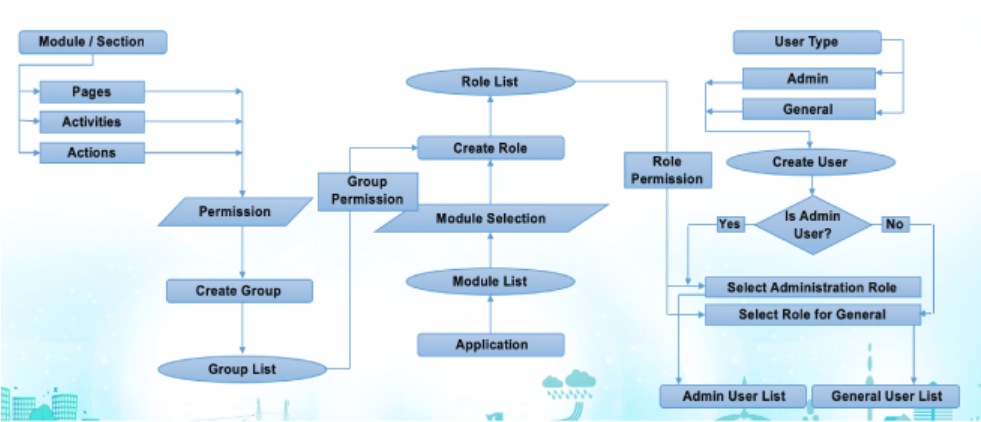
RBAC is Used in PrismERP
-
Access Role Management: Admins navigate to the User Access Control section under Administration or General Configuration.
-
Create Roles: Define roles that represent job functions or access requirements.
-
Assign Permissions: Link permissions (access to modules, reports, menus) to roles carefully according to policy.
-
Create and Manage Users: Add users into the system and assign one or more roles.
-
Control User-Role Assignments: Adjust assignments as necessary for organizational changes.
-
Review and Audit: Periodically review roles, permissions, and user-role assignments to maintain security hygiene.
-
Use Additional Security Features: Leverage multi-factor authentication and IP restrictions integrated with RBAC for enhanced protection.