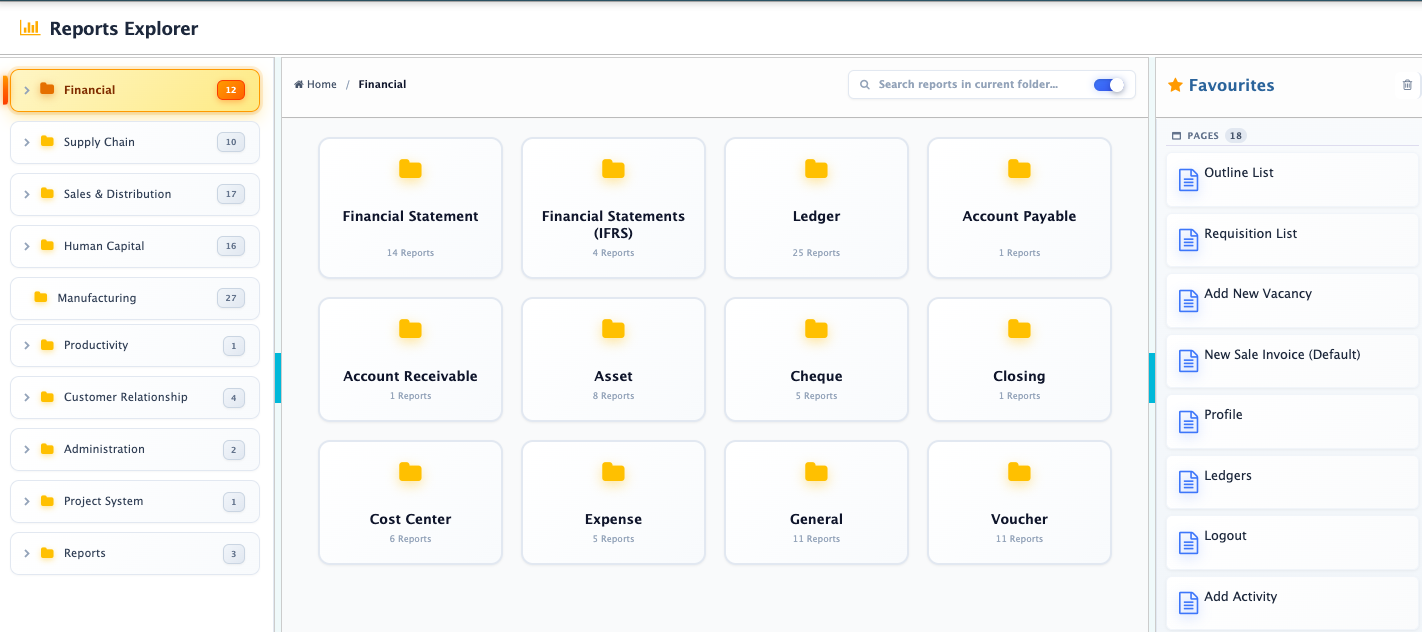
Report Explorer
In PrismERP, users can access reports either from the individual module report menus or through the Report Explorer, which provides a centralized view of reports across the entire system.The Report Explorer displays all reports in a structured module-wise hierarchy, making it easier to browse and access reports from a single location. Reports are organized under major system modules such as Financial, Supply Chain, Sales & Distribution, Human Capital, Manufacturing, Productivity, Customer Relationship, Administration, and Project System. Each module contains its related report groups and report counts.
Users can expand modules and navigate through report categories to open specific reports directly from the explorer. A search option is also available to quickly locate reports from the report list.The report search includes two configurations. If Search reports in current folder is selected, the search will only return reports from the currently opened folder or module. If not selected, the search works across the entire report explorer and returns matching reports from all modules and folders.Once a report is selected, it opens in the Report Previewer where users can apply filters, select report outlines, configure layouts, and generate the final report output.The Report Explorer also includes a Favourites section. Users can bookmark frequently used reports from different modules across the system, and those bookmarked reports become visible in the favourites list for quick access.