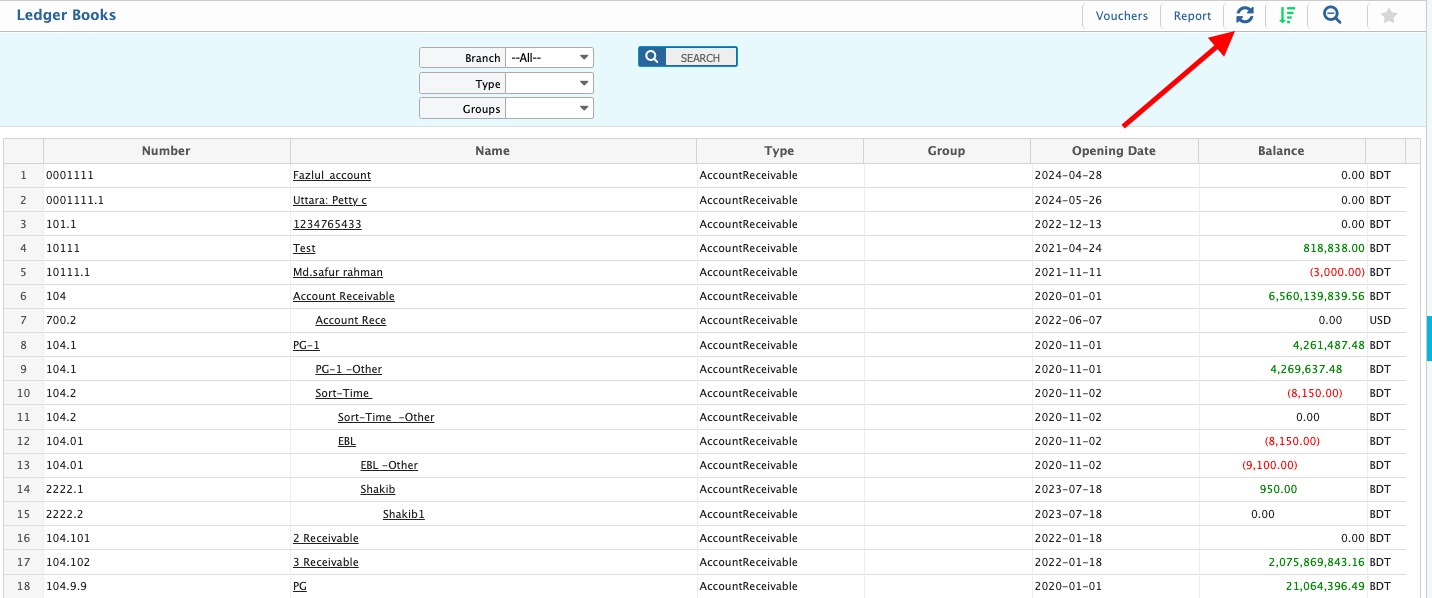
Account Balance Recalculation

A Smart Process to Revalidate and Synchronize Account Totals Across the System
In dynamic business environments, financial data often undergoes changes due to corrections, returns, backdated entries, or manual adjustments. To maintain the accuracy and integrity of your financial reports, PrismERP offers a powerful Account Balance Recalculation feature.
This function ensures that all account balances—whether in ledgers, subledgers, or control accounts—are correctly updated and reflect the latest transactional data, helping you maintain financial accuracy, compliance, and audit readiness.

Account Balance Recalculation in PrismERP is the process of updating and correcting the balances of general ledger and subledger accounts after financial adjustments. It ensures that any new transactions, reversals, or corrections are properly reflected in the account totals—providing a true and updated financial position.
This process is especially useful after:

  • Manual journal adjustments
  • Backdated entries or postings
  • Voided or corrected transactions
  • Year-end financial closing activities
  • Migration of legacy data into PrismERP

How Does It Work in PrismERP?

PrismERP automatically tracks transactions and maintains real-time balances. However, in cases of manual entries, reversals, or bulk updates, this feature allows you to trigger a recalculation process for:

  • Specific accounts
  • Particular periods
  • Complete ledger summaries

With one click, the system scans and reprocesses transactions, updating balances without affecting transaction history.

Key Features of Account Balance Recalculation

Real-Time Balance Correction

Recalculate balances instantly after adjustments to ensure reporting accuracy.

Selective Recalculation

Apply recalculations to specific accounts, cost centers, departments, or fiscal periods.

Preserves Transactional Integrity

Balances are updated without altering historical transaction data—ensuring audit compliance.

Supports Multi-Currency Reconciliation

Accurately reprocess balances in base and foreign currencies for international transactions.

Fully Integrated with Financial Modules

Recalculation reflects across General Ledger, Accounts Payable, Accounts Receivable, and Trial Balance reports.

User Permission Control

Only authorized finance users can perform recalculation tasks to ensure secure financial control.

Why Is Account Balance Recalculation Important?

  • Ensures accurate financial statements
  • Avoids discrepancies in audit and compliance checks
  • Supports smooth year-end closing and reporting
  • Helps maintain consistency after data migration or corrections
  • Reduces manual effort in resolving ledger mismatches

Integrated for Total Financial Accuracy

This feature works seamlessly with:

  • General Ledger (GL)
  • Subledger Systems
  • Cash & Bank
  • Fixed Assets
  • Trial Balance and Financial Reports

No matter how complex your chart of accounts or financial structure is, PrismERP ensures all recalculated balances are reflected in real-time reports.

Who Should Use This Feature?

  • Finance Teams managing large volumes of adjustments
  • Auditors and Controllers ensuring year-end accuracy
  • Accountants correcting historical data or performing reconciliations
  • ERP Admins handling post-migration validations

Stay Financially Accurate with PrismERP

When financial precision matters, the Account Balance Recalculation feature ensures your books are always correct, current, and audit-ready.
Request a Demo or consult with our ERP experts to see how this feature supports your accounting integrity.