Standard Vouchers
Standard vouchers in PrismERP provide a clear and organized way to record financial transactions. They capture every payment, receipt, fund transfer, or internal adjustment accurately, ensuring all business transactions are properly documented.The four key vouchers—Payment, Receipt, Contra, and Journal—help maintain accuracy, transparency, and a complete audit trail. By using these vouchers, businesses can streamline accounting processes, reduce errors, and keep financial management straightforward and reliable.
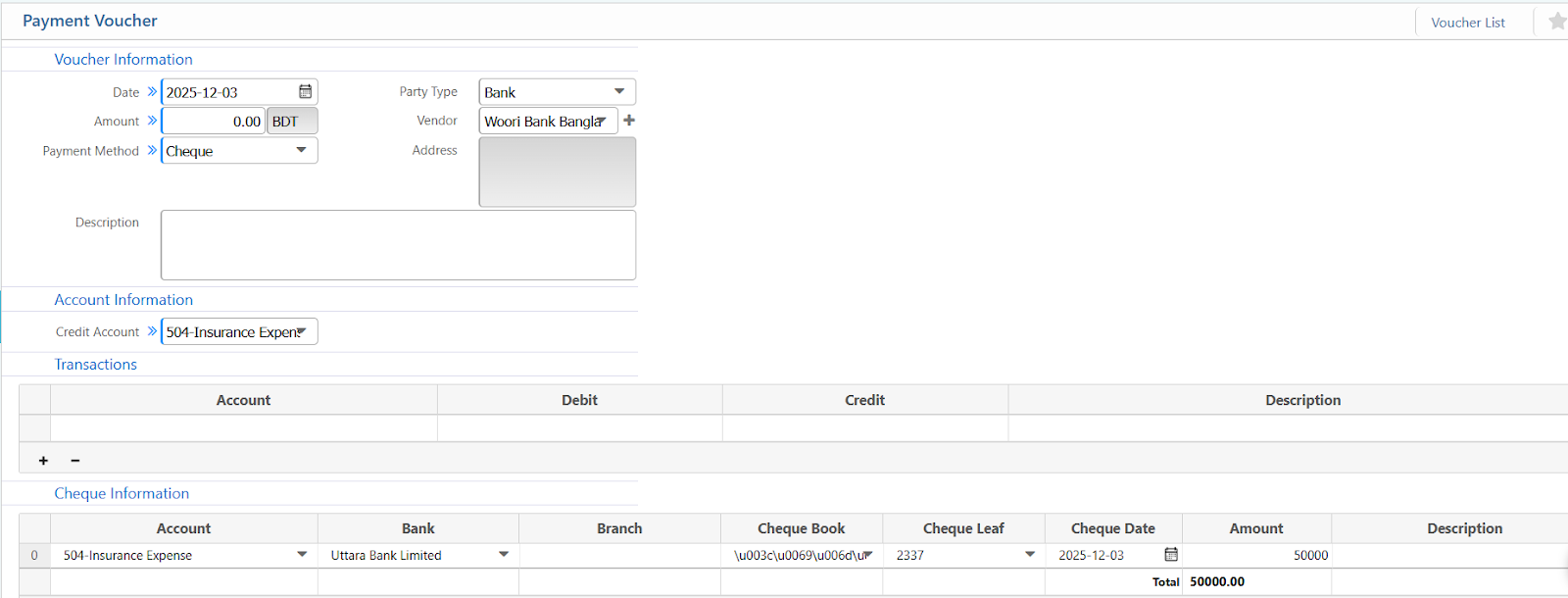
1. Payment Voucher
| Field | Description |
|---|---|
| Date | Enter the voucher date. |
| Amount | Enter the payment amount in BDT. |
| Payment Method | Select the method (Cash, Bank, Mobile Banking, etc.). |
| Party Type | Choose the party type (Vendor, Customer, Employee, All). |
| Vendor | Select the vendor linked to this payment. |
| Credit Account | Select the credit account for the outgoing payment. |
| Transactions-Account | Select the account for debit or credit entry. (Required when splitting receipt or adding multiple accounts) |
| Transactions – Debit | Enter the debit amount (if applicable). |
| Transactions –Credit | Enter the credit amount (if applicable). |
| Cheque – Account | Select the bank account used for the cheque. (Required if Payment Method is Bank / Cheque) |
| Cheque – Bank | Choose the bank name. |
| Cheque – Branch | Choose the bank branch. |
| Cheque – Cheque Book | Select the cheque book. |
| Cheque – Cheque Leaf | Select the cheque leaf number. |
| Cheque – Cheque Date | Enter the cheque date. |
| Cheque –Amount | Enter the cheque amount. |
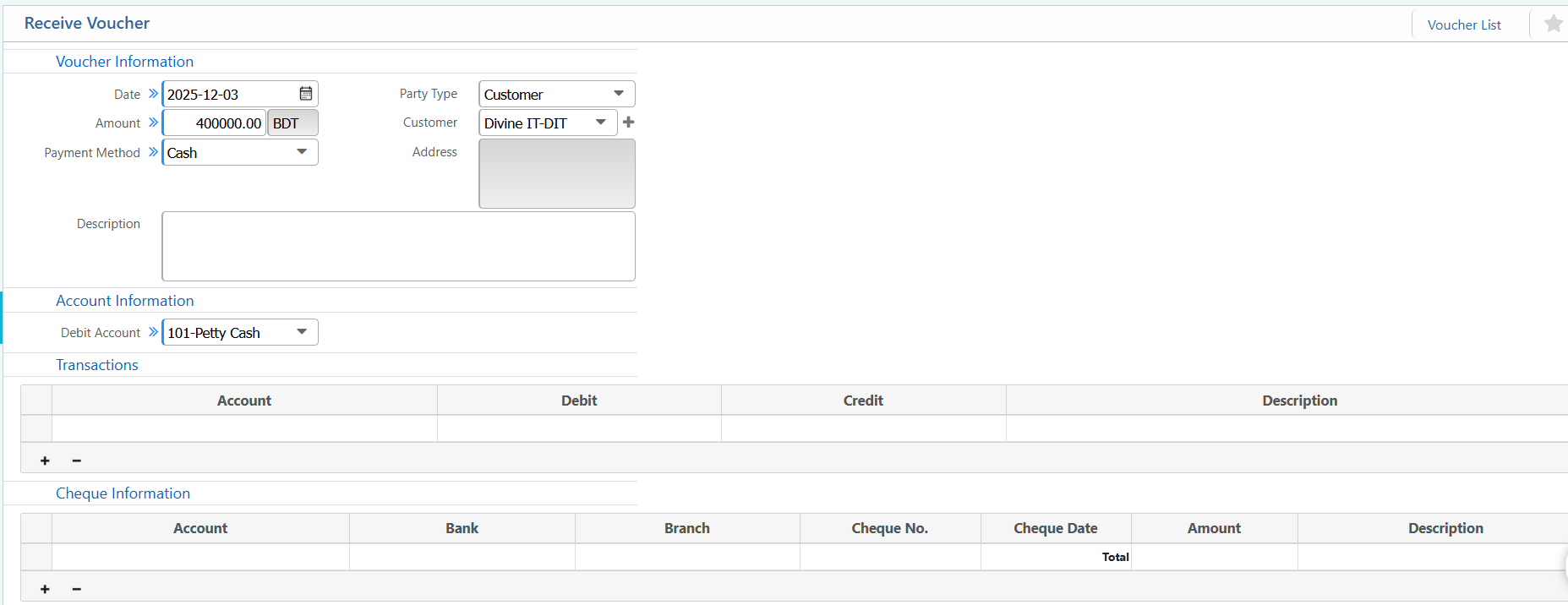
2. Receive Voucher
| Field / Section | Description / Action |
|---|---|
| Date | Enter the voucher date. |
| Amount | Enter the received amount in BDT. |
| Payment Method | Select the method (Cash, Bank, Mobile Banking, etc.). |
| Party Type | Choose the party type (Customer, Vendor, Employee, All). |
| Customer | Select the customer linked to this receipt. |
| Debit Account | Select the debit account receiving the money (e.g., Cash, Bank). |
| Transactions – Account | Select the account for debit or credit entry. (Required when splitting receipt or adding multiple accounts) |
| Transactions – Debit | Enter the debit amount (if applicable). |
| Transactions – Credit | Enter the credit amount (if applicable). |
| Cheque – Account | Select the bank account receiving the cheque. (Required if Payment Method is Bank / Cheque) |
| Cheque – Bank | Choose the bank name. |
| Cheque – Branch | Choose the bank branch. |
| Cheque – Cheque No. | Enter the cheque number. |
| Cheque – Cheque Date | Enter the cheque date. |
| Cheque – Amount | Enter the cheque amount. |
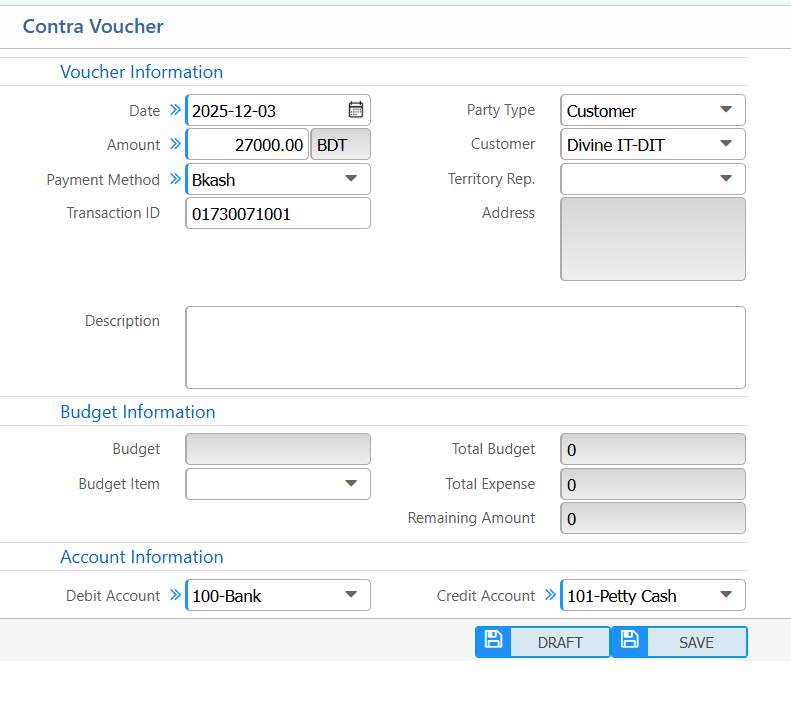
3. Contra Vouchers
| Field / Section | Description / Action |
|---|---|
| Date | Enter the voucher date. |
| Amount | Enter the amount to transfer in BDT. |
| Payment Method | Select the method (Cash, Bank, Mobile Banking, e.g., Bkash). |
| Transaction ID | Enter the transaction reference number (Required for digital payment). |
| Party Type | Select the party type (Customer, Vendor, Employee, All). |
| Customer | Select the customer linked to this voucher (if Party Type = Customer). |
| Territory Rep. | Select the responsible sales/territory representative. |
| Address | Enter or system auto-fills the address. |
| Budget Item | Select the specific budget item. |
| Debit Account | Select the account receiving the money (e.g., Bank). |
| Credit Account | Select the account from which the money is taken (e.g., Cash, Bank). |
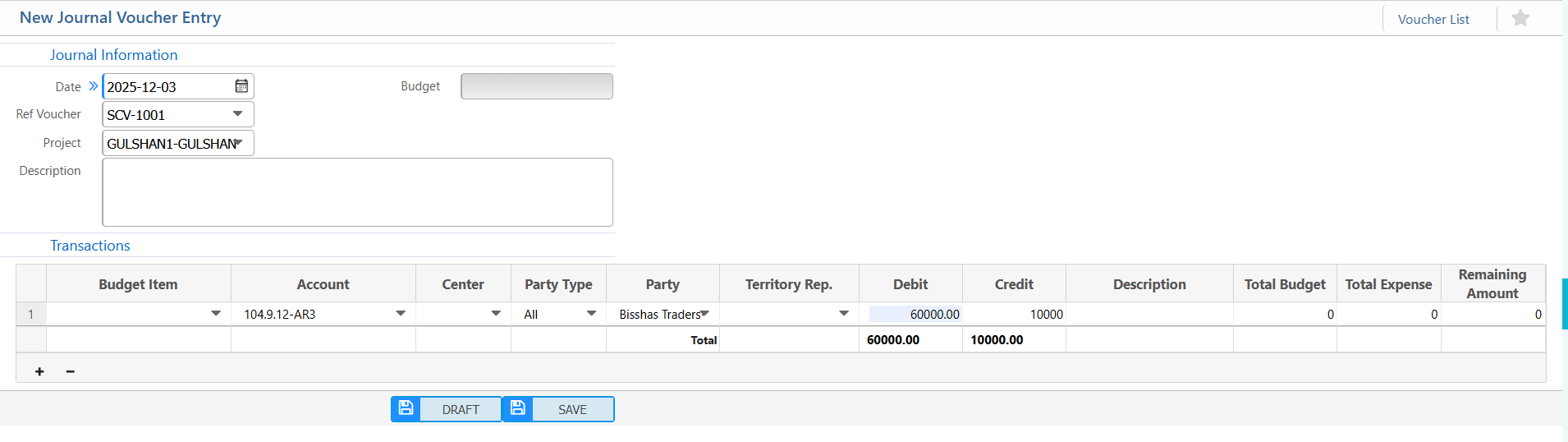
4. Journal Voucher
| Field | Action |
|---|---|
| Date | Enter the journal voucher date. |
| Ref Voucher | Enter reference voucher number (if applicable). |
| Project | Select the project linked to this journal entry. |
| Budget | Select the budget linked to this journal entry. |
| Transactions – Budget Item | Select the specific budget item for the transaction line. |
| Transactions – Account | Select the ledger account for this transaction. |
| Transactions – Center | Select cost/department center (if applicable). |
| Transactions – Party Type | Select party type (Customer, Vendor, Employee, Bank, All). |
| Transactions – Party | Select the specific party linked to the transaction. |
| Transactions – Territory Rep. | Select territory/sales representative (if applicable). |
| Transactions – Debit | Enter the debit amount for this transaction line. |
| Transactions – Credit | Enter the credit amount for this transaction line. |