Customer Master
Customer Master in PrismERP stores all essential information about each customer, including personal details, company data, contacts, addresses, and banking information. It tracks membership cards, categories, credit limits, and opening balances. Users can access vouchers, sale and service orders, ledger entries, attachments, and transactions linked to the customer. Control actions like creating invoices, recording receipts, assigning routes, and editing balances are available. Additional setups for customer categories, membership cards, and service portals help organize customer management efficiently.
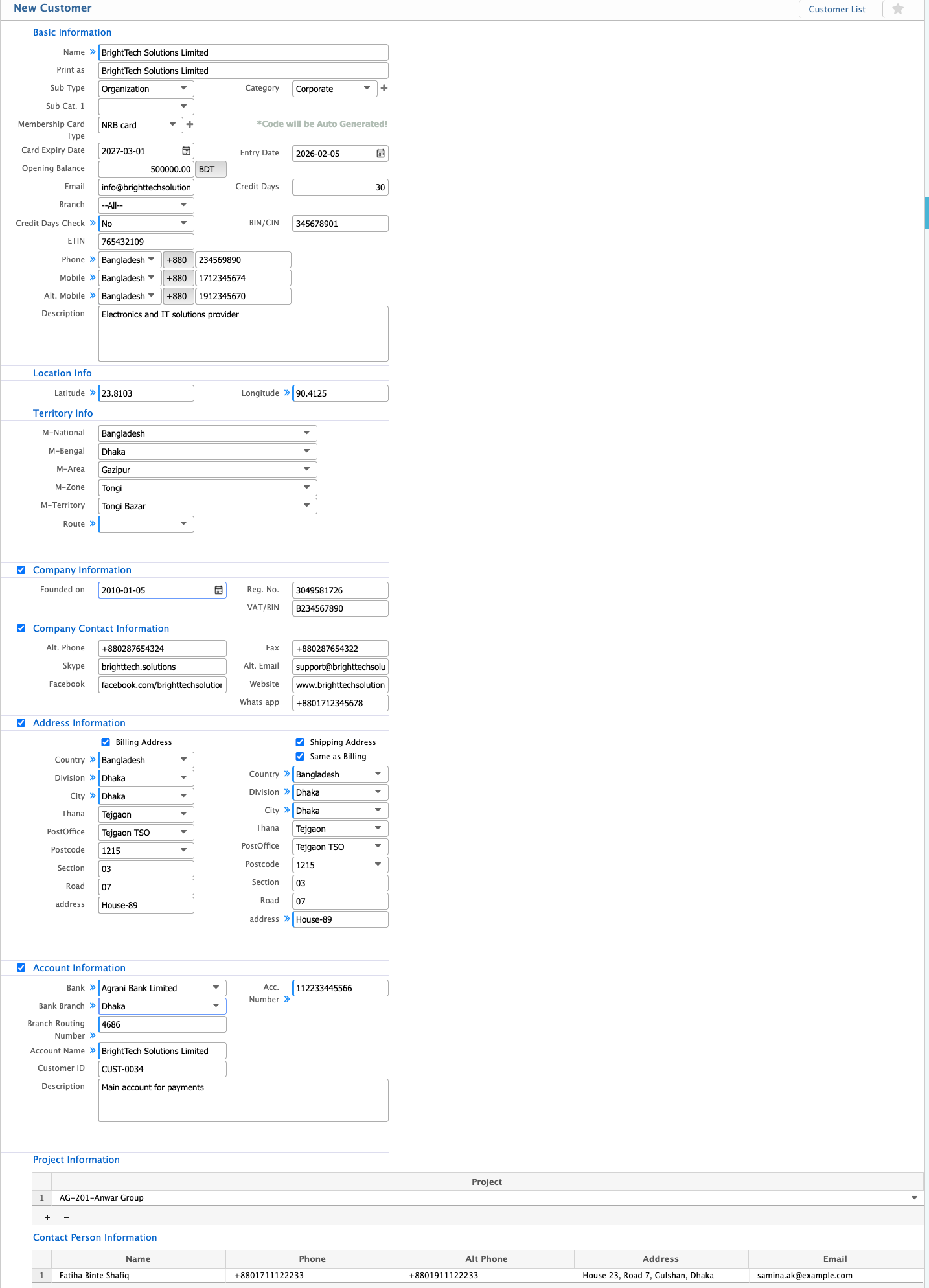
Add New Customer
| Field | Action |
|---|---|
| Name | Enter the customer’s full name. |
| Sub Type | Select the customer’s subtype. |
| Organization | Enter the organization name, if applicable. |
| Category | Select the category of the customer. |
| Parent | Select the parent customer, if any. |
| Membership Card Type | Select the type of membership card. |
| Card Expiry Date | Enter the expiry date of the membership card. |
| Opening Balance | Enter the customer’s opening balance in BDT. |
| Entry Date | Enter the date of entry. |
| Enter the customer’s email address. | |
| Credit Days | Enter the number of credit days allowed. |
| Branch | Select the branch the customer is associated with. |
| Credit Days Check | Toggle Yes/No to enforce credit day limit. |
| BIN/CIN | Enter the Business Identification Number / Corporate Identification Number. |
| ETIN | Enter the Electronic Tax Identification Number. |
| Phone | Enter the customer’s phone number. |
| Mobile | Enter the customer’s mobile number. |
| Alt. Mobile | Enter an alternate mobile number. |
| Description | Enter additional notes or description. |
| Latitude | Enter the geographical latitude of the customer location. |
| Longitude | Enter the geographical longitude of the customer location. |
| M-National | Select the national territory. |
| M-Bengal | Select the Bengal region. |
| M-Area | Select the area. |
| M-Zone | Select the zone. |
| M-Territory | Select the territory. |
| Route | Select the delivery route. |
| Founded on | Enter the company’s founding date. |
| Reg. No. | Enter the company registration number. |
| VAT/BIN | Enter the VAT or Business Identification Number. |
| Alt. Phone | Enter an alternate company phone number. |
| Skype | Enter the Skype ID. |
| Enter the company Facebook page link. | |
| Fax | Enter the fax number. |
| Alt. Email | Enter an alternate email address. |
| Website | Enter the company website. |
| Enter WhatsApp number. | |
| Billing Address | Enter the full billing address. |
| Country | Select the country (Bangladesh). |
| Division | Select the division. |
| City | Select the city. |
| Thana | Enter the Thana or sub-district. |
| PostOffice | Enter the post office name. |
| Postcode | Enter the postcode. |
| Section | Enter the section/local area. |
| Road | Enter the street/road name. |
| Address | Enter the full address line. |
| Shipping Address | Enter the shipping address if different from billing. |
| Bank | Select the bank. |
| Bank Branch | Select the bank branch. |
| Branch Routing Number | Enter the routing number of the branch. |
| Account Name | Enter the account holder name. |
| Customer ID | Enter the customer ID. |
| Acc. Number | Enter the bank account number. |
| Description | Add notes for the account. |
| Project | Select the project associated with the customer. |
| Name | Enter the contact person’s name. |
| Phone | Enter the contact person’s phone number. |
| Alt Phone | Enter an alternate phone number for the contact person. |
| Address | Enter the contact person’s address. |
| Enter the contact person’s email address. |
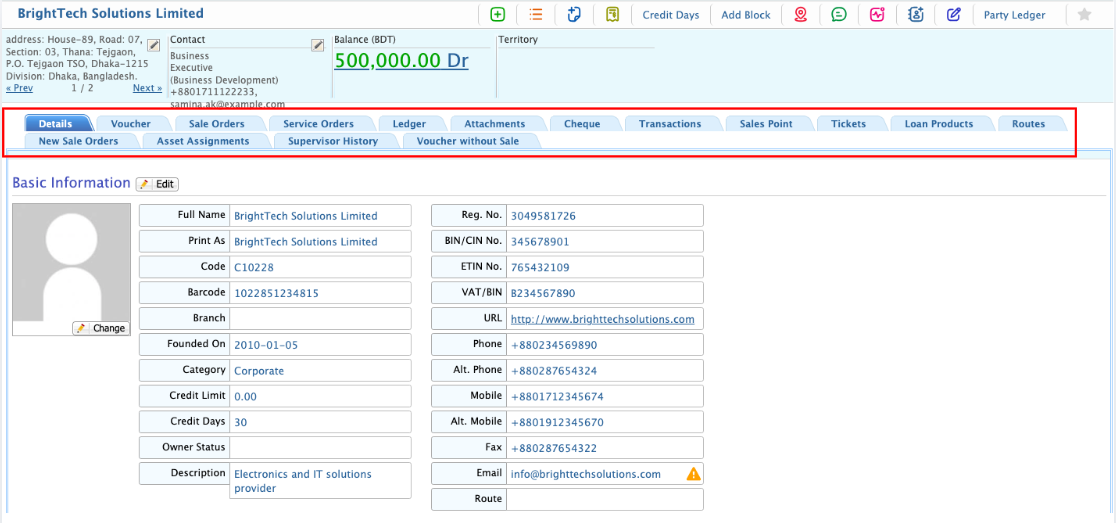
Customer Details View
| Field | Action |
|---|---|
| Details | View all basic information of the customer and edit the information as needed. |
| Voucher | View all vouchers linked to this customer, including payment and expense details. |
| Sale Orders | Access all sale orders placed by the customer, showing items, quantities, and delivery status. |
| Service Orders | View service orders for this customer, including service type, schedule, and completion status. |
| Ledger | Check all ledger entries for the customer account, including debits, credits, and balances. |
| Attachments | Add new documents related to this customer or download existing attachments for reference. |
| Cheque | View details of cheques received from this customer, including cheque number, date, and amount. |
| Transactions | Track all financial transactions for the customer, including payments, adjustments, and receipts. |
| Sales Point | Review sales transactions associated with this customer at different sales points. |
| Tickets | Access tickets raised by the customer, including service requests and support history. |
| Loan Products | View any loan products linked to this customer, with details of amounts, terms, and repayments. |
| Routes | Check delivery or service routes related to the customer, including assigned personnel and schedule. |
| New Sale Orders | Access details of new sale orders created for this customer before finalization. |
| Asset Assignments | Review any company assets assigned to this customer for projects or services. |
| Supervisor History | Track supervisor approvals or actions related to this customer’s transactions. |
| Voucher without Sale | View vouchers linked to this customer that are not associated with any sale order. |
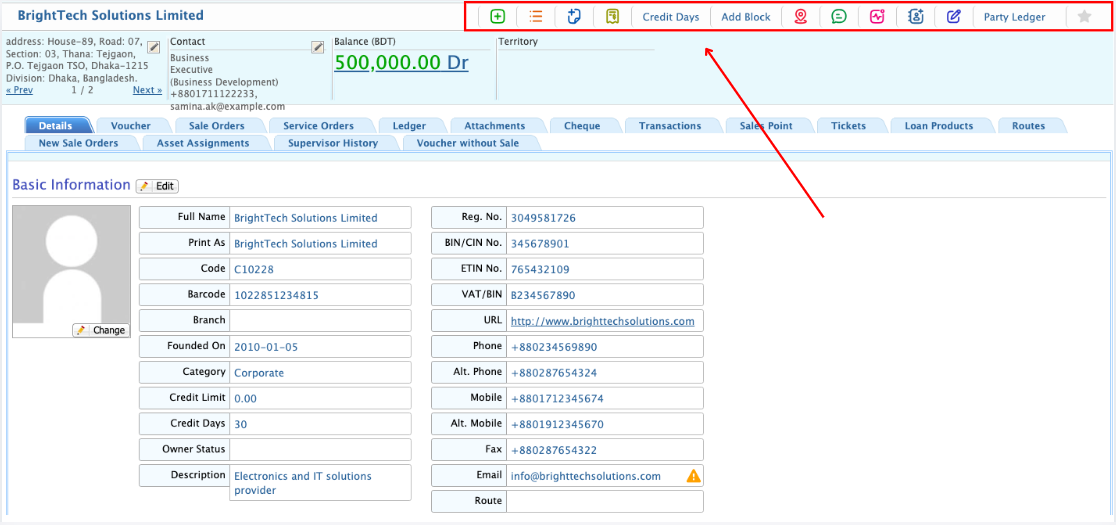
Customer Control Items
| Field | Action |
|---|---|
| New SI | Create a new Sale Invoice for the selected customer. |
| SI List | View the list of all Sale Invoices associated with the customer. |
| New SSO | Create a new Service Sale Order for the customer. |
| New Receipt | Record a new payment receipt from the customer. |
| Credit Days | Set or adjust the customer’s credit days. |
| Block | Block the customer for new orders or transactions temporarily. |
| Assign Route | Assign a delivery or service route for the customer. |
| SMS | Send an SMS to the customer using the registered mobile number. |
| Category Change Log | View the history of changes made to the customer’s category. |
| Add Contact | Add a new contact person for the customer. |
| Edit Opening | Edit the opening balance for the customer account. |
| Party Ledger | View the customer’s ledger, including all transactions and balances. |
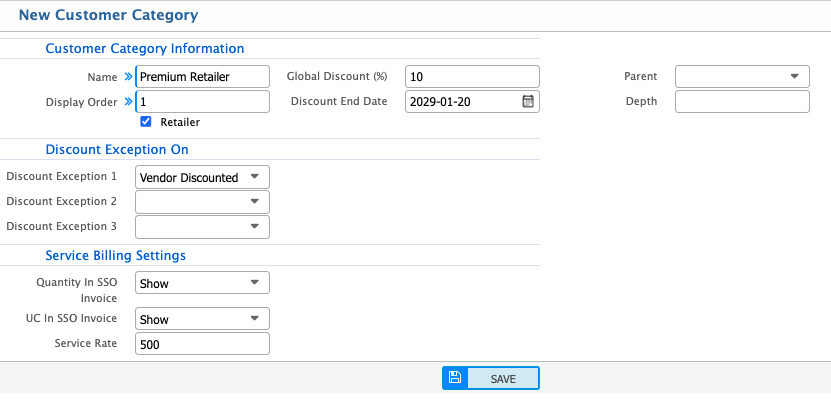
Add Customer Category
| Field | Action |
|---|---|
| Name | Enter the name of the customer category to identify it in the system. |
| Display Order | Set the display order for the category in lists.. |
| Retailer Global Discount | Enter the global discount percentage applicable to customers in this category. |
| Discount End Date | Specify the date until which the discount is valid. |
| Parent | Select a parent category if this is a sub-category. |
| Depth | Enter the depth level to indicate hierarchy within categories. |
| On Discount Exception 1 | Enter any exception rules for discount 1 applicable to this category. |
| Discount Exception 2 | Enter any exception rules for discount 2 applicable to this category. |
| Discount Exception 3 | Enter any exception rules for discount 3 applicable to this category. |
| Quantity In SSO Invoice | Choose whether to show the quantity in Service Sale Order invoices. |
| UC In SSO Invoice | Choose whether to show Unit Cost in Service Sale Order invoices. |
| Service Rate | Specify the service rate applicable for this category. |
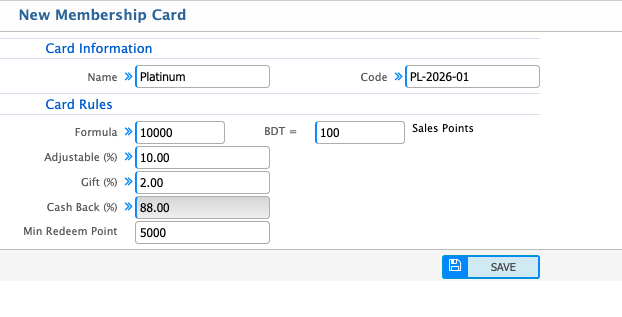
Add Membership Card Type
| Field | Action |
|---|---|
| Name | Enter the name of the membership card to identify it in the system. |
| Code | Enter or auto-generate a unique code for the card. |
| Formula | Define the formula for the card’s value or points calculation. |
| BDT | Specify the currency equivalent for points or rewards. |
| Sales Points | Enter the points earned per sale at applicable sales points. |
| Adjustable | Enter the adjustable percentage of points that can be modified. |
| Gift | Enter the percentage of gift points awarded. |
| Cash Back | Enter the percentage of cash back offered to cardholders. |
| Min Redeem Point | Enter the minimum number of points required to redeem rewards. |
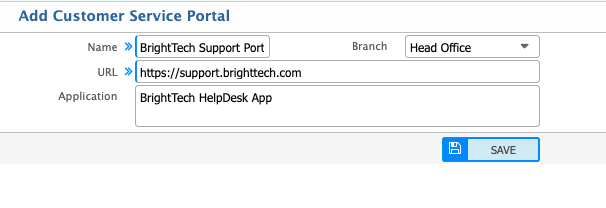
Add Customer Service Portal
| Field | Action |
|---|---|
| Name | Enter the name of the customer service portal to identify it within the system. |
| Branch | Select the branch or branches where this portal is applicable. |
| URL | Enter the URL of the portal. |
| Application | Enter the name of the application associated with this portal. |