Received Cheque
Received Cheque in PrismERP is used to record and manage all incoming cheques received from customers or other parties. Each entry captures cheque-related details such as date, bank information, amount, receipt book, and related references. The system maintains a structured list of all received cheques, where users can search, filter, update status, and generate reports. Each record is linked with its corresponding voucher for accounting reference and verification purposes.
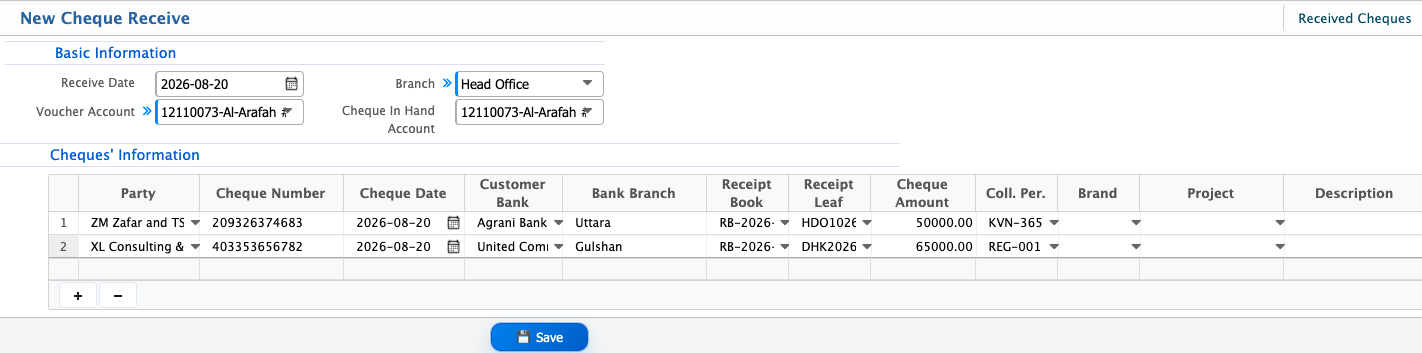
Add Received Cheque
| Field | Action |
|---|---|
| Receive Date | Enter the date on which the cheque is received. |
| Branch | Select the branch where the cheque is recorded. |
| Voucher Account | Select the account used to generate the accounting voucher for this receipt. |
| Cheque In Hand Account | Select the account where received cheques are temporarily held until clearance. |
| Party | Select the customer or party from whom the cheque is received. |
| Cheque Number | Enter the cheque number exactly as mentioned on the cheque. |
| Cheque Date | Enter the date written on the cheque. |
| Customer Bank | Enter the name of the customer’s bank issuing the cheque. |
| Bank Branch | Enter the branch name of the issuing bank. |
| Receipt Book | Select the receipt book used for this cheque receipt. |
| Receipt Leaf | Enter or select the receipt leaf number issued against this cheque. |
| Cheque Amount | Enter the amount mentioned on the cheque. |
| Coll. Per. | Enter the collection percentage if applicable. |
| Brand | Select the brand associated with this cheque receipt, if required. |
| Project | Select the related project if the cheque is received against a specific project. |
| Description | Enter any additional notes or reference details for the cheque receipt. |
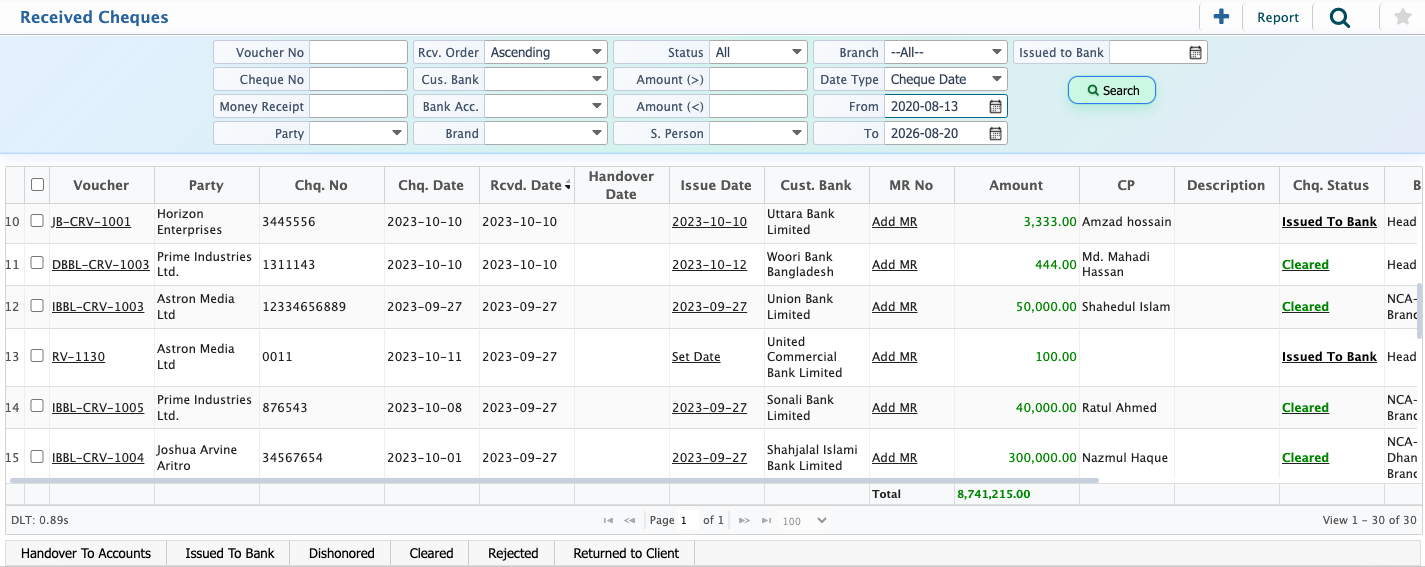
Received Cheque List - Search & Actions
| Field | Action |
|---|---|
| Voucher No | Search by voucher number to locate a specific received cheque entry. |
| Cheque No | Search by cheque number to find a particular cheque. |
| Money Receipt | Search by money receipt reference linked to the cheque, if available. |
| Party | Filter by party to view cheques received from a specific customer. |
| Rcv. Order | Sort received cheque records in ascending or descending order. |
| Cus. Bank | Filter by the customer bank from which the cheque was issued. |
| Bank Acc. | Filter by the bank account where the cheque is recorded. |
| Brand | Filter received cheques based on brand. |
| Status | Filter by cheque status and update the status as required. |
| S. Person | Filter by salesperson associated with the received cheque. |
| Branch | Filter received cheques by branch. |
| Date Type | Select Cheque Date to apply date-based filtering. |
| From | Select the start date to filter received cheques from a specific date. |
| To | Select the end date to filter received cheques up to a specific date. |
| Set Date | Set or update the effective date for selected received cheques when required. |
| Add MR | Assign or add a receipt book against the received cheque for proper tracking. |
| Add New | Add a new cheque receive entry directly from the list view. |
| Edit | Modify details of an existing received cheque entry if corrections are needed. |
| Report | Preview, generate, and download received cheque reports in formats such as PDF, Excel, or CSV. |