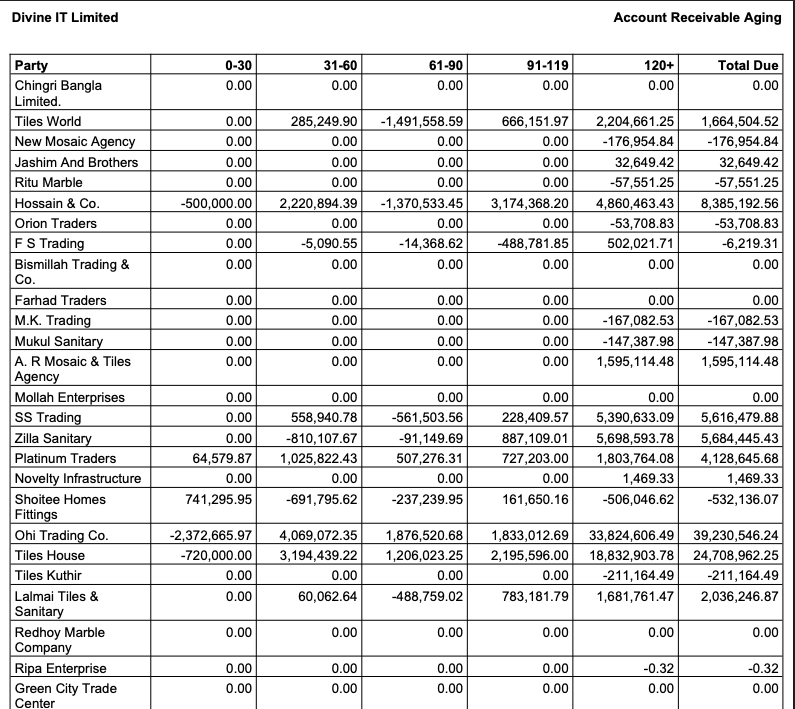
Account Receivable Aging
Invoice-Based Receivable with Aging in PrismERP is used to track all customer invoices and monitor the payment status of each invoice along with any outstanding amount. Every invoice is recorded in the system with its full details, and the payment status is continuously updated as transactions are made against it.The system organizes unpaid or partially paid invoices into aging periods based on how long the amount has remained outstanding. These aging ranges are typically grouped as 0–30 days, 31–60 days, and 61+ days. Each invoice is placed into the appropriate category depending on the number of days it remains unpaid after the invoice date. This structure helps in viewing customer dues based on time duration and current payment status.
PrismERP generates a receivable report that shows all outstanding invoices grouped by customer and aging category. The report includes invoice references, customer details, invoice dates, outstanding balances, and aging classification. Each record is shown in a structured format so that invoice-wise receivable positions can be reviewed easily across different customers.The report can be filtered using different parameters such as party, date range, branch, and invoice status. These filters allow users to view receivables based on specific customers, selected time periods, or organizational branches. The data is updated automatically whenever a payment or adjustment is recorded in the system, ensuring that the report always reflects the latest financial status.
The receivable report can also be exported in multiple formats such as PDF, Excel, or CSV. Each exported file contains the same invoice and aging information, maintaining consistency across reporting formats used for accounting, review, and documentation purposes within the system environment.