Bank Account Reconciliation
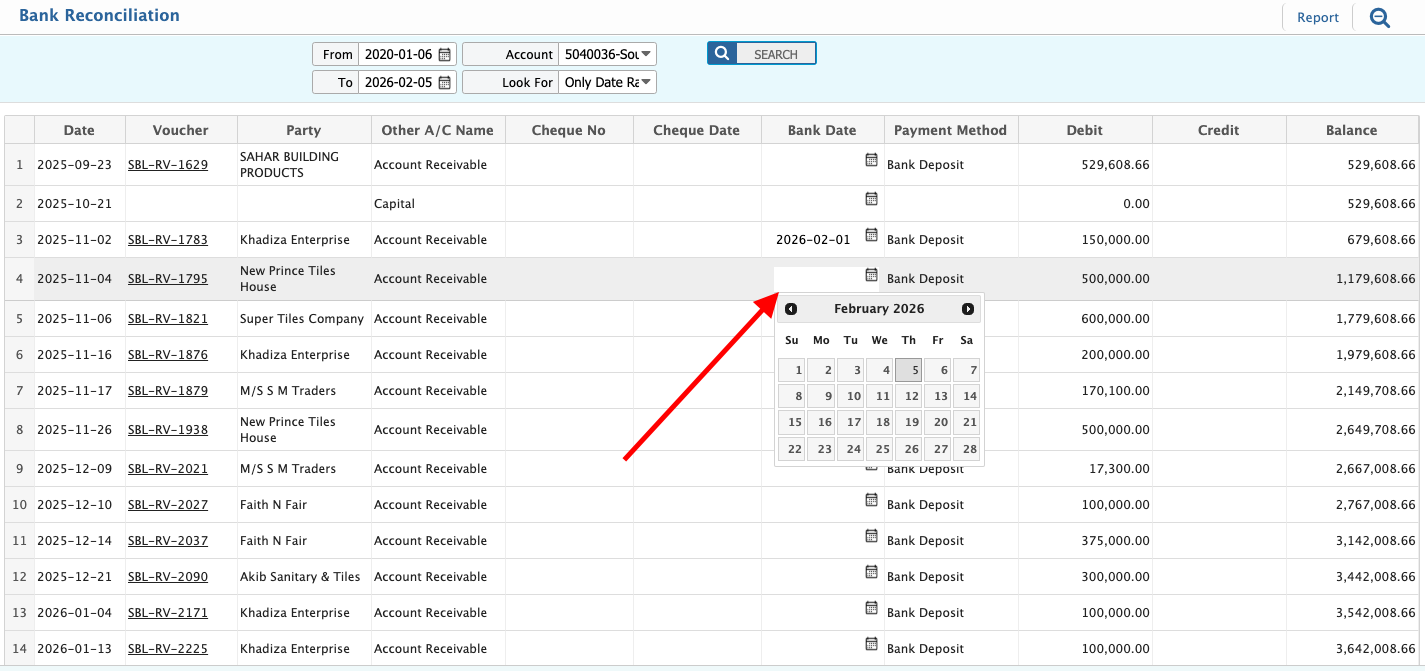
Bank Account Reconciliation in PrismERP is used to match system-recorded bank transactions with the actual entries shown in bank statements. It allows vouchers to be reviewed within a selected date range for a specific bank account and reconciled against balance dates. Differences can be identified and adjusted during the reconciliation process. Built-in reporting options support review, printing, and audit reference.
| Field | Action |
|---|---|
| Date Range | Select the required start and end date to define the reconciliation period. |
| Account | Select the bank account to be reconciled. |
| Search | Click to load all vouchers within the selected date range and account. |
| Voucher List | Review the displayed list of vouchers along with their transaction dates for reconciliation. |
| Reconciliation Date | Select the balance date to reconcile the listed entries; the system adjusts the balance automatically. |
| Report Date Range | Select the date range for the reconciliation report. |
| Preview / Print | Click Preview to view the report or Print to generate a hard copy of the reconciliation report. |