Loan Type & Policy Configuration
Loan Type and Loan Policy setup in PrismERP defines how employee loans are created, structured, and processed in the system. Loan Type is used to define different categories of loans such as advance salary, personal loan, or other organization-specific loan types. Loan Policy defines how each loan type behaves in practice by setting the rules for eligibility, calculation, repayment, and accounting.
In Loan Policy, the system allows configuration of employee eligibility conditions such as employment type, designation, department, and the minimum duration required before a loan can be applied. It also defines how the loan amount is calculated based on salary components, along with multipliers, fixed or variable rules, installment count, repayment limits, and interest settings.
The policy also controls repayment behavior, including installment structure, repayment frequency, maximum delay period, and whether multiple loans can run at the same time. It further defines how and when repayment starts in relation to loan disbursement.
At the accounting level, Loan Policy maps the loan process to specific accounts such as loan account, principal account, interest account, and contra account to ensure proper financial posting during disbursement and repayment.
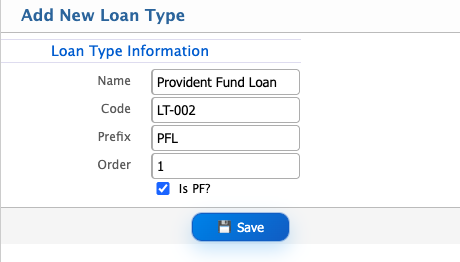
Add Loan Type
| Field | Action |
|---|---|
| Name | Enter the name of the loan type. |
| Code | Enter a unique identifier for the loan type for system tracking and reference. |
| Prefix | Enter a short prefix that will be used in auto-generated loan numbers. |
| Order | Enter the display order to define how this loan type will appear in lists. |
| Is PF? | Select if the loan type is related to Provident Fund (PF); enable if applicable, otherwise keep disabled. |
Add Loan Policy
| Field | Action |
|---|---|
| Name | Enter the name of the loan policy for identification. |
| Eligible For | Select the category of employees (e.g., all employees, specific groups, or designations) eligible under this policy. |
| Employee Eligibility | Define specific eligibility conditions such as department, designation, or employee type. |
| Eligible After Type | Select the condition type for eligibility (e.g., after joining, after confirmation). |
| Eligible After | Enter the required duration (e.g., months or years) an employee must complete to become eligible. |
| Loan On | Select the basis on which the loan amount will be calculated (e.g., basic salary, gross salary). |
| Multiplier Type | Select how the multiplier is applied (e.g., fixed or variable). |
| Loan Type | Select the applicable loan type linked to this policy. |
| Multiplier | Enter the multiplier value to calculate maximum loan eligibility. |
| Fixed Variant | Select if the loan amount is fixed or varies based on defined rules. |
| Installment | Enter the number of installments for loan repayment. |
| Max Delay (Months) | Enter the maximum allowed delay period before repayment starts. |
| Max Tenure (Year - Fixed EMI) | Enter the maximum repayment duration in years for fixed EMI loans. |
| Allow Concurrent Loan | Select whether employees can take multiple loans at the same time. |
| Installment Applicable | Select whether installment-based repayment is applicable for this policy. |
| Repayment from Disburse Month | Select if repayment starts from the same month as loan disbursement. |
| Repayment Frequency | Select how frequently repayments will occur (e.g., monthly). |
| Min Installment | Enter the minimum installment amount allowed. |
| Max Installment | Enter the maximum installment amount allowed. |
| Interest Applicable | Select whether interest will be applied to the loan. |
| Loan Account | Select the account where the loan amount will be recorded. |
| Principal Account | Select the account used for tracking the principal repayment. |
| Interest Account | Select the account used for recording interest amounts. |
| Contra Account | Select the contra account used for balancing loan-related transactions. |