Training Finance
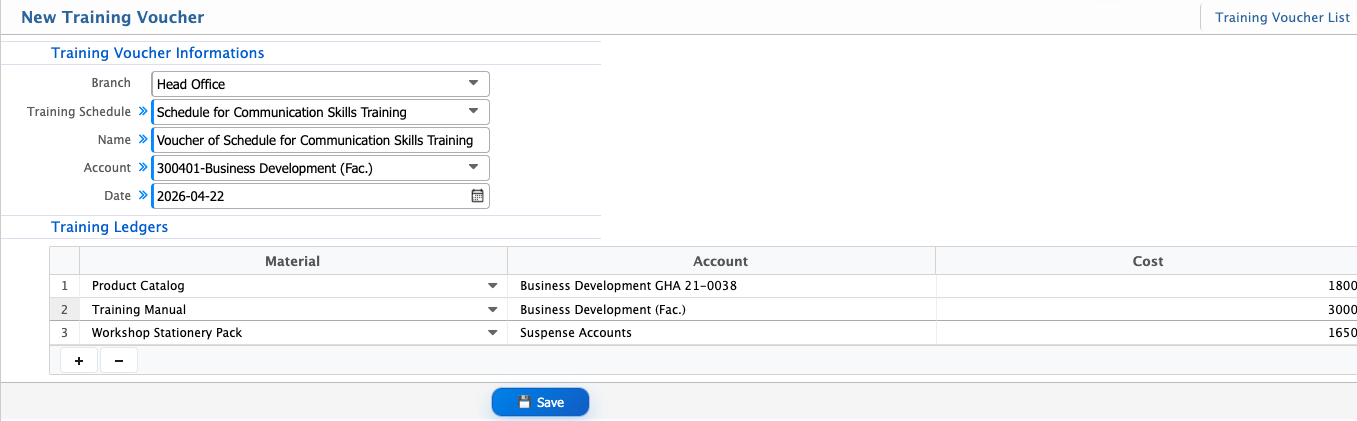
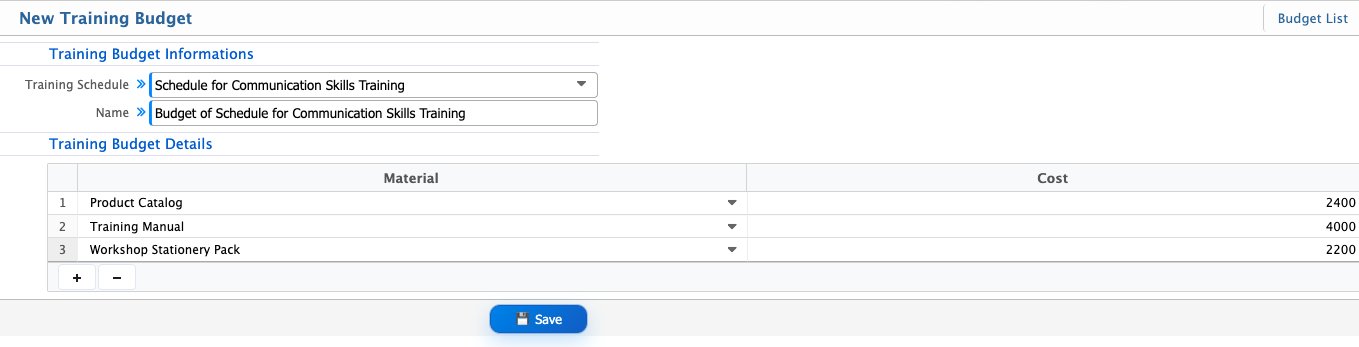
Training Finance in PrismERP is used to manage all financial records related to training activities. It includes budgeting for training sessions and recording expenses through vouchers linked with specific training schedules.Under the Training Budget, users can assign materials to a training schedule and define the associated cost for each item. Under Training Voucher, users can record financial transactions by selecting the branch, training schedule, account, materials, and cost details.
Add Training Budget
| Field | Action |
|---|---|
| Training Schedule | Select the training schedule for which the budget is being created. |
| Material | Select the training material included in the budget. |
| Cost | Enter the cost of the selected training material. |
Add Training Voucher
| Field | Action |
|---|---|
| Branch | Select the branch where the training voucher will be created. |
| Training Schedule | Select the training schedule linked with the voucher. |
| Name | Enter the name/reference title of the training voucher. |
| Account | Select the account associated with the training expense or transaction. |
| Date | Select the voucher creation or transaction date. |
| Material | Select the training material used in the training. |
| Account | Select the ledger account where the material cost will be recorded. |
| Cost | Enter the cost amount for the selected training material. |