Training Setup
Training Setup in PrismERP is used to configure all core training master data required for training management. It includes Training Evaluation, Training Material, Training Organization, Training Venue, Trainer, and Training definitions. These setups define how training evaluation is done, how materials and venues are assigned, and how trainers are linked to training. It also connects evaluation methods with each training type. The Training Setup module in PrismERP serves as the base configuration for all training-related operations.
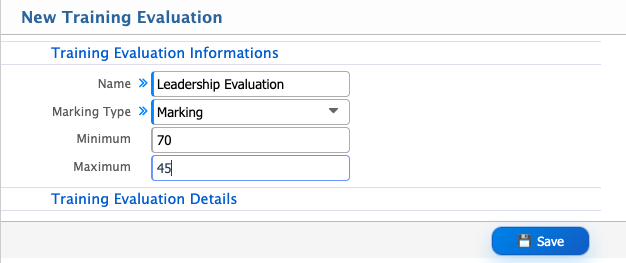
Add Training Evaluation
| Field | Action |
|---|---|
| Name | Enter the evaluation name to identify the training assessment. |
| Marking Type | Select the marking type (e.g., numeric, percentage, grade-based) used for evaluation. |
| Marking | Select the marking structure or method applicable to the evaluation. |
| Minimum | Enter the minimum score required for the evaluation. |
| Maximum | Enter the maximum score allowed for the evaluation. |
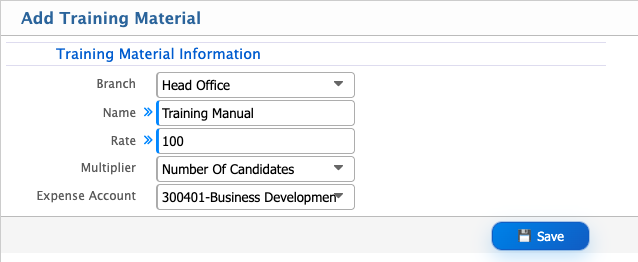
Add Training Material
| Field | Action |
|---|---|
| Branch | Select the branch where the training material will be assigned. |
| Name | Enter the name of the training material for identification (e.g., Training Manual, Toolkit, Laptop). |
| Rate | Enter the unit cost of the training material used for calculation. |
| Multiplier | Enter the multiplier value to scale the material cost based on usage or allocation logic. |
| Expense Account | Select the expense account where the training material cost will be recorded. |
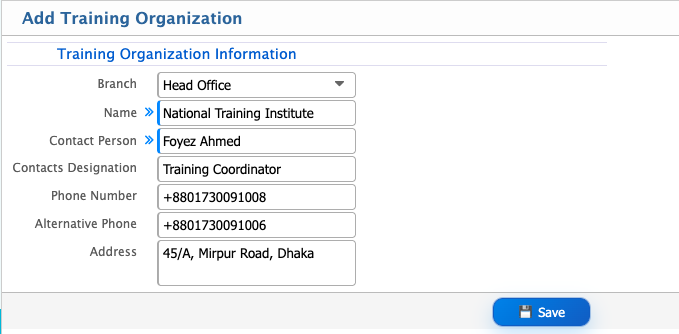
Add Training Organization
| Field | Action |
|---|---|
| Branch | Select the branch where the training organization will be assigned. |
| Name | Enter the name of the training organization. |
| Contact Person | Enter the name of the primary contact person from the organization. |
| Contacts Designation | Enter the designation of the contact person. |
| Phone Number | Enter the primary phone number of the organization. |
| Alternative Phone | Enter an alternative contact number for communication purposes. |
| Address | Enter the full address of the training organization. |
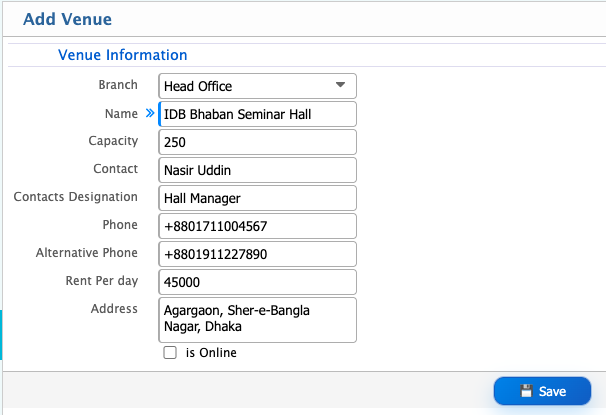
Add Training Venue
| Field | Action |
|---|---|
| Branch | Select the branch where the venue will be assigned. |
| Name | Enter the name of the venue used for training or events. |
| Capacity | Enter the total number of participants the venue can accommodate. |
| Contact | Enter the name of the primary contact person for the venue. |
| Contacts Designation | Enter the designation of the venue contact person. |
| Phone | Enter the primary contact number for the venue. |
| Alternative Phone | Enter an alternative contact number for communication. |
| Rent Per Day | Enter the daily rental cost of the venue. |
| Address | Enter the full address of the venue location. |
| Is Online | Select whether the venue is online (virtual) or physical. |
Add Trainer
| Field | Action |
|---|---|
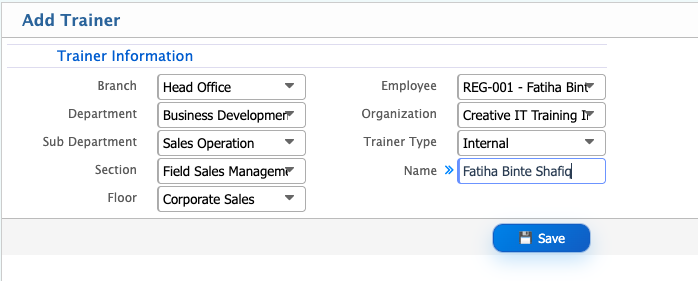
| Branch | Select the branch where the trainer will be assigned. |
| Department | Select the department to which the trainer is assigned. |
| Sub Department | Select the sub department under the main department. |
| Section | Select the section for more specific organizational grouping. |
| Floor | Select the floor where the trainer is located or assigned. |
| Employee | Select the employee who will act as a trainer (used for internal trainers). |
| Organization | Select the external organization if the trainer is associated with an external training provider. |
| Trainer Type | Select the trainer type: Internal, External, or Organizational. |
| Name | Enter the name of the trainer for identification. |
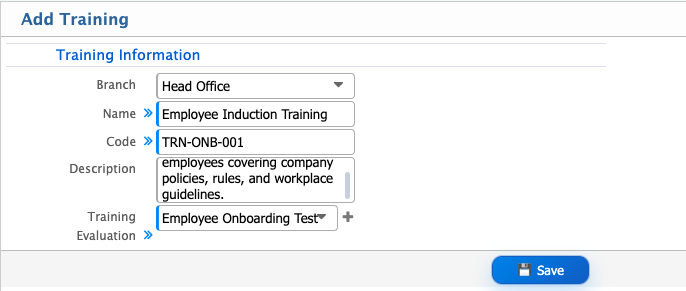
Add Training
| Field | Action |
|---|---|
| Branch | Select the branch where the training will be assigned. |
| Name | Enter the name of the training program. |
| Code | Enter a unique code for identifying the training. |
| Description | Enter a brief description of the training purpose and content. |
| Training Evaluation | Select the evaluation method used to assess trainee performance in this training. |