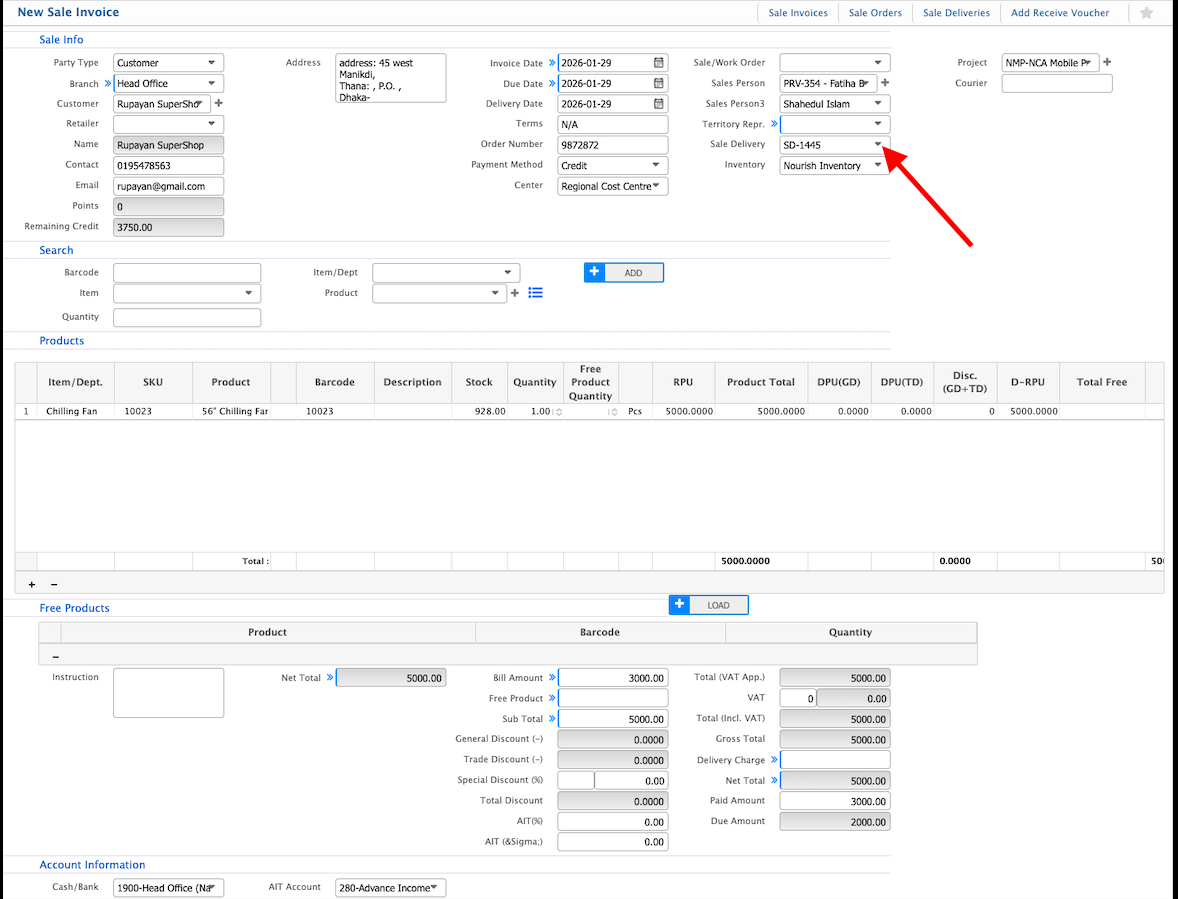
Sale Invoice from Delivery
Sale Invoice from Delivery in PrismERP allows invoices to be created based on an existing delivery record. Delivery, customer, and product details are automatically brought into the invoice, allowing users to focus on reviewing quantities, managing free products, and completing payment-related information. Delivery charges and account details can be entered during the same process.
| Field | Action |
|---|---|
| Party Type | Select the type of party. |
| Customer | Select the customer for whom the sale invoice is being created. |
| Branch | Select the branch under which the invoice is generated. |
| Invoice Date | Select the date of the sale invoice. |
| Due Date | Enter the payment due date for the invoice. |
| Delivery Date | Enter the expected delivery date for the order. |
| Terms | Select payment or delivery terms. |
| Order Number | Enter the associated sale order number. |
| Payment Method | Select the payment method. |
| Center | Select the sales or distribution center handling the invoice. |
| Sale/Work Order | Select the related sale or work order. |
| Sales Person | Select the salesperson responsible for the invoice. |
| Territory Repr. | Select the territory representative, if applicable. |
| Inventory | Select the inventory from which items will be issued. |
| Project | Select the related project, if applicable. |
| Courier | Enter the courier service for delivery. |
| Item/Dept | Search or select the item or department. |
| Item | Select the specific item for invoicing. |
| Product | Select the product to add it to the sale invoice. |
| Quantity | Enter the quantity of the selected product. |
| Free Product | Select eligible free products linked with the sale invoice. |
| Free Product Quantity | Enter the quantity of any free products linked to the item. |
| Instruction | Enter any special instructions for the free product. |
| Delivery Charge | Enter applicable delivery charges. |
| Paid Amount | Enter the amount paid against the invoice. |
| Cash/Bank | Select the cash or bank account used for payment. |
| AIT Account | Select the AIT account for recording advance income tax. |