The PrismERP Sale Order lets businesses create, manage, and track sales orders directly within the ERP system. Users can enter order details, add products, manage free items, apply terms and conditions, and calculate totals. With PrismERP, sales orders are recorded accurately, deliveries can be tracked, and customer transactions are easier to manage.
Sale Order (User Section)
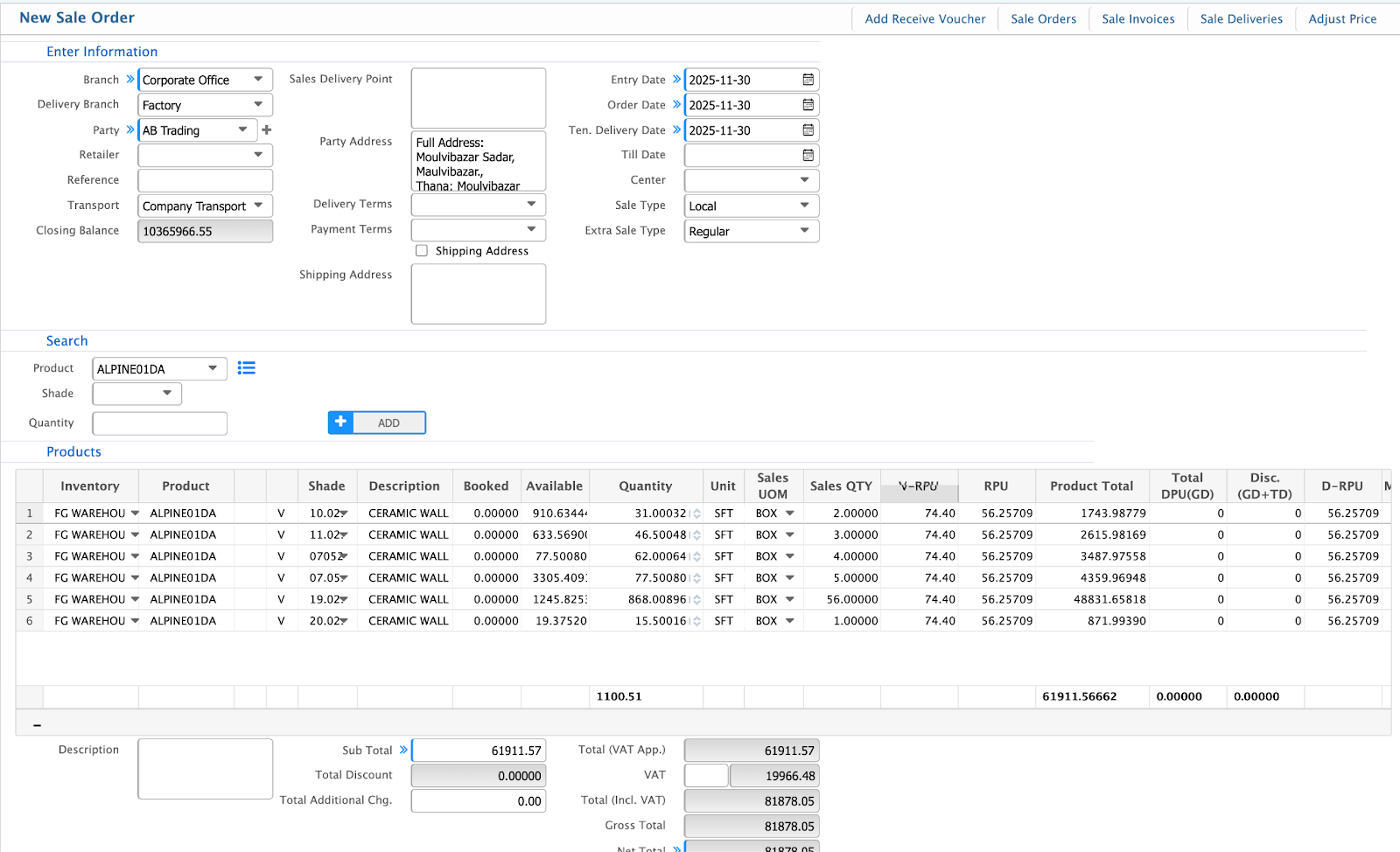
1.1 Creating a New Sale Order
| Field | Description/ Action |
|---|
| Branch | Select the branch where the sale order is created |
| Delivery Branch | Select the branch from which products will be delivered |
| Party Type | Specify the type of party (Customer, Vendor, etc.) |
| Customer | Select the customer for this order |
| Payment Terms | Specify payment terms |
| Entry Date | Date when the order is entered |
| Order Date | Official order date |
| Tentative Delivery Date | Expected delivery date |
| Till Date | Validity end date for the order |
| Center | Select cost center or location |
| Project | Link the order to a project (optional) |
| Quotation | Reference a related quotation |
| Sales Person | Select the sales representative |
1.2 Search and Add Products
| Action | Description/ Steps |
|---|
| Select product | Choose product from the dropdown |
| Enter quantity | Specify the quantity to add |
| Click ADD | Add the product to the order |
1.3 Free Products Section
| Action | Description/ Steps |
|---|
| Click LOAD | Load free products available for the order |
| Specify product, barcode, and quantity | Enter details of free products to include |
1.4 Terms & Conditions
- Select applicable T&C from dropdown
1.5 Additional Clause
- Use '+' / '-' buttons to add or remove clauses
2. Sale Order List Page
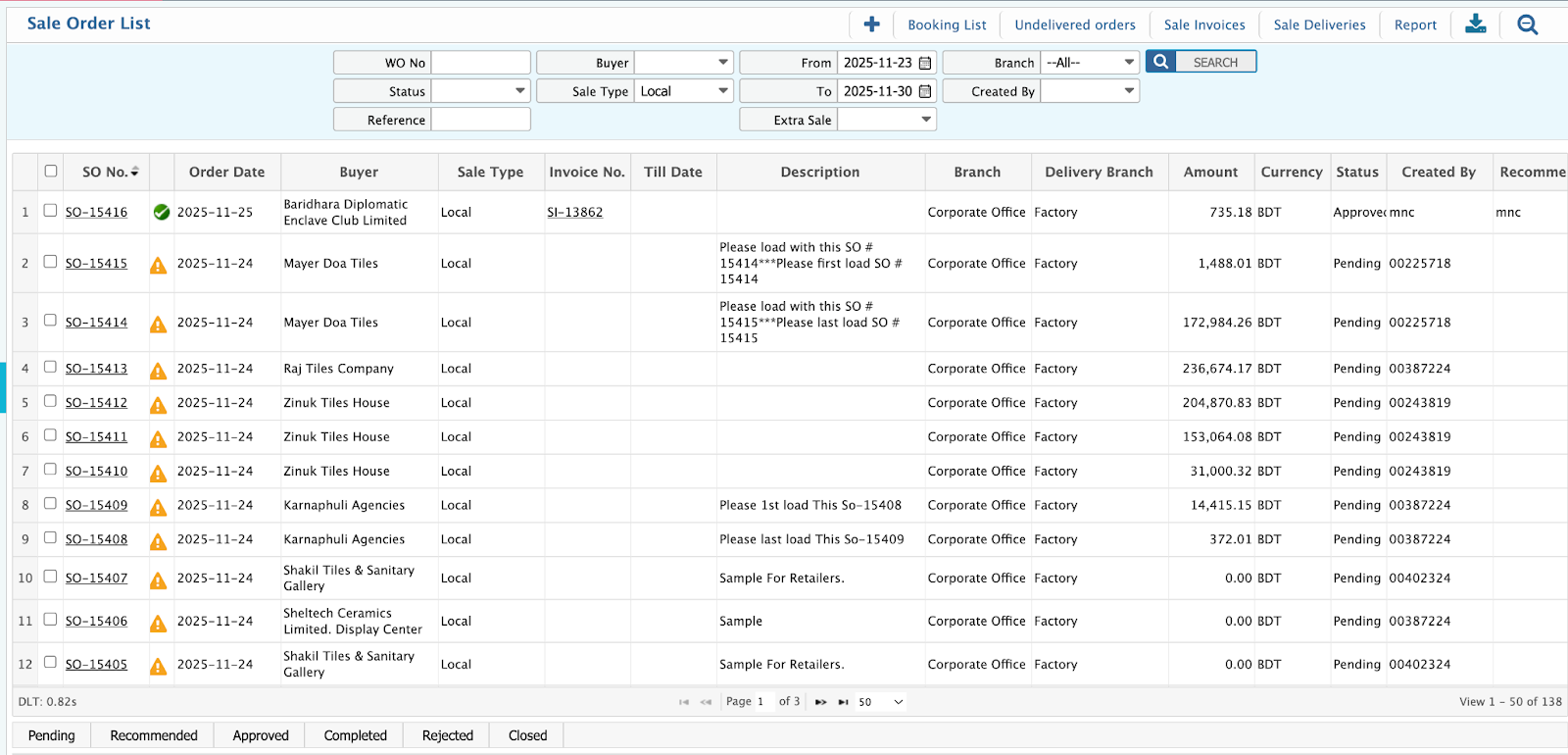
2.1 Search and Filter Options
| Filter | Description |
|---|
| WO No | Search by work order number |
| Buyer | Filter by customer/buyer name |
| From/To Dates | Filter orders within date range |
| Status | Filter by order status |
| Branch | Filter by branch |
| Created By | Filter by user |
| Project | Filter by project |
| Sales Person | Filter by sales representative |
| Quote | Filter by quotation reference |
Sale Order (Admin Section)
The PrismERP Sale Order Admin Section gives administrators complete control over how sales orders are handled. Work orders, field labels, and product grids can be set up exactly how your business needs them. Pricing, taxes, discounts, stock visibility, and extra charges are all easy to manage, so every order stays accurate and organized.
1. Sale Order Configuration (Admin Section)
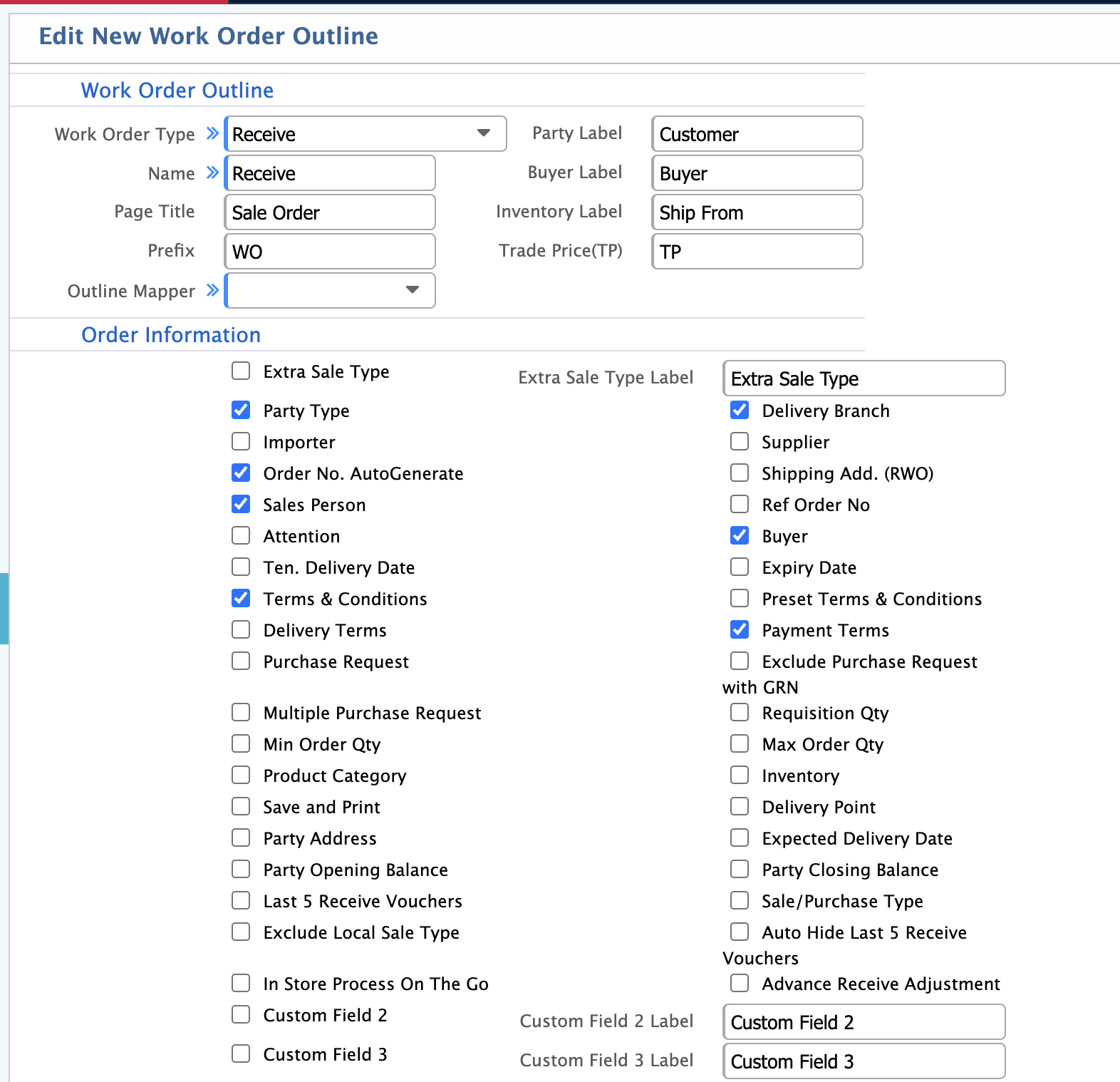
1.1 Work Order Outline
| Field | Description |
|---|
| Work Order Type | Defines the transaction type (Receive/Issue/SO) |
| Party Label | Custom name for customer field |
| Buyer Label | Custom label for buyer |
| Page Title | Title shown on Sale Order interface |
| Inventory Label | Renames inventory section |
| Trade/Profit Type | Default trade type (TP/RP) |
| Outline Mapper | Links outline with UI layout |
| Field | Description |
|---|
| Order Number | Enables order number input |
| Party Type | Shows customer category field |
| Attention | Contact person field |
| Sales Person | Select salesperson |
| Terms & Conditions | Enables T&C entry |
| Delivery Terms | Delivery terms dropdown |
| Delivery Type | Delivery mode/selector |
| Multiple Purchase Requisition | Attach multiple PRs |
| Note Order Copy | Copy from old order |
| Project Company | Enables project-based sales |
| Party Address | Customer address fields |
| Billing Address | Billing address entry |
| Delivery Address | Delivery address entry |
| Show Address Balance | Displays outstanding balance |
| Delivery Branch | Select delivery branch |
| Delivery A/C | Delivery account (WIP) |
| Delivery Date | Scheduled delivery date |
| Previous Delivery Date | Earlier delivery date |
| Expected Delivery Date | Estimated delivery date |
| Delivery Completion Date | Actual completion date |
| Total Quantity | Total qty option |
| Returning Qty | Returned qty input |
| Max Order Qty | Caps quantity |
| Price Level | Shows price level |
| Extra Note | Additional remarks |
| Previous LPO | Linked LPO number |
| Invoice Adjustment | Adjustment entry options |
| Custom Field 1–3 | Extra fields |
| Custom Field Labels | Labels for custom fields |
| Last 5 Received/Voucher Days | View recent received vouchers |
| Field | Description |
|---|
| Bulk Product Load | Load multiple products |
| Duplicate Product | Allow duplicate product rows |
| Item Filter | Product filter panel |
| Scan Qty on Duplicate | Barcode scan increases qty |
| Warn Wise Product Stock | Stock shortage alerts |
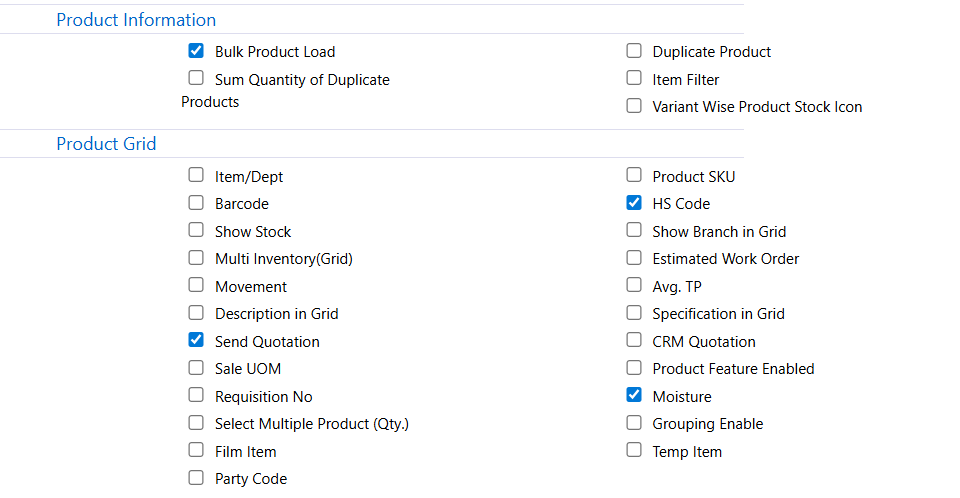
1.4 Product Grid
| Field | Description |
|---|
| Item/Dept | Shows item department |
| Barcode | Displays barcode column |
| Stock | Shows available stock |
| Movement | Product movement info |
| Show on Grid | Show extra details |
| Send Out | Sends out qty column |
| SKU | Stock keeping unit column |
| Multi Product Select | Add multiple products |
| Item Note | Product-specific notes |
| Party Code | Customer-specific item code |
| HS Code | HS code for export |
| Show Brand | Displays product brand |
| Estimated Work Order | Shows estimated WO |
| Any TP | Trading price column |
| Specification | Shows product specs |
| QA Condition | Quality acceptance |
| Product Feature Enabled | Enables item features |
| Grouping | Group similar items |
| Temp Item | Temporary item entry |
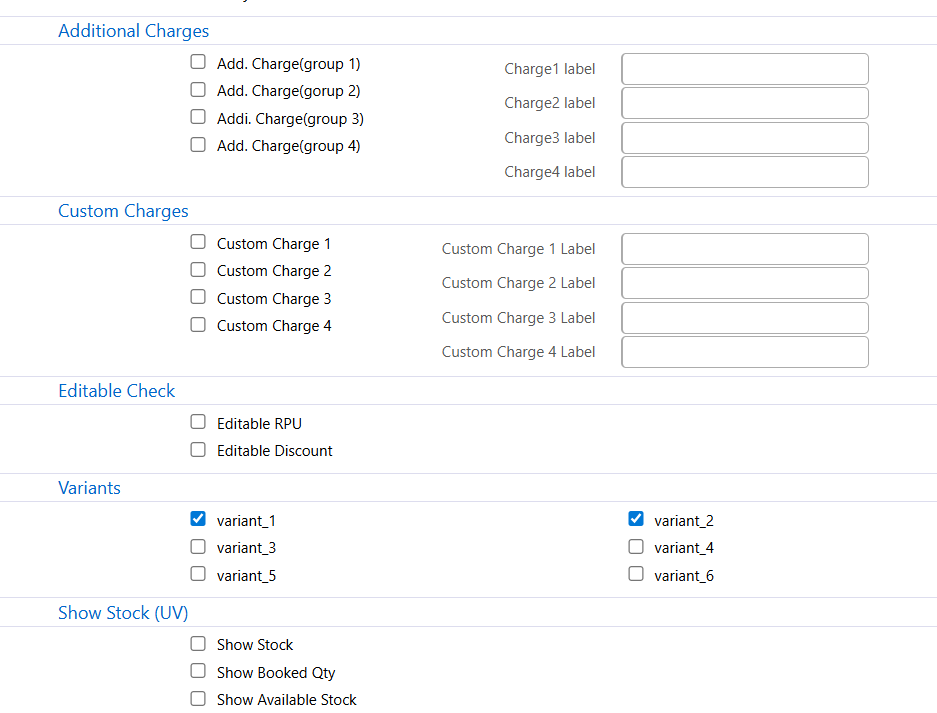
1.5 Additional Charges
| Field | Description |
|---|
| Charge 1–4 | Extra charge fields |
| Charge Labels | Names for additional charges |
1.6 Custom Charges
| Field | Description |
|---|
| Custom Charge 1–4 | User-defined charge fields |
| Custom Charge Labels | Labels for custom charges |
1.7 Editable Check
| Field | Description |
|---|
| Editable IPU | Allow editing IPU |
| Editable Discount | Allow editing discount |
1.8 Variants
| Field | Description |
|---|
| Variant 1–6 | Enables product variants |
1.9 Show Stock
| Field | Description |
|---|
| Show Stock | Display total stock |
| Show Booked Qty | Show booked qty |
| Show Available Stock | Show actual available stock |
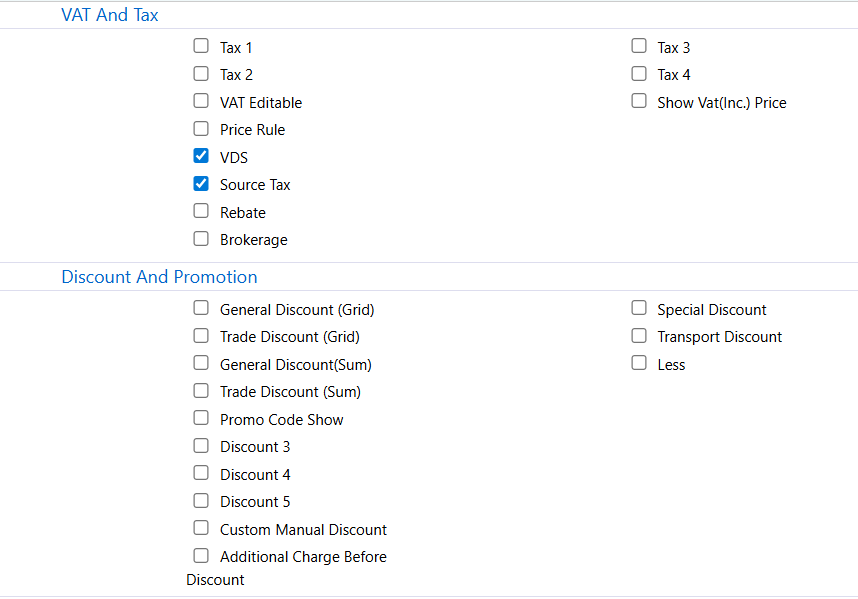
1.10 VAT & Tax
| Field | Description |
|---|
| Tax 1–3 | Multiple tax inputs |
| VAT Editable | Allows editing VAT |
| Show VAT(Inc.) Price | Shows VAT-included price |
| Field | Description |
|---|
| General Discount | Overall discount |
| Trade Discount | Trade-related discount |
| Item Discount | Item-level discount |
| Discount Show | Display discount value |
| Additional Discount | Extra discount field |
| Custom Manual Discount | Manual discount entry |
| Discount Before/After | Charge order setting |
| Transport Discount | Transport-related discount |
| Special Discount | Special/custom discount |
| Less | Deduction field |
1.12 Others
| Field | Description |
|---|
| Header Note | Shows header-level note |
| Payment Type | Payment method selector |
| Multi Currency | Multi-currency support |
| Non-editable After Convert | Locks fields post-conversion |
| City Group | Enables customer group handling |
| Credit Limit Check | Blocks SO if credit limit exceeded |
| Branch Wise Check | Validation by branch |
| Print After Save | Prints after saving |
| Auto Print | Automatically prints |
| Email Copy | Sends document via email |
| Exception Email | Sends alerts for exceptions |
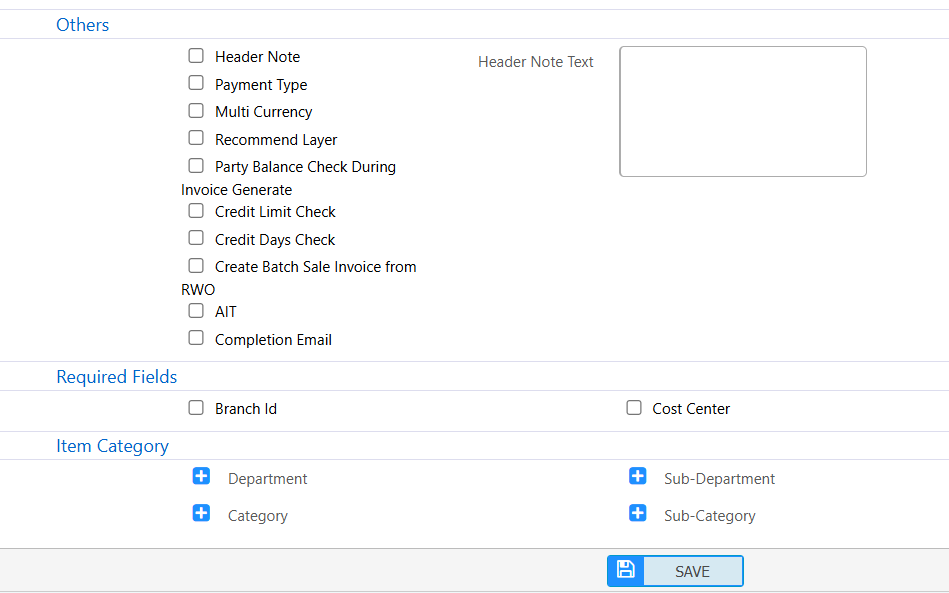
1.13 Required Fields
| Field | Description |
|---|
| Branch | Mandatory branch field |
| Cost Center | Mandatory cost center |
1.14 Item Category Controls
| Field | Description |
|---|
| Department | Shows department field |
| Sub-Department | Shows sub-department |
| Category | Shows product category |
| Sub-Category | Shows product sub-category |
1.15 User Guidelines
| Field | Description |
|---|
| Administrators | Enable necessary fields only, rename custom fields, test outline |
| End Users | Fill mandatory fields, verify totals, review delivery and address info |