👥 Territory Assignment (Employee)
Assigning employees to specific territories is a key function in PrismERP's Territory Management module. It ensures that each territory is covered by responsible personnel, enabling focused sales operations, better accountability, and accurate territory-based reporting.
Territory Assignment (Employee) allows businesses to allocate designated sales representatives, regional managers, or field officers to defined geographical territories. With this setup, PrismERP can automatically map transactions, leads, collections, and customer interactions to the correct territory resource.
Navigation
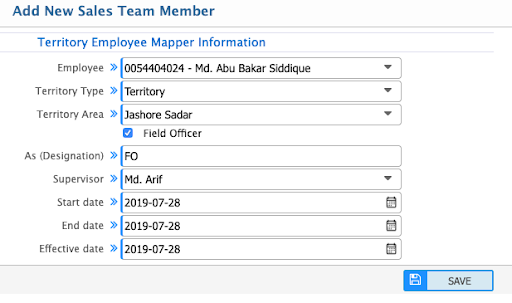
Add Sales Team Member
🧾 Step-by-Step Configuration
➤ 1. Select Employee
Choose the employee you want to assign from the employee dropdown. This can be a:
- Regional Sales Manager (RSM)
- Territory Sales Manager (TSM)
- Field Officer (FO), etc.
➤ 2. Choose Territory Type
Select the appropriate territory type that has already been created (e.g., Region, Zone, Area).
➤ 3. Select Territory Area
Assign the exact area within the selected territory type where the employee will operate (e.g., "Khulna Region").
➤ 4. Designation
The “As (Designation)” field auto-populates based on the configuration of the territory type.
➤ 5. Supervisor
If the employee is a sub-role (e.g., FO), assign the immediate supervisor (e.g., TSM). This helps maintain a parent-child reporting structure.
➤ 6. Effective Dates
- Start Date – When the employee begins operating in the territory.
- End Date – Optional; define if there's an assignment expiry.
- Effective Date – The system starts applying this configuration from this date.
➤ 7. Field Officer Checkbox
If the employee is a Field Officer, check the box labeled Field Officer to enable role-specific behavior and reporting.
🧠 Example Scenario
Mr. Arif is assigned as a TSM in “Jashore Sadar” region. Now you want to assign Md. Abu Bakar Siddique as a Field Officer (FO) under him.
Steps:
- Add Siddique as an employee.
- Select Territory Type = Region, Area = Jashore Sadar.
- Mark him as Field Officer.
- Assign Mr. Arif as his Supervisor.
✅ Result: The system now maps all Siddique’s sales and collections to Jashore Sadar territory under Arif’s supervision.
🔄 Batch Employee Assignment
To assign multiple employees at once:
➤ Navigation:
Batch Sales Team Member Add
This allows quick onboarding or restructuring of a sales team based on realignment of territories or seasonal promotions.
📊 Territory-wise Transaction Mapping
Once assigned:
- Sales Orders created by the employee will auto-tag the respective territory.
- Collections and Customer Visits will reflect in territory performance.
- Reports and KPIs are segmented by employee-territory linkage.
📝 Recommendation
- Assign one active employee per role in each area for clean reporting.
- Use start/end dates to control temporary assignments.
- Periodically review supervisor mappings to maintain chain of command.
📎 Related Screens
-
Add Sales Team Member Form
-
List of Assigned Employees

-
Field Officer Assignment
