Territory Hierarchy Management
PrismERP's Territory Hierarchy Management allows businesses to define and manage parent-child relationships among territories, enabling structured oversight, reporting clarity, and operational efficiency. This hierarchical setup ensures clear traceability of responsibilities across regions, zones, and areas.
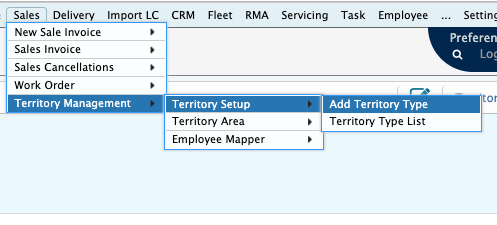
📍 Navigation Add Territory Type
➤ 1. Create Territory Types
Define all territory types that will be used in the hierarchy (e.g., Nation, Region, Zone, Area).
Example:
- Nation └─ Region └─ Zone └─ Area
➤ 2. Assign Parent-Child Relationship
While creating a territory type, assign a Parent Territory Type (if applicable). This links sub-territories under their respective parent.
➤ 3. Designate Team Roles
Assign a Lead Designation (e.g., TSM, RSM, FO) to each territory type to define responsibility per level.
➤ 4. Create Territory Areas
For each type, create Territory Areas (e.g., Bangladesh > Khulna Region > Jessore Zone > Jashore Sadar Area). When creating a territory area, define:
- Parent Area (if it’s a sub-territory)
- Location Assignments (Division, City, Thana)
➤ 5. Auto Organogram Generation
Once hierarchy and areas are configured, PrismERP automatically builds a Territory Organogram, which provides a tree view for territory structures.Each level can have its own assigned resources and will roll up reporting to the parent level.
Add Territory Type
Navigation Sales to Add Territory Type
Territory Type List

Add Territory Area
Navigation to Add Territory Area

Territory Organogram
Navigation to Territory Area Organogram
