Assessment Outline Setup
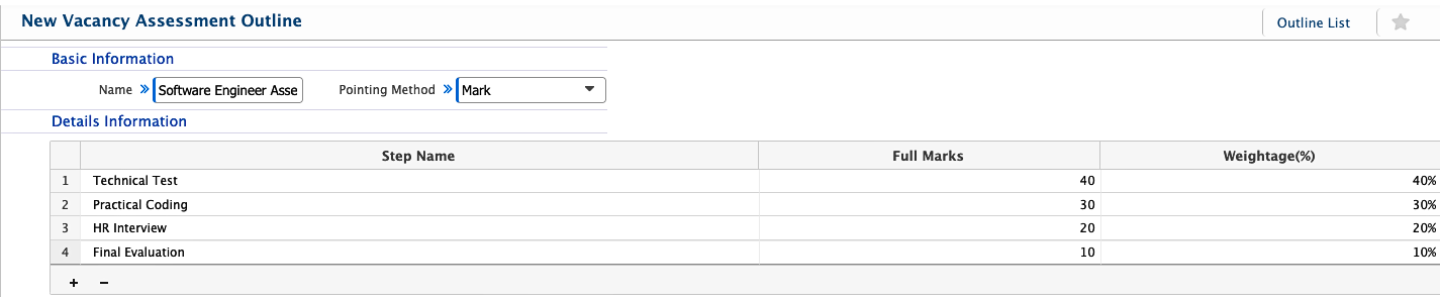
The Assessment Outline section in PrismERP is used to set up how candidates will be evaluated during recruitment. HR teams can create vacancy assessment outlines by defining steps, assigning marks, and setting weightage for each stage. This structure is used to break down the evaluation process into clear parts.
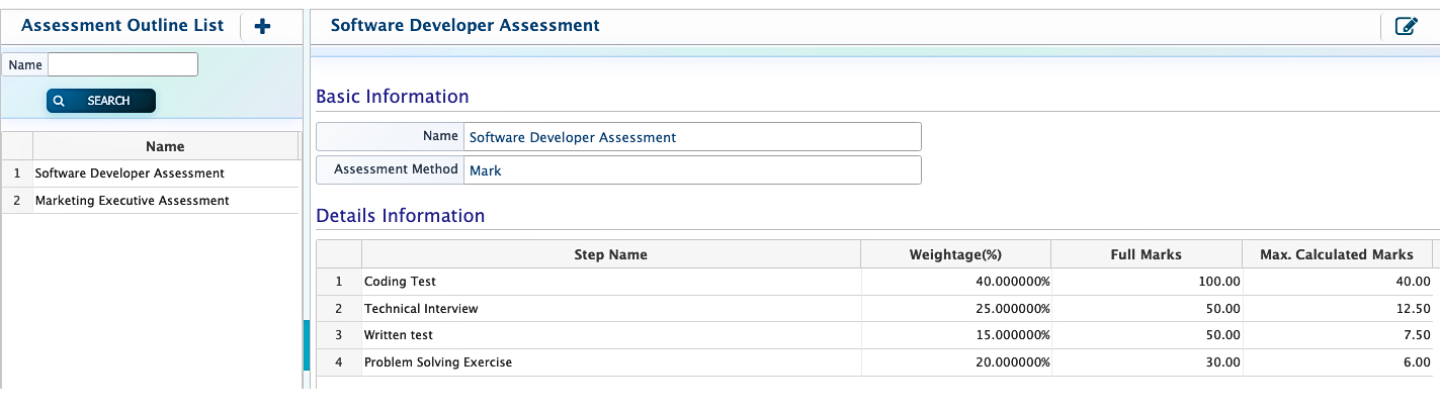
After an outline is created, it appears in the Assessment Outline List. From there, users can search for specific outlines, add new ones when needed, or edit existing ones. Any part of the outline, including the name, steps, marks, or weightage, can be updated whenever required.
| Field | Action |
|---|---|
| Name | Enter the name of the vacancy assessment outline. |
| Pointing Method | Select the method for assigning points. |
| Step Name | Enter the name of each assessment step. |
| Full Marks | Enter the maximum marks for each step. |
| Weightage (%) | Enter the weightage of each step in percentage of the total assessment. |
After creating a vacancy assessment outline, it is displayed in the Assessment Outline List along with all other configured outlines. Each entry shows the outline name and its defined structure. Users can easily search through the list by name to quickly find a specific outline. New outlines can also be added directly from the list whenever required. At the same time, existing outlines remain fully editable, allowing users to update the name, assessment method, steps, full marks, or weightage whenever changes are needed.