Approver Assignment
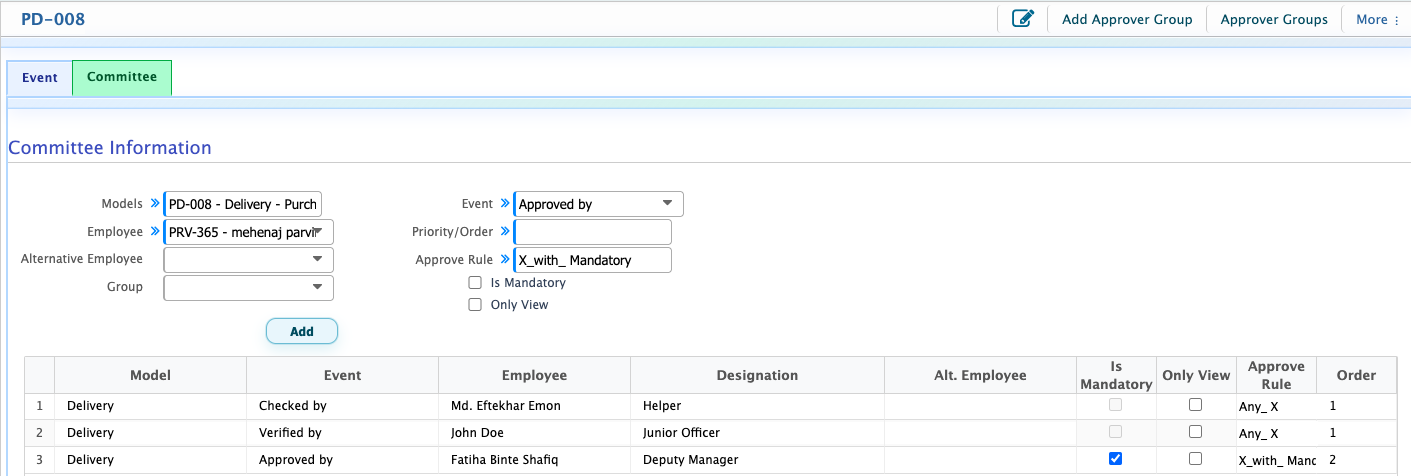
After configuring the workflow events and their respective approval rules, users can assign employees to those events to define who will be responsible for each approval stage. For example, if an event is named Checked By, users can assign an employee who will be responsible for checking the document.When assigning an employee, users can select the relevant Event from the available options. Once an event is selected, the system automatically loads the approval rule configured for that event. Users can then complete the remaining committee information to define the employee's role and responsibilities in the approval process.
Add Committee
| Field | Action |
|---|---|
| Models | Select the applicable model for the committee member assignment. |
| Employee | Select the employee who will be responsible for performing the assigned workflow event. |
| Alternative Employee | Select an alternative employee who can perform the assigned responsibility when required. |
| Group | Select the relevant group for assigning or organizing committee members. |
| Event | Select the previously configured workflow event, such as Checked By, Verified By, or Approved By. The approval rule associated with the selected event will be loaded automatically by the system. |
| Priority/Order | Define the priority or sequence in which the assigned committee members will participate in the approval process. |
| Is Mandatory | Enable this option to mark the assigned employee as a mandatory approver whose approval is required according to the configured approval rule. |
| Only View | Enable this option if the assigned employee should only be able to view the document without performing an approval action. |
Approver Group
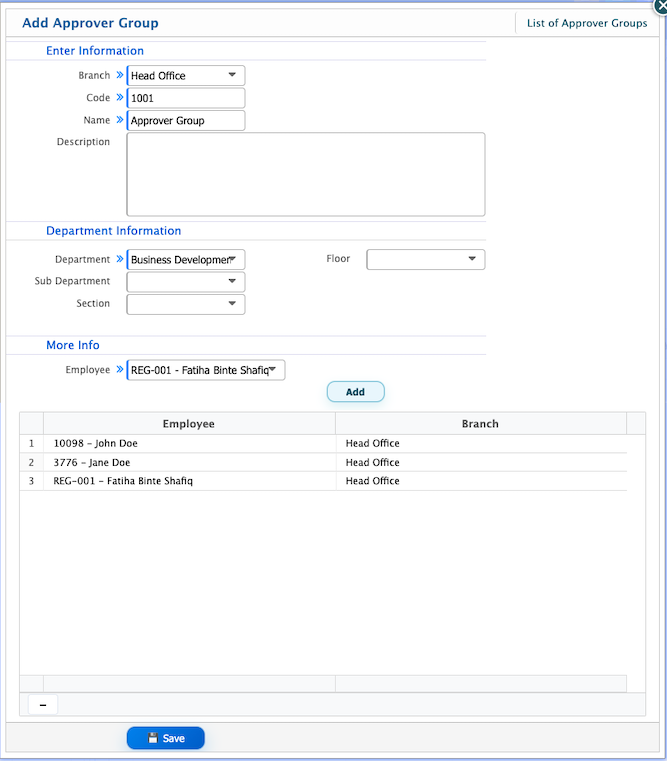
An Approver Group allows users to keep multiple employees together as a group for approval purposes. Instead of selecting the same employees individually every time they need to be assigned to a workflow, users can create a group once and add the required employees to it. Later, while configuring a workflow, users can simply select the approver group instead of adding each employee one by one. Users can also update the group members whenever needed.
Approver Group
An Approver Group allows users to organize multiple employees into a predefined group for approval purposes. Instead of selecting individual employees separately every time a workflow requires the same set of approvers, users can create a group and assign the required employees to it once. When configuring a workflow, users can select the approver group rather than adding each employee individually.
Add Approver Group
| Field | Action |
|---|---|
| Branch | Select the branch to which the approver group belongs. |
| Code | Enter a unique code to identify the approver group. |
| Name | Enter a name for the approver group. |
| Description | Provide a brief description of the approver group and its purpose. |
| Department | Select the department associated with the approver group. |
| Sub Department | Select the relevant sub-department under the selected department. |
| Section | Select the section associated with the approver group. |
| Floor | Select the floor associated with the department. |
| Employee | Select the employees who will be included in the approver group. |